
What Is BIM and Why Is It Transforming the AEC Industry?
.png?width=1536&height=1024&name=what%20is%20bim%20(2).png)
BIM is the process of creating and managing a structure’s 3D representation with all its physical and functional properties to serve as a single point of information. This model includes data about structural components, architectural elements, MEP services, materials, quantities, cost, schedules, and predictive building performance.
Since BIM connects all phases of a building’s lifecycle from architecture to construction and maintenance, it is transforming the AEC industry by:
-
Improving collaboration between architects, engineers, and other stakeholders in the project.
-
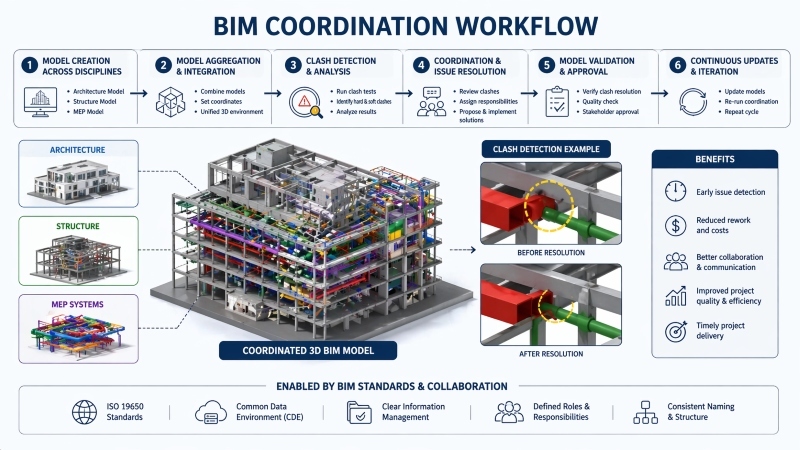
Identifying potential bottlenecks and avoiding costly reworks through early clash detection in the BIM workflow.
-
Auto-generating Bills of Quantities (BOQs) based on real-time changes in project specifications.
-
Keeping the project timeline in check and dodging cost overruns using data-driven insights at every stage of work.
-
Optimising building performance by providing energy, daylight, and sustainability analyses.
How Does BIM Work Across Design, Construction, and Facility Management?
.png?width=1672&height=941&name=how%20bim%20works%20(2).png)
BIM is a versatile process that works across various segments of the built environment. Let’s have a closer look at them:
BIM for Design
-
Allows the creation of multiple intelligent 3D models that are easy to iterate.
-
Enables real-time collaboration among multidisciplinary teams.
-
Auto-updates drawings, schedules, and documentation in case of design changes.
BIM for Construction
-
Converts architectural drawings into functional and detailed working drawings.
-
Facilitates coordination between contractors, consultants, and engineers.
-
Generates quantity take-offs and estimation for procurement planning.
-
Supports construction sequencing and cost mapping to streamline site activities.
BIM for Facility Management
-
Serves as a central repository of asset management
-
Provides access to equipment specifications, warranties, and maintenance timelines.
-
Supports space management, occupancy planning, and future expansion needs.
What Are the Different BIM Dimensions and Their Applications?
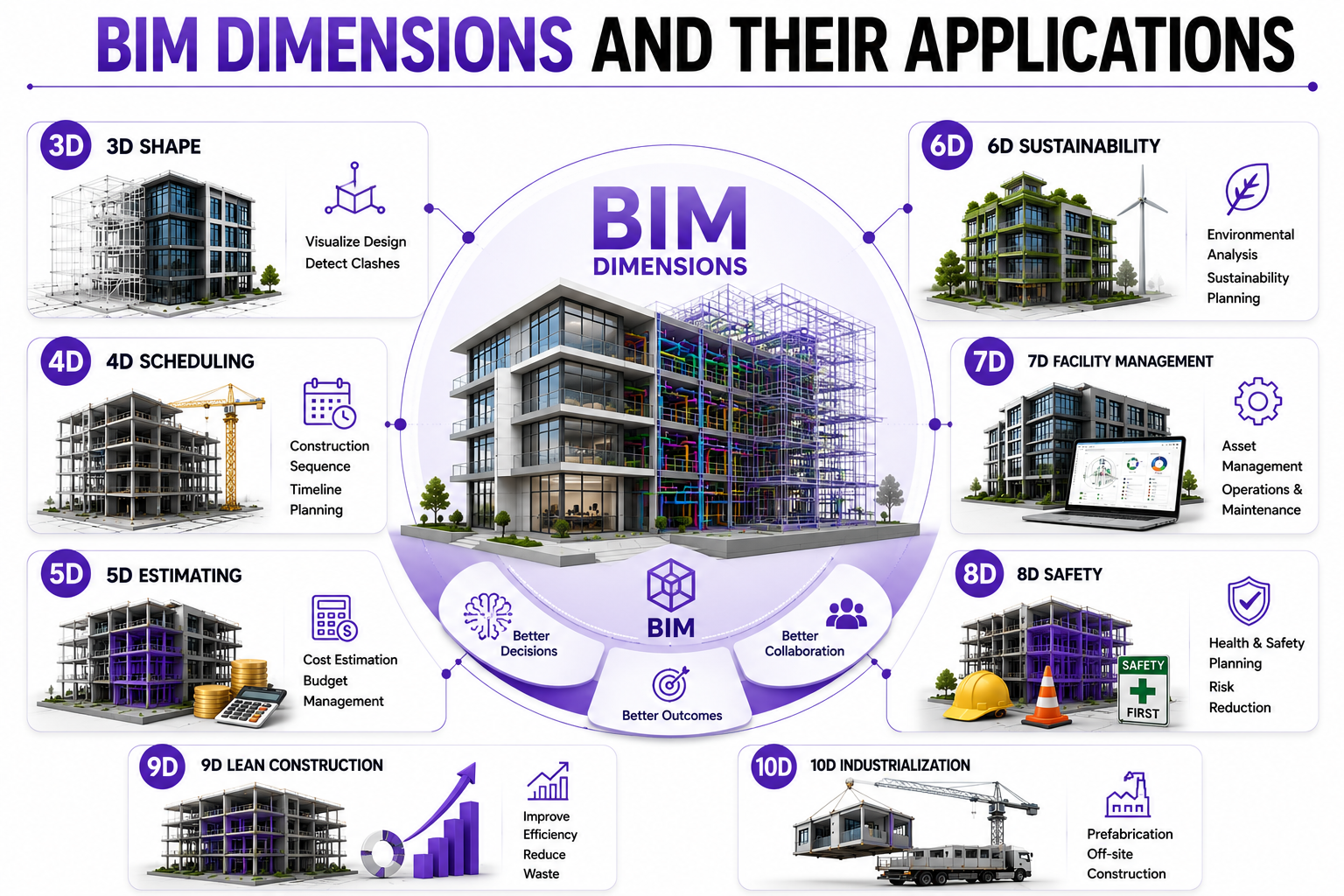
A three-dimensional geometry is the basis of Building Information Modeling (BIM). As a project progresses, new dimensions are added to the model. Each dimension serves as a layer of data or information that enhances the quality of project delivery. Here are the key BIM dimensions:
-
3D: Shape
It represents the basic structure of a project along the X, Y, and Z axes. This model helps you better visualise a project’s design, identify clashes, and avoid conflicts.
-
4D: Scheduling
It adds a layer of timeline to the model, allowing professionals to track the construction sequence and plan every aspect of the project with foresight.
-
5D: Estimating
Further enriching the model, this dimension brings money into the picture. It allows the team to add cost data, manage budgets, and avoid overspending.
While there is no international agreement on BIM dimensions beyond 5D, there are a few more categories that are widely discussed:
-
6D: Sustainability
Environmental data finds a place in this dimension. It is largely useful for infrastructure projects of scale such as airports, public plazas, and commercial campuses where the impact on the natural ecosystem is immense.
-
7D: Facility Management
This denotes the aspects of facility management and maintenance. It shares information about asset status, operation manuals, and technical specifications to optimise functions throughout the structure’s lifecycle.
-
8D: Safety
It overlays the attributes of health and safety into BIM modelling. This layer includes all possible data on site safety, such as equipment, signage, scaffolding, and machinery, thus helping reduce accidents.
-
9D: Lean Construction
This dimension focuses on building performance by applying lean construction data. It is highly effective in eliminating inefficiency and waste in construction projects.
-
10D: Industrialization
Suitable for large-scale DFMA projects (Design for Manufacturing and Assembly), this dimension unlocks seamless workflow productivity. It primarily deals with prefabrication and off-site construction methods.
What Are BIM Levels and How Do They Work?
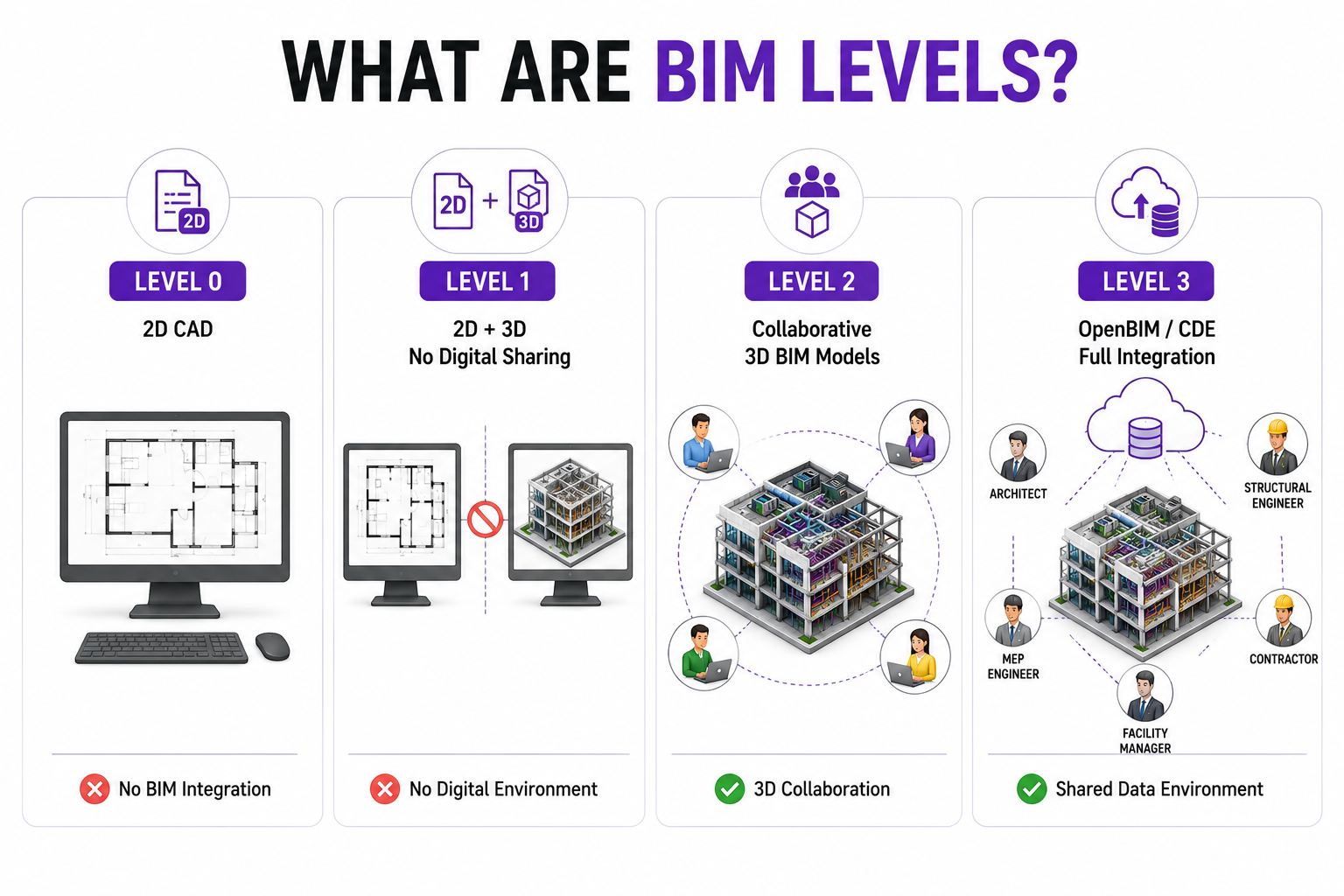
BIM levels indicate the extent of BIM integration within a team’s project workflows. Here are the key BIM levels you must know about:
Level 0: At this level, the team is still working with 2D CAD files. This means that BIM has not seeped into their workflows because 3D models are absent.
Level 1: At this grade, teams are working with both 2D and 3D files, but there is no sharing of digital environments between the two disciplines.
Level 2: At this stage, teams are actively collaborating on 3D BIM models. Most firms today are operating on this level.
Level 3: This is the highest level of BIM integration where every team member works on shared models hosted in the cloud, also known as OpenBIM or Common Data Environment (CDE).
Which BIM Tools, Software, and Technologies Are Used in the Industry?
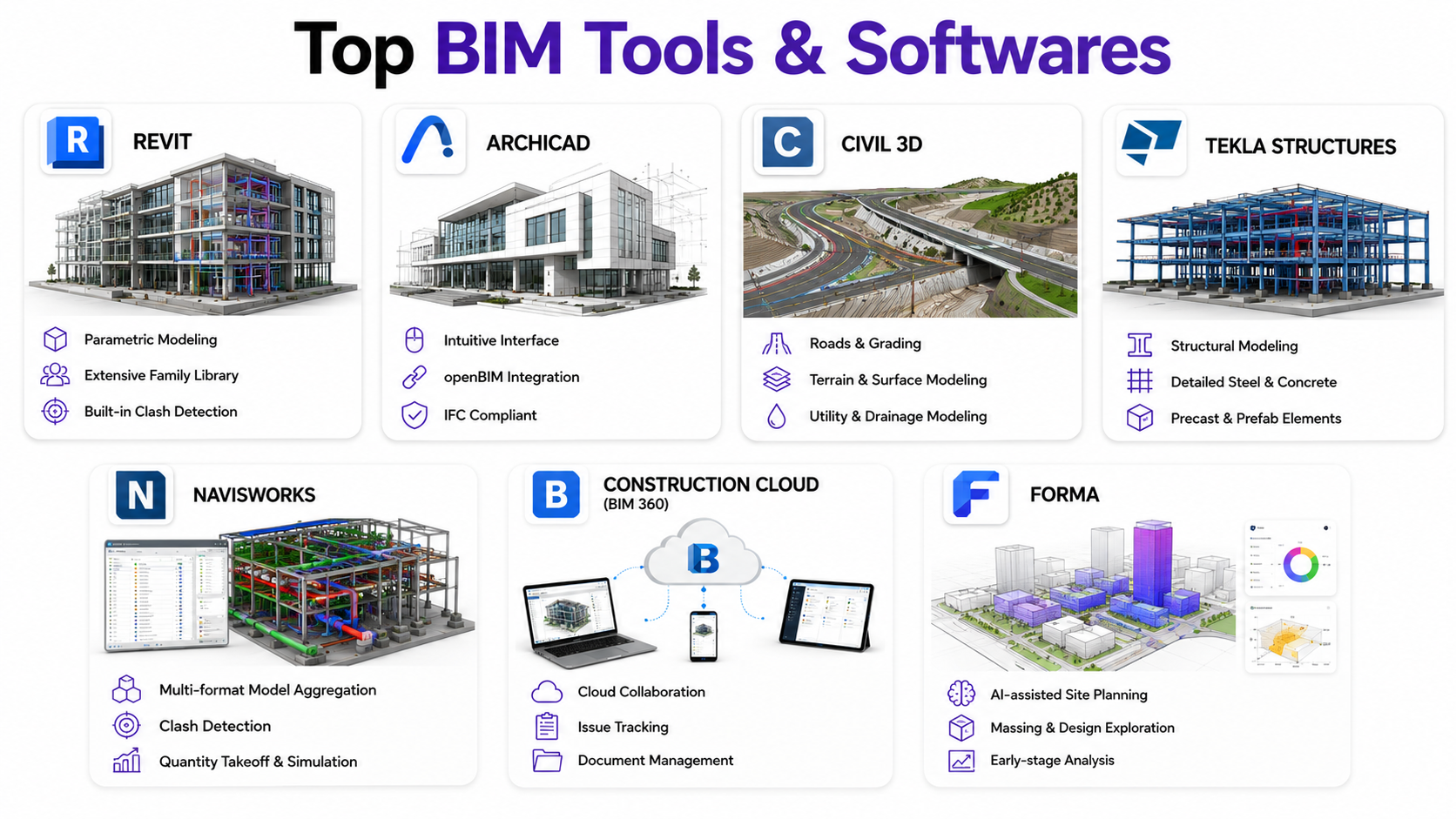
BIM processes become tangible with software that allows professionals to visualise the project through an easy-to-use wireframe. Different software are useful for every profession, depending upon their features, workflows, and tools. Here’s a breakdown:
-
Revit
It is the most widely used BIM software across industries such as architecture, structural design, and MEP engineering. The key USP of this software is its parametric modelling ability combined with an extensive library of families, and It also has a built-in clash detection feature that assists in seamless coordination between teams.
-
ArchiCAD
Known for its intuitive interface and openBIM (seamless integration with other BIM software) approach, ArchiCAD is an excellent alternative to Revit software. It also offers superior interoperability that is compliant with IFSC standards.
-
Civil 3D
The true blue BIM software for civil engineers, this one is the most prevalently used for projects in the segment of roads, grading, utilities, and land developments. It also supports terrain and surface modelling alongside utility and drainage modelling, offering a comprehensive overview of the project.
-
Tekla Structures
As the name suggests, this BIM software excels in structural modelling and detailing. It is highly recommended for projects where the structure is built using steel, concrete, precast, and prefab elements.
-
Navisworks
Navisworks is essentially a BIM project coordination software that allows the combining of models from multiple formats. This supports effective clash detection and mindful construction planning. Professionals can also do quantity takeoffs and run construction simulations on the model.
-
Construction Cloud
Backed by the strengths of BIM 360, this software unifies cloud-based collaboration with project management tools. It allows teams to share models, track issues, manage documentation, and coordinate seamlessly.
-
Forma
This cloud-native platform supports early-stage design, planning, and analysis of projects. With an AI-assisted tool for site planning and massing, architects appreciate the design exploration abilities of this software.
|
Software |
Useful for |
Key Applications |
|
Revit |
Architects, Civil Engineers |
3D modelling, project documentation |
|
ArchiCAD |
Architects, Civil Engineers |
Building design, team collaboration |
|
Civil 3D |
Civil Engineers, Structural Engineers |
Utility networks and road construction |
|
Tekla Structures |
Civil Engineers, Structural Engineers |
Structural detailing, steel fabrication |
|
Navisworks |
Architects, Civil Engineers, Facility Managers |
Clash detection, construction timelines |
|
Construction Cloud |
Civil Engineers, Facility Managers |
Design collaboration, issue tracking |
|
Forma |
Architects, Civil Engineers |
Site analysis, sustainability reports |
How Is BIM Used in Architecture, Structure, MEP, and Infrastructure Projects?
BIM processes find a role in every facet of building construction and design. Here’s an overview of what it is used for in the various fields of work:
|
Architecture |
Structure |
MEP |
Infrastructure |
|
3D building design and visualization |
Structural 3D modelling and analysis |
HVAC, electrical, and plumbing design |
Road, bridge, and utility design |
|
Automated documentation of drawings |
Reinforcement, steel, and construction detailing |
System sizing and performance analysis |
Terrain, grading, and drainage modelling |
|
Design coordination with other project stakeholders |
Quantity estimation and procurement |
Asset data for facility management |
Construction planning and phasing |
|
Spatial planning and area analysis |
Fabrication-ready BIM models |
Installation and shop drawings |
Utility and corridor coordination |
What Roles and Career Paths Exist in the BIM Industry?
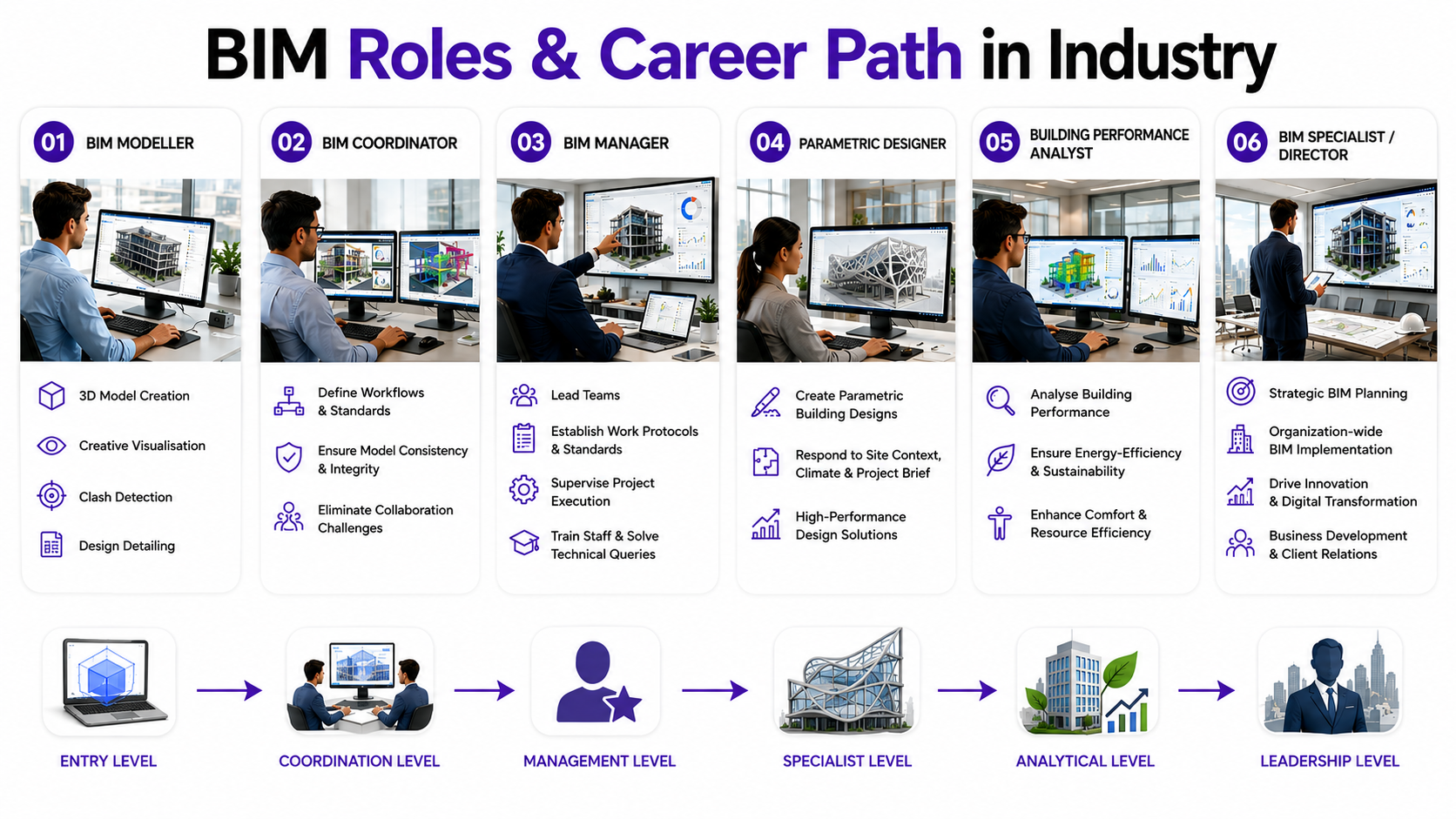
Learning BIM allows architects and engineers to explore unique career avenues on the digital front. Let’s explore the key BIM jobs with their salary ranges:
BIM Modeller
This is an entry-level job in the BIM career trajectory where professionals create 3D models of architectural and infrastructure projects. The key responsibilities in this role include creative visualisation, clash detection, and design detailing. As a BIM modeller, you can earn between INR 3,50,000 and 4,00,000 lakhs per annum.
BIM Coordinator
Stepping up from the role of a modeller, a BIM Coordinator defines their team’s workflows and standards for BIM usage. They ensure consistency and integrity in the model, helping eliminate collaboration challenges. The salary of a BIM Coordinator ranges from INR 7.3 to 8 lakhs depending upon skill and project complexity.
BIM Manager
Considered a top-of-the-hierarchy role, BIM Managers lead teams, establish work protocols, set standards, and supervise the project execution. At this level, professionals train their staff and solve technical queries, ensuring seamless teamwork. The remuneration in this BIM job can be anywhere between INR 8,90,000 and 9,50,000 per annum.
Parametric Designer
A parametric designer uses BIM software such as Revit to create unique building designs. They ideate architectural forms that respond to the site context, climate, and project brief, resulting in a high-performance structure. The average pay of a parametric designer is typically between INR 4,20,000 and ₹9,60,000 annually.
Building Performance Analyst
These professionals analyse and optimise buildings for everyday operations. They consider the factors of energy-efficiency, sustainability, and comfort that help in creating resource-efficient structures. The starting pay of a Building Performance Analyst varies from INR 5 to 6 lakhs per year.
How Can Architects and Engineers Start Learning BIM in 2026?
Professionals can upskill in BIM through YouTube tutorials, LinkedIn groups, software tutorials, subject matter experts, and paid courses. While free resources are a great start for curious beginners, paid courses offer in-depth knowledge of BIM that can truly help you build a career.
Novatr’s BIM Professional Program for AEC professionals is conceptualised to offer advanced job roles in architecture careers, digital engineering, construction technology, and digital construction. This 7-month online course offers an understanding of BIM fundamentals and cross-disciplinary impact.
The course curriculum offers insights into BIM software, workflows, and processes, helping learners become well-rounded professionals & sharpen their BIM skills. Delivered by 400+ industry practitioners, the program is backed by case studies, projects, and live sessions to offer a comprehensive understanding of the subject.
What Makes This BIM Course Stand Out?
-
End-to-end BIM lifecycle training
-
Hands-on industry projects and portfolio building
-
Training on industry-standard BIM software
-
Specialization options across Architecture, Structure, MEP, and Infrastructure
-
BIM coordination and collaborative workflow training
-
Career support for job readiness