---
title: "BIM Coordination Workflow Explained: Stages, Tools, and Standards"
description: Learn BIM coordination workflow, stages, tools, ISO 19650 role, and how to master BIM coordination effectively.
image: https://blog.novatr.com/hubfs/BIM%20coordination%20workflow%20stages%20with%203D%20models..jpg
---
[Blogs](https://www.novatr.com/learning-hub)
- [Architecture & Construction](https://www.novatr.com/learning-hub?category=Architecture+%26+Construction)
- [BIM](https://www.novatr.com/learning-hub?category=BIM)
- [Computational Design](https://www.novatr.com/learning-hub?category=Computational+Design)
- [Company News](https://www.novatr.com/learning-hub?category=Company+News)
- [Expert Talks](https://www.novatr.com/learning-hub?category=Expert+Talks)
Explore Courses
[Just Launched  BIM Professional Program v.2026 Take your career to the next level by mastering the real-world application of BIM. Know More](https://www.novatr.com/courses/bim-professional-program)
[ Master Computational Design Course Break into an advanced career by learning to apply the power of computation to the art of design. Know More](https://www.novatr.com/courses/computational-design)
[Blogs](https://www.novatr.com/learning-hub)
Explore Blogs
- [Architecture & Construction](https://www.novatr.com/learning-hub?category=Architecture+%26+Construction)
- [BIM](https://www.novatr.com/learning-hub?category=BIM)
- [Computational Design](https://www.novatr.com/learning-hub?category=Computational+Design)
- [Company News](https://www.novatr.com/learning-hub?category=Company+News)
- [Expert Talks](https://www.novatr.com/learning-hub?category=Expert+Talks)
Courses
- [BIM Professional Program v.2026](https://www.novatr.com/courses/bim-professional-program)
- [Master Computational Design](https://www.novatr.com/courses/computational-design)
- [CIVIL/](https://www.novatr.com/learning-hub?category=BIM)
Featured Article
# BIM Coordination Workflow Explained for Real Projects

Deependra Dobriyal
April 27, 2026
6 min read
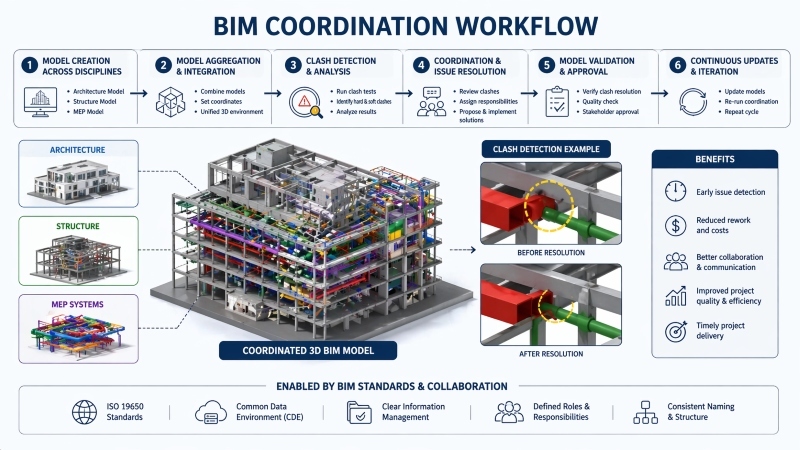

**What is BIM coordination** and why is it important in construction today? It is a structured approach where multiple design models are integrated, reviewed, and aligned to identify conflicts before construction begins. This improves accuracy, reduces delays, and supports better collaboration.
Studies show that poor coordination and data issues cause over [50%](https://www.autodesk.com/blogs/construction/construction-industry-statistics/) of rework in construction projects, significantly impacting cost and timelines. At the same time, BIM adoption can reduce rework costs by up to [40–50%](https://link.springer.com/article/10.1007/s43939-025-00200-2?) and significantly improve coordination efficiency.
As construction becomes more complex, structured coordination workflows are no longer optional. They ensure accurate information flow, reduce risks, and enable teams to deliver projects more efficiently.
Unlock High-Paying Careers With BIM
Master BIM workflows, software and skills on real projects.
Apply Now
\*Limited seats available
## **What Is a BIM Coordination Workflow?**
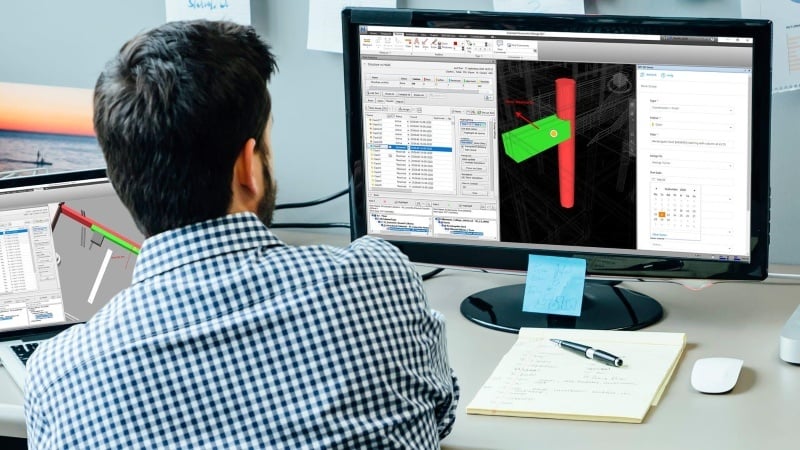
To understand **what is BIM coordination**, it is important to see it as more than just [clash detection](https://www.novatr.com/blog/what-civil-engineers-should-know-about-clash-detection-in-bim). It is a continuous process where models from different disciplines are integrated and aligned to ensure they work together without conflicts.
A BIM coordination workflow defines how teams create, share, review, and update models throughout a project. It ensures that architects, engineers, and contractors collaborate using the same data.
This workflow plays an important role in design coordination. For example, when an HVAC duct intersects with a structural beam, the issue is identified in the model and resolved before construction begins.
The process relies heavily on 3d BIM coordination, where models are visualized in three dimensions. This helps teams understand spatial relationships and detect conflicts more accurately.
## **Key Stages of BIM Coordination**
The **BIM coordination process** follows a structured sequence that ensures models are accurate and aligned before construction.
The process can be broken down into the following stages:
- **Model Creation Across Disciplines**Each team, including architecture, structure, and MEP, develops its own model based on project requirements. These models must follow agreed standards to ensure compatibility.
- **Model Aggregation and Integration**All discipline models are combined into a shared environment. This step allows teams to visualize how systems interact within the same space.
- **Clash Detection and Analysis**
Conflicts between systems are identified using [BIM tools](https://www.novatr.com/blog/8-popular-bim-software). This includes both hard clashes, such as overlapping elements, and soft clashes, such as insufficient clearance.
- **Coordination and Issue Resolution**Teams review detected clashes and decide on solutions. This often involves design adjustments, rerouting systems, or modifying layouts.
- **Model Validation and Approval**Once issues are resolved, the model is reviewed to ensure it meets project requirements and coordination standards.
- **Continuous Updates and Iteration**The workflow is repeated as designs evolve. This ensures that models remain accurate and aligned throughout the project lifecycle.
This structured BIM coordination workflow ensures that issues are resolved early, reducing the need for costly changes during construction.
Suggested Read: [10 Common Clash Detection Mistakes To Avoid](https://www.novatr.com/blog/10-common-clash-detection-mistakes-to-avoid)
## **Essential Tools Used in BIM Coordination**
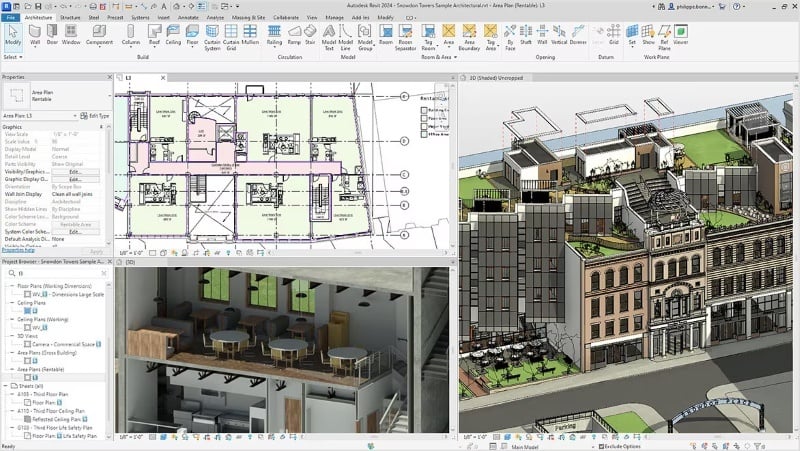
Effective coordination depends on the capabilities of modern BIM coordination software. These tools enable teams to create models, detect clashes, and manage workflows efficiently.
Here is how each tool contributes to coordination:
### **1. Autodesk Revit**
[Revit](https://www.novatr.com/blog/detailed-revit-guide) is used to create detailed discipline-specific models for architecture, structure, and MEP systems. It allows teams to build intelligent models with embedded data, ensuring that every element carries information such as dimensions, materials, and system connections. This makes it easier to update designs and maintain consistency across the project.
### **2. Autodesk Navisworks**
[Navisworks](https://www.novatr.com/blog/navisworks-guide) is widely used for model aggregation and clash detection. It enables teams to combine models from different disciplines into one environment and run advanced clash detection tests. Users can categorize clashes, assign priorities, and track resolution progress, making it a central tool in coordination workflows.
### **3. Autodesk Construction Cloud**
[Autodesk Construction Cloud](https://www.novatr.com/blog/autodesk-construction-cloud-acc-complete-guide) supports collaboration by allowing teams to share models, track issues, and manage project data in real time. It ensures that all stakeholders work with the latest information, reducing miscommunication and improving coordination efficiency.
### **4. Solibri**
[Solibri](https://www.novatr.com/blog/how-solibri-is-used-by-bim-coordinators-and-engineers-for-model-checking) focuses on model checking and quality assurance. It helps teams validate models against predefined rules, ensuring compliance with standards and identifying errors beyond basic clash detection, such as missing components or incorrect data.
### **5. Tekla Structures**
[Tekla](https://www.novatr.com/blog/tekla-for-civil-engineers-benefits-applications) is primarily used for detailed structural modeling. It provides highly accurate models for steel and concrete structures, enabling precise coordination with other disciplines and supporting fabrication-level detailing.
## **Role of BIM Standards (ISO 19650)**
BIM coordination becomes more effective when supported by structured standards. ISO 19650 provides a framework for managing information throughout the project lifecycle.
This standard defines how data is created, shared, and maintained. It ensures that all teams follow consistent processes, improving coordination and reducing errors.
For example, ISO 19650 establishes naming conventions, file structures, and responsibilities. This prevents confusion and ensures that models are organized and easy to manage.
In the context of design coordination, these standards ensure that all models are aligned and updated consistently. This improves collaboration and supports better decision-making.
## **How to Master BIM Workflows?**

Mastering [BIM](https://www.novatr.com/blog/detailed-bim-guide) workflows requires a combination of technical knowledge, process understanding, and real project exposure. Professionals need to develop skills that go beyond basic software usage.
Take your civil engineering career to the next level with Novatr’s [BIM Professional Course for Civil Engineers](https://www.novatr.com/courses/bim-for-civil-engineers), a project-based program that prepares you to plan, design, and manage construction projects using 12+ industry software and essential BIM plugins.
Learn how to work with Autodesk Revit, Navisworks, construction cloud and key plugins like DiRoots.One, pyRevit, EF-Tools, ProSheets, Issue and Model Checker for Revit to improve automation, accuracy, and project efficiency.
**Here’s what you’ll gain:**
- End-to-end understanding of BIM workflows, modeling, estimation, coordination, sequencing, and documentation.
- Hands-on training aligned with ISO 19650 standards and real residential + commercial projects.
- **Globally recognized certifications**:
After completing the core modules, learners can also choose 2 additional specializations, including:
- **Visual Programming with Dynamo** – for automation and parametric workflows
- **4D, 5D & 6D with BIM** – for time, cost, and facility integration
- **Tekla for RCC Modeling** – for detailed steel and concrete modeling
- **Civil 3D for Infrastructure** – for roadways, railways, and utilities
- **Project Strategy & Optimization with Plannerly -** Plan, structure, and audit BIM execution plans.
Equip yourself with hands-on BIM skills and become job-ready for global infrastructure and construction opportunities.
Master BIM and Get Hired Faster
Join a community of 8500+ Architects and Engineers.
Explore Now
\*Limited seats available
## Conclusion
Understanding **what is BIM coordination** and how workflows operate provides a strong foundation for managing complex construction projects. A structured approach improves collaboration, reduces errors, and ensures efficient project delivery.
As BIM adoption continues to grow, developing coordination skills becomes essential for professionals working in construction. Strengthening knowledge of workflows, tools, and standards can improve both project outcomes and career growth.
For those looking to build these capabilities, structured programs such as the [BIM Professional course for Civil Engineers](https://www.novatr.com/courses/bim-for-civil-engineers) offered by [Novatr](https://www.novatr.com/) can support the development of industry-relevant skills and deeper workflow understanding.
Visit our [resource page](https://www.novatr.com/learning-hub) to explore structured learning options.
## **FAQs**
### **1. How Much Does A BIM Coordinator Make?**
A BIM coordinator’s salary varies by experience and location. Entry-level roles offer moderate pay, while experienced professionals earn higher compensation.
### **2. Can You Do BIM Coordination Through Tekla?**
Yes, Tekla supports structural coordination. It is often used with tools like Navisworks for clash detection and model integration.
### **3. How BIM Improves Construction Coordination?**
BIM improves coordination by combining models into a shared environment, enabling early clash detection and better communication.
### **4. How To Choose BIM Coordination Software?**
Choose software based on project size, compatibility, collaboration features, and model handling capacity.
Was this content helpful to you
Like Yes
Dislike No

TABLE OF CONTENTS
BIM Is The New Standard. Are You Certified?
Get Certified in BIM
SHARE ON YOUR SOCIALS
Link Copied Successfully
Related articles
[ BIM Civil BIM Coordination vs Traditional Coordination? And Why BIM Coordination is better? 28 April 2026 5 min read](https://blog.novatr.com/blog/bim-coordination-vs-traditional-coordination-and-why-bim-coordination-is-better) [ CIVIL Top 10 Firms For BIM Coordinators in the USA (To Work) 26 August 2025 5 min read](https://blog.novatr.com/blog/firms-for-bim-coordinators-in-the-usa-to-work) [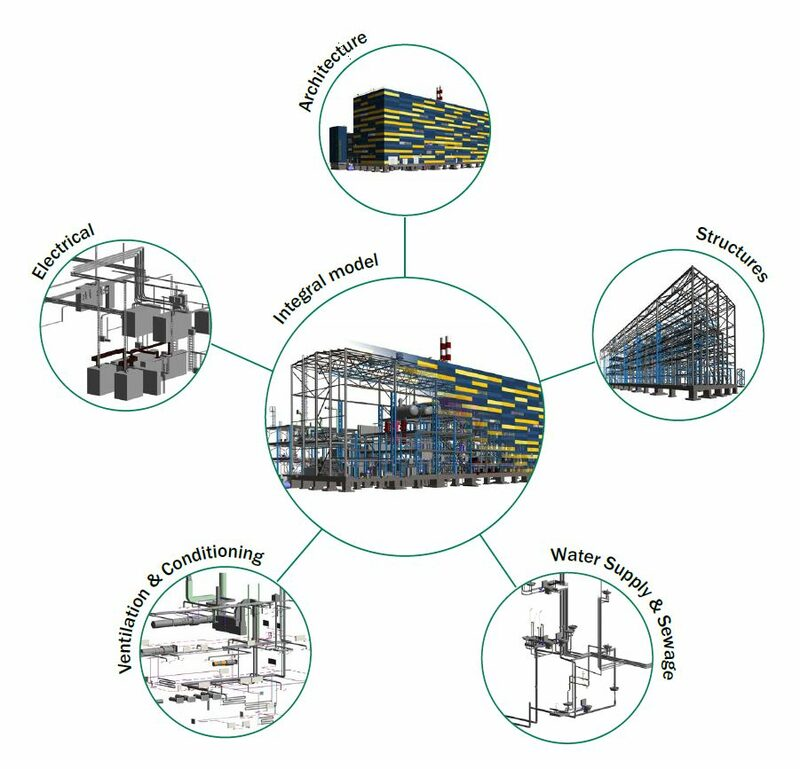 CIVIL How Solibri Is Used by BIM Coordinators and Engineers for Model Checking? 19 February 2026 5 min read](https://blog.novatr.com/blog/how-solibri-is-used-by-bim-coordinators-and-engineers-for-model-checking) [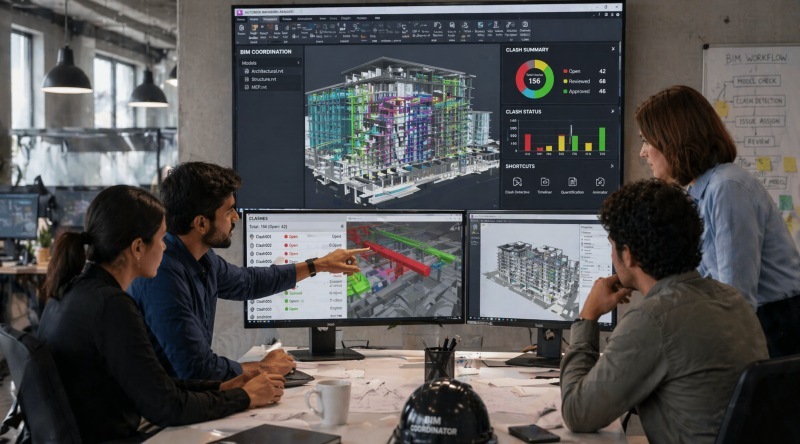 CIVIL How BIM Coordination Works in Real Projects? 27 April 2026 6 min read](https://blog.novatr.com/blog/how-bim-coordination-works-in-real-projects)
Download Syllabus
## BIM Professional Program
Next Cohort
June 2026
Program Duration
7 Months
Premium Program benefits
8 Credentials from Autodesk, NSDC, Novatr
1 program. 10 career paths. Infinite Growth.
40+ ISO 19650 & RIBA real-world projects to practice
1-on-1 guidance. Access 400+ industry experts.
Access the biggest AEC-Tech community on the planet. 8500+ and counting
Curated for you by 100+ global BIM leaders.
Lifelong access to course content
Enter your details to download the program syllabus.
##### BIM Professional Program
June 2026, 7 Months
Your Name Invalid name.
Phone Number Enter a valid phone number
Email Please enter a valid email address.
Select years of experience\* Currently studying 0-1 years 1-2 years 2-4 years 4-8 years 8-10 years 10-12 years 12+ years Invalid selection.
Specialisation Select your background\* Architecture Civil Engineering Mechanical Engineering Electrical Engineering Invalid selection.
Are you professionally trained in interior design?
Yes
No
I agree to the [Terms of Use](https://www.novatr.com/terms-and-conditions) and [Privacy Policy](https://www.novatr.com/privacy-policy), and consent to be contacted by Email, Call, WhatsApp, or SMS.
Submit
Ready to skyrocket your career?
Begin your next chapter in AEC
with Novatr!
We are here to help you take the industry by storm with advanced, tech-first skills.
[Explore Courses](https://www.novatr.com/#courses)
Join our newsletter
Submit
Thank you for signing up.
We’ll send you a nice letter once per week. No spam.

Dare to Disrupt.
Join thousands of people who organise
work and life with Novatr.
Company
- [About Us](https://www.novatr.com/about)
- [BIM Professional Program v.2026](https://www.novatr.com/courses/bim-professional-program)
- [Masters Computational Design](https://www.novatr.com/courses/computational-design)
- [Become a Mentor](https://www.novatr.com/apply-as-mentor)
- [Hiring from Us](https://www.novatr.com/hire-from-us)
- [Careers at Novatr](https://www.novatr.com/career)
Resources
- [Blog](https://www.novatr.com/learning-hub)
- [Media Room](https://www.novatr.com/media-room-home-page)
- [Career Builder](https://www.novatr.com/career-navigator)
- [Events & Webinars](https://www.novatr.com/webinars)
- [FAQs & Support Center](https://www.novatr.com/contact-us)
- [Contact Us](https://www.novatr.com/contact-us)
- [Privacy Policy](https://www.novatr.com/privacy-policy)
- [Terms of Use](https://www.novatr.com/terms-and-conditions)
©2023 Oneistox Network Pvt. Ltd.
All Rights Reserved
```json
{
"@context" : "https://schema.org",
"@type" : "BlogPosting",
"author" : {
"@type" : "Person",
"name" : "Deependra Dobriyal",
"url" : "https://blog.novatr.com/blog/author/deependra-dobriyal"
},
"dateModified" : "2026-04-27T12:30:24.046Z",
"datePublished" : "2026-04-27T12:26:46.000Z",
"headline" : "BIM Coordination Workflow Explained: Stages, Tools, and Standards",
"image" : [ "https://blog.novatr.com/hubfs/BIM%20coordination%20workflow%20stages%20with%203D%20models..jpg" ],
"mainEntityOfPage" : {
"@id" : "https://blog.novatr.com/blog/bim-coordination-workflow-explained-stages-tools-and-standards",
"@type" : "WebPage"
},
"publisher" : {
"@type" : "Organization",
"logo" : {
"@type" : "ImageObject",
"url" : "https://blog.novatr.com/hubfs/Novatr%20Prev%20OX-2.svg"
}
}
}
```