---
title: 10 Common Clash Detection Mistakes To Avoid
description: Avoid common mistakes in BIM clash detection. Learn causes, solutions, and improve coordination for better construction outcomes.
image: https://blog.novatr.com/hubfs/BIM%20coordination%20model%20showing%20clash%20detection..jpg
---
[Blogs](https://www.novatr.com/learning-hub)
- [Architecture & Construction](https://www.novatr.com/learning-hub?category=Architecture+%26+Construction)
- [BIM](https://www.novatr.com/learning-hub?category=BIM)
- [Computational Design](https://www.novatr.com/learning-hub?category=Computational+Design)
- [Company News](https://www.novatr.com/learning-hub?category=Company+News)
- [Expert Talks](https://www.novatr.com/learning-hub?category=Expert+Talks)
Explore Courses
[Just Launched  BIM Professional Program v.2026 Take your career to the next level by mastering the real-world application of BIM. Know More](https://www.novatr.com/courses/bim-professional-program)
[ Master Computational Design Course Break into an advanced career by learning to apply the power of computation to the art of design. Know More](https://www.novatr.com/courses/computational-design)
[Blogs](https://www.novatr.com/learning-hub)
Explore Blogs
- [Architecture & Construction](https://www.novatr.com/learning-hub?category=Architecture+%26+Construction)
- [BIM](https://www.novatr.com/learning-hub?category=BIM)
- [Computational Design](https://www.novatr.com/learning-hub?category=Computational+Design)
- [Company News](https://www.novatr.com/learning-hub?category=Company+News)
- [Expert Talks](https://www.novatr.com/learning-hub?category=Expert+Talks)
Courses
- [BIM Professional Program v.2026](https://www.novatr.com/courses/bim-professional-program)
- [Master Computational Design](https://www.novatr.com/courses/computational-design)
- [CIVIL/](https://www.novatr.com/learning-hub?category=BIM)
Featured Article
# 10 Common Clash Detection Mistakes To Avoid

Deependra Dobriyal
April 27, 2026
5 min read
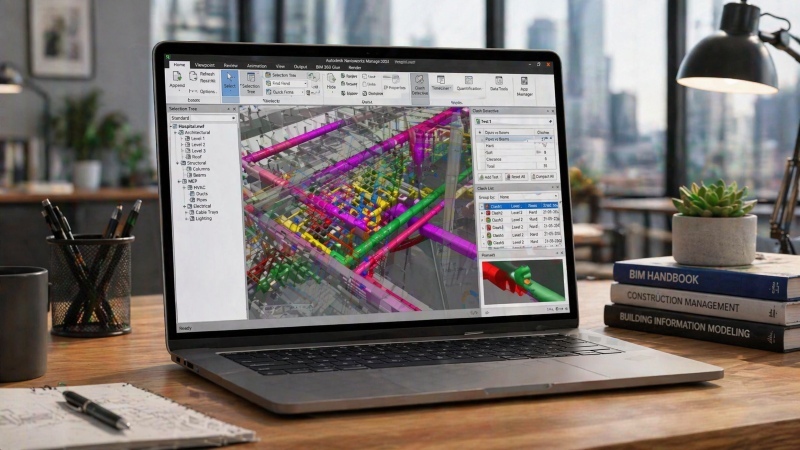

**Mistakes in BIM clash detection** can delay projects, increase costs, and reduce coordination efficiency when not handled correctly. Clash detection is designed to identify conflicts early, but poor workflows and inconsistent models often limit its effectiveness.
According to the National Institute of Building Sciences, coordination gaps and design errors contribute to nearly [30%](https://www.nibs.org/page/nbims) of construction rework. This shows the impact of poor coordination practices on project outcomes.
Understanding these mistakes helps teams improve workflows, reduce risks, and ensure smoother execution. With the right approach, BIM enables better model coordination and supports efficient project delivery from design to construction.
Unlock High-Paying Careers With BIM
Master BIM workflows, software and skills on real projects.
Apply Now
\*Limited seats available
## **Why Clash Detection Fails in Many Projects?**
To understand mistakes in [BIM clash detection](https://www.novatr.com/blog/what-civil-engineers-should-know-about-clash-detection-in-bim), it is important to first examine why clash detection fails in many projects. While BIM tools are advanced, their effectiveness depends on how they are used within a structured workflow.
A common issue begins with a lack of clarity around **what is clash detection in BIM**. It is not just running automated checks. It involves identifying, reviewing, and resolving conflicts between different systems such as structure, architecture, and MEP.
Failures often occur due to poor model quality. If models are incomplete or inconsistent, clash detection results become unreliable. For example, missing elements or incorrect levels can produce false clashes or hide real ones.
Another major reason is weak coordination between teams. When disciplines work in isolation, clashes increase. Even if detected, they may not be resolved properly due to lack of communication.
In many cases, teams rely too heavily on software without understanding how BIM helps in clash detection. BIM provides tools, but decision-making still depends on human input and [coordination](https://www.novatr.com/blog/how-bim-coordination-works-in-real-projects).
## **10 Common Clash Detection Mistakes**
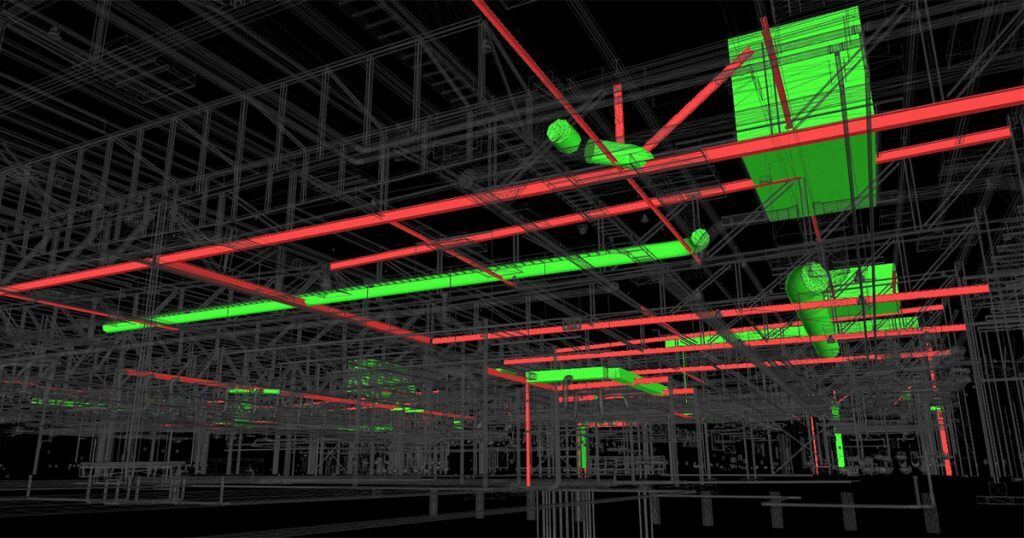
Understanding these errors helps improve coordination and avoid costly delays. The following list highlights the most frequent **mistakes in BIM clash detection** seen across projects.
### **1. Running Clash Detection Too Late**
Clash detection should begin during the design stage, not after construction starts. When teams delay coordination, conflicts move from digital models to the physical site. This leads to rework, project delays, and increased costs. Early detection allows teams to resolve issues before they impact construction schedules.
### **2. Ignoring Model Quality**
Accurate results depend on accurate models. When models lack detail, contain incorrect levels, or miss critical components, clash detection becomes unreliable. For example, an incomplete MEP model may fail to show conflicts with structural elements. Maintaining high-quality models ensures that BIM model clash detection produces meaningful results.
### **3. Overloading Models with Excessive Detail**
Adding unnecessary details too early can slow down coordination and create irrelevant clashes. For instance, including small fixtures or minor components may generate clashes that do not affect construction. Teams should focus on the required level of detail based on the project stage to maintain efficiency.
### **4. Not Defining Clash Detection Rules Clearly**
Without clear rules, software may detect hundreds of unnecessary clashes. Teams must define which elements to check and what tolerances to apply. For example, setting proper clearance values helps avoid false positives. Structured rules improve the accuracy of clash detection in Revit and similar tools.
### **5. Ignoring Soft Clashes and Clearance Issues**
Clash detection is not limited to physical overlaps. Clearance issues, such as space needed for maintenance or installation, are equally important. Ignoring these can lead to operational challenges after construction. Addressing both hard and soft clashes ensures better coordination outcomes.
### **6. Lack of Structured Coordination Meetings**
Detecting clashes is only one part of the process. Without regular coordination meetings, issues remain unresolved. Teams must review clashes together, assign responsibilities, and agree on solutions. This collaborative approach supports effective resolving clash in BIM.
### **7. Over-Reliance on Software Without Interpretation**
Tools such as clash detection in Revit can identify conflicts, but they do not provide solutions. Teams must analyze results and make informed decisions. Relying only on software without engineering judgment can lead to incorrect or impractical resolutions.
### **8. Poor Issue Tracking and Documentation**
When clashes are not tracked properly, they can reappear in updated models. Teams should use issue tracking systems to assign responsibilities, monitor progress, and document resolutions. This ensures accountability and prevents repeated conflicts.
### **9. Weak Communication Between Disciplines**
Clash detection depends on collaboration. When teams work in isolation, [coordination in BIM workflow](https://www.novatr.com/blog/how-bim-coordination-works-in-real-projects) breaks down. For example, structural changes may not be communicated to MEP teams, leading to new clashes. Strong communication improves alignment and reduces conflicts.
### **10. Failing to Update Models Regularly**
Outdated models lead to inaccurate coordination. If one discipline updates its model while others continue using older versions, clash detection results become unreliable. Consistent updates ensure that all teams work with the latest information.
These mistakes show the importance of structured workflows and collaboration. Addressing them improves the effectiveness of BIM model clash detection and supports better project outcomes.
## **How to Avoid Clash Detection Mistakes?**

Avoiding errors requires a structured and proactive approach. Teams must focus on process, coordination, and consistent model management.
To improve outcomes, consider the following strategies:
- **Start Coordination Early:** Run clash detection during the design phase to prevent on-site conflicts.
- **Maintain Model Accuracy:** Ensure all discipline models are complete and aligned before coordination.
- **Define Clear Rules and Tolerances:** Set parameters to avoid unnecessary or duplicate clashes.
- **Use Issue Tracking Systems:** Assign and monitor clashes to ensure timely resolution.
- **Conduct Regular Coordination Reviews:** Align teams through structured meetings and discussions.
- **Focus on Functional Solutions:** Apply real-world considerations when resolving clash in BIM.
- **Leverage BIM Capabilities Effectively:** Understanding how BIM helps in clash detection improves decision-making and coordination.
- **Keep Models Updated:** Ensure all teams use the latest versions for accurate results.
These strategies support efficient coordination and reduce the risk of recurring conflicts.
## **How to Learn Industry-Level Coordination Skills?**
Developing expertise in BIM coordination requires both technical knowledge and practical exposure. Professionals must understand tools, workflows, and real project challenges.
To build strong skills, focus on the following areas:
- **Software Skills:** Learn tools such as Revit and Navisworks used for BIM model clash detection. Understanding how to configure clash tests and interpret results is essential.
- **Understanding Coordination Workflows:** Gain clarity on processes such as model integration and **resolving clash in BIM**.
- **Industry Standards:** Learn standards such as ISO 19650 to work on global projects with structured workflows.
- **Hands-on Experience:** Exposure to real projects helps you understand coordination challenges and develop effective solutions.
- **Advanced Capabilities:** Explore automation, 4D scheduling, and cost integration to expand your expertise.
[](https://www.novatr.com/courses/bim-for-civil-engineers/l?utm_source=blog&utm_medium=website_card_after_intro&utm_campaign=bim_civil_course_leads)
A structured program can significantly accelerate this learning curve. Novatr’s [BIM Professional Course for Civil Engineers](https://www.novatr.com/courses/bim-for-civil-engineers) focuses on real project workflows, hands-on training with tools such as Revit, Navisworks, and construction cloud platforms, and alignment with ISO standards. It also offers globally recognized certifications and optional specializations in areas such as automation, infrastructure modeling, and cost and time integration.
This structured approach helps professionals understand **BIM clash detection construction conflict resolution strategies** and apply them effectively in real-world scenarios.
Master BIM and Get Hired Faster
Join a community of 8500+ Architects and Engineers.
Explore Now
\*Limited seats available
## Conclusion
Avoiding mistakes in BIM clash detection requires a clear focus on process, communication, and model accuracy. When teams adopt structured workflows and maintain consistent coordination, clash detection becomes a reliable tool for improving project outcomes.
For professionals aiming to build these capabilities, structured programs such as the [BIM Professional course for Civil Engineers](https://www.novatr.com/courses/bim-for-civil-engineers) by [Novatr](https://www.novatr.com/) offer hands-on exposure to industry tools and real project workflows, helping bridge the gap between theory and practice.
Visit our [resource page](https://www.novatr.com/learning-hub) to explore structured learning options.
Was this content helpful to you
Like Yes
Dislike No

TABLE OF CONTENTS
BIM Is The New Standard. Are You Certified?
Get Certified in BIM
SHARE ON YOUR SOCIALS
Link Copied Successfully
Related articles
[ CIVIL What Civil Engineers Should Know about Clash Detection in BIM? 27 April 2026 6 min read](https://blog.novatr.com/blog/what-civil-engineers-should-know-about-clash-detection-in-bim) [-1.png) CIVIL Leveraging BIM for Clash Detection in Civil Engineering 29 May 2024 12 min read](https://blog.novatr.com/blog/bim-for-clash-detection) [ CIVIL Solibri Vs Autodesk Navisworks: What BIM Coordinators and Engineers Should Know? 20 February 2026 7 min read](https://blog.novatr.com/blog/solibri-vs-autodesk-navisworks-what-bim-coordinators-and-engineers-should-know) [ CIVIL How Nemetschek Software Is Used Alongside Autodesk on Real Projects? 19 February 2026 4 min read](https://blog.novatr.com/blog/how-nemetschek-software-is-used-alongside-autodesk-on-real-projects)
Download Syllabus
## BIM Professional Program
Next Cohort
June 2026
Program Duration
7 Months
Premium Program benefits
8 Credentials from Autodesk, NSDC, Novatr
1 program. 10 career paths. Infinite Growth.
40+ ISO 19650 & RIBA real-world projects to practice
1-on-1 guidance. Access 400+ industry experts.
Access the biggest AEC-Tech community on the planet. 8500+ and counting
Curated for you by 100+ global BIM leaders.
Lifelong access to course content
Enter your details to download the program syllabus.
##### BIM Professional Program
June 2026, 7 Months
Your Name Invalid name.
Phone Number Enter a valid phone number
Email Please enter a valid email address.
Select years of experience\* Currently studying 0-1 years 1-2 years 2-4 years 4-8 years 8-10 years 10-12 years 12+ years Invalid selection.
Specialisation Select your background\* Architecture Civil Engineering Mechanical Engineering Electrical Engineering Invalid selection.
Are you professionally trained in interior design?
Yes
No
I agree to the [Terms of Use](https://www.novatr.com/terms-and-conditions) and [Privacy Policy](https://www.novatr.com/privacy-policy), and consent to be contacted by Email, Call, WhatsApp, or SMS.
Submit
Ready to skyrocket your career?
Begin your next chapter in AEC
with Novatr!
We are here to help you take the industry by storm with advanced, tech-first skills.
[Explore Courses](https://www.novatr.com/#courses)
Join our newsletter
Submit
Thank you for signing up.
We’ll send you a nice letter once per week. No spam.

Dare to Disrupt.
Join thousands of people who organise
work and life with Novatr.
Company
- [About Us](https://www.novatr.com/about)
- [BIM Professional Program v.2026](https://www.novatr.com/courses/bim-professional-program)
- [Masters Computational Design](https://www.novatr.com/courses/computational-design)
- [Become a Mentor](https://www.novatr.com/apply-as-mentor)
- [Hiring from Us](https://www.novatr.com/hire-from-us)
- [Careers at Novatr](https://www.novatr.com/career)
Resources
- [Blog](https://www.novatr.com/learning-hub)
- [Media Room](https://www.novatr.com/media-room-home-page)
- [Career Builder](https://www.novatr.com/career-navigator)
- [Events & Webinars](https://www.novatr.com/webinars)
- [FAQs & Support Center](https://www.novatr.com/contact-us)
- [Contact Us](https://www.novatr.com/contact-us)
- [Privacy Policy](https://www.novatr.com/privacy-policy)
- [Terms of Use](https://www.novatr.com/terms-and-conditions)
©2023 Oneistox Network Pvt. Ltd.
All Rights Reserved
```json
{
"@context" : "https://schema.org",
"@type" : "BlogPosting",
"author" : {
"@type" : "Person",
"name" : "Deependra Dobriyal",
"url" : "https://blog.novatr.com/blog/author/deependra-dobriyal"
},
"dateModified" : "2026-04-27T09:25:03.856Z",
"datePublished" : "2026-04-27T08:55:13.000Z",
"headline" : "10 Common Clash Detection Mistakes To Avoid",
"image" : [ "https://blog.novatr.com/hubfs/BIM%20coordination%20model%20showing%20clash%20detection..jpg" ],
"mainEntityOfPage" : {
"@id" : "https://blog.novatr.com/blog/10-common-clash-detection-mistakes-to-avoid",
"@type" : "WebPage"
},
"publisher" : {
"@type" : "Organization",
"logo" : {
"@type" : "ImageObject",
"url" : "https://blog.novatr.com/hubfs/Novatr%20Prev%20OX-2.svg"
}
}
}
```