---
title: "Twinmotion vs Lumion: Which Rendering Software is Best for You"
description: Lumion and Twinmotion are the go-to rendering software for architects. How do they compare with each other and what should you learn? Let’s find out!
image: https://drt8cv58r2b23.cloudfront.net/images/blog/blogHero/twinmotion_vs_lumion_which_rendering_software_is_best_for_you_2022.jpg
---
[Blogs](https://www.novatr.com/learning-hub)
- [Architecture & Construction](https://www.novatr.com/learning-hub?category=Architecture+%26+Construction)
- [BIM](https://www.novatr.com/learning-hub?category=BIM)
- [Computational Design](https://www.novatr.com/learning-hub?category=Computational+Design)
- [Company News](https://www.novatr.com/learning-hub?category=Company+News)
- [Expert Talks](https://www.novatr.com/learning-hub?category=Expert+Talks)
Explore Courses
[Just Launched  BIM Professional Program v.2026 Take your career to the next level by mastering the real-world application of BIM. Know More](https://www.novatr.com/courses/bim-professional-program)
[ Master Computational Design Course Break into an advanced career by learning to apply the power of computation to the art of design. Know More](https://www.novatr.com/courses/computational-design)
[Blogs](https://www.novatr.com/learning-hub)
Explore Blogs
- [Architecture & Construction](https://www.novatr.com/learning-hub?category=Architecture+%26+Construction)
- [BIM](https://www.novatr.com/learning-hub?category=BIM)
- [Computational Design](https://www.novatr.com/learning-hub?category=Computational+Design)
- [Company News](https://www.novatr.com/learning-hub?category=Company+News)
- [Expert Talks](https://www.novatr.com/learning-hub?category=Expert+Talks)
Courses
- [BIM Professional Program v.2026](https://www.novatr.com/courses/bim-professional-program)
- [Master Computational Design](https://www.novatr.com/courses/computational-design)
- [BIM/](https://www.novatr.com/learning-hub?category=BIM) [BIM/](https://www.novatr.com/learning-hub?category=BIM)
Featured Article
# Twinmotion vs Lumion: Which Rendering Software is Best for You? (2026)

Tristin Theron
August 11, 2022
5 min read
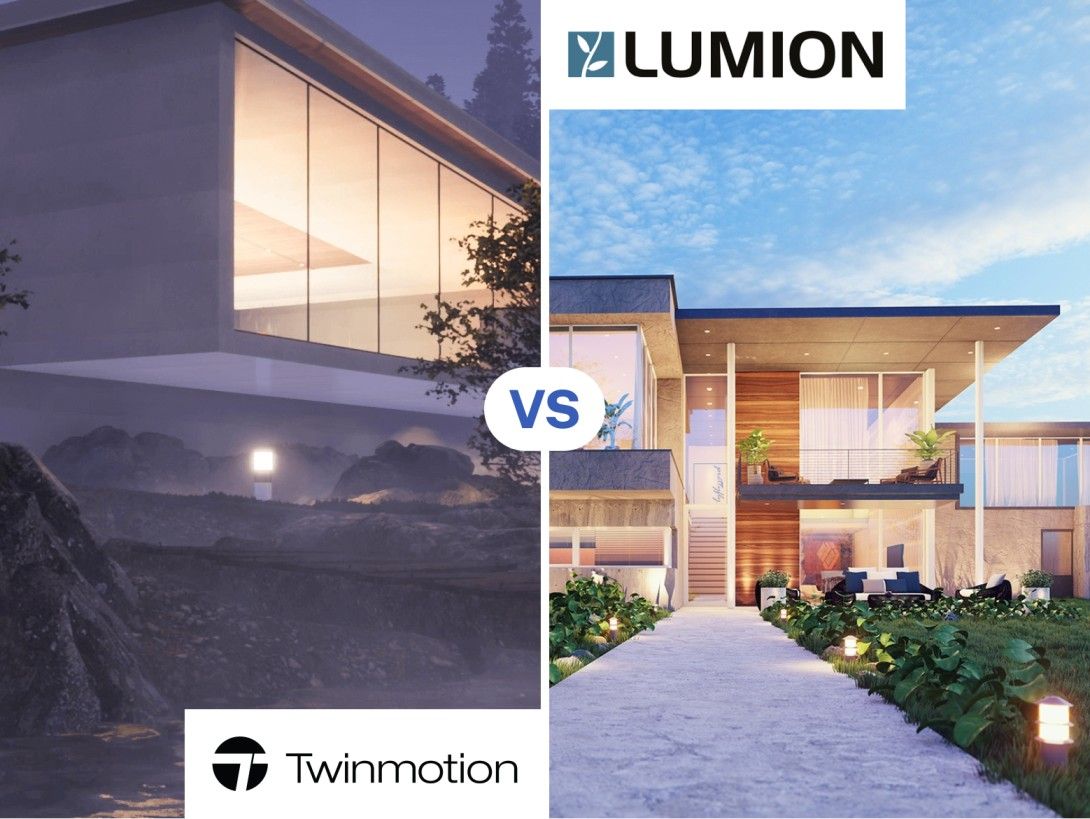

*Twinmotion vs Lumion - a neck-to neck battle of the popular rendering software for architects and designers. The visualisation of spatial qualities is not just something used for the final product of a drawing set or presentation, but also an important tool in the process of communication with clients throughout the process of design. These render engines are tools to quickly get through ideas to people/clients that are not able to visualise things from 2-dimensional drawings. This is why it's important to choose a [render engine that is the best fit for your workflow](https://www.novatr.com/blog/best-rendering-software) of software combinations.
In this article, we will explore Lumion vs Twinmotion as two of the most popular choices by architects and see how they stack up against each other.*
Unlock High-Paying Careers With BIM
Master BIM workflows, software and skills on real projects.
Apply Now
\*Limited seats available
[](https://cdn2.unrealengine.com/feature-forma6-st-philbert-4k-3840x2160-ec08834f5b55.jpg?resize=1&w=1528)
## Twinmotion vs Lumion: Features
### **Materials**
Lumion comes with a limited amount of materials but is of very high quality. While Twinmotion has direct access to Quixele Megascans built into the software, it has a very large library that comes with more variation, at expense of quality.
### **Export Channels**
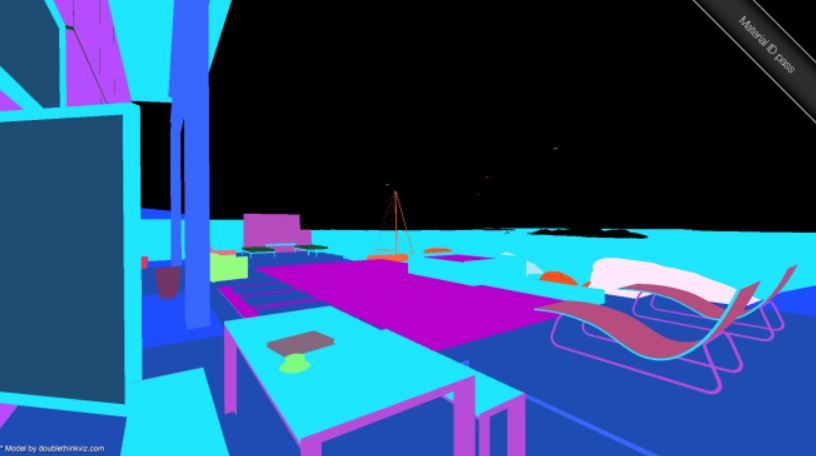
Lumion allows you to export different channels when making a rendering, like a light and shadows channel, Material ID channel, etc. This makes it much easier to have control of the image while in post-production, using the extra channels as layers. Twinmotion renders do not offer this feature, but this doesn't matter if you are just going to be using the stock render.
[](https://forum.lumion.com/index.php?action=dlattach;topic=4706.0;attach=414541;image)
### **Common Features of Twinmotion vs Lumion**
● Twinmotion and Lumion both carry an extensive library of vegetation, materials, textures, people, and objects.
● Both software have intelligent environmental features that allow you to adjust seasonal and landscaping qualities.
● Both software is compatible with most major BIM and architectural modeling software.
● Both software can be used in VR, however, Twinmotion has better support for most major VR headsets with an intuitive Render refresh rate that prevents VR nausea.
## Render Output Quality
Twinmotion has an option for a 4K render output quality (3840 x 2160), but the software also can customize the resolution with a cap at 9000 x 9000 resolution. While Lumion has a max render output of 8K (7680x4320).
Higher DPI is not always better though in most cases, as in most workflows you would not need the highest resolution images to convey concepts to people. It is only if your images are being used for promotional purposes that you would need the highest resolutions.
Based on the Lumion vs Twinmotion output quality, they would both be fine for all uses from concepts to commercial use, while Twinmotion would be slightly better for promotional images.
[](https://service-content.lumion.com/lumiondotcom-even/wp-content/uploads/2019/08/hipcafe.jpg)
## Cost Against Features Offered
Twinmotion 2022 sits at around 499 USD while Lumion 12 is around 1509 USD and Lumion 12 PRO is around 3019 USD. This makes the cost gap quite significant while the features offered are relatively similar. A license for Twinmotion makes a lot more sense for an individual trying to get themselves a rendering software, while Lumions packages make more sense in the context of a firm buying the software for their employees.
Both are free to students with limited access to features.
## Ease of Learning vs Ease of Mastery
### **Ease of Learning**
Both the Lumion software and Twinmotion software are incredibly intuitive when it comes to the user interface. They both make it as easy as possible to change environmental conditions like weather and landscape, as well as add people, objects, vegetation, and materials. The “out of the box” renders you can get from Lumion vs Twinmotion varies the most. When using the software close to their factory settings, Lumion is much easier to make an appealing image.
### **Ease of Mastery**
When trying to take an image further, it is difficult to do with Lumion and is harder to achieve unless you are doing lots of post-production in photoshop. Twinmotion offers more settings to get a better image in the first go if you know the software well, meaning less post-production time on photoshop if you are willing to do the work in the software itself.
[](https://service-content.lumion.com/lumiondotcom-even/wp-content/uploads/2019/08/Scorpia-Front-View.jpg)
## Limitations
Twinmotion has a large amount of HDRIs with an easy system to customize HDRIs in the software that you can make use of. While Lumion does not have many HDRIs built into the software, you can get a custom HDRI into Lumion, it's just more complicated.
You have to download the HDRI from a third-party website, and then model a sphere, then place that sphere into the model and enlarge it until it encapsulates your model. After that, you may apply the HDRI to the sphere as a material and it should do the trick.
[](https://i0.wp.com/real-time-rendering.com/wp-content/uploads/2022/01/Pawel-Rymsza-1.jpg?fit=800%2C469&ssl=1)
## System Requirements
The lumion high-end system requirements and Twinmotion high-end system requirements would allow you to render large models like cities, large commercial/residential buildings, airports, and parks. If You are working on smaller projects like large homes, single residential/commercial buildings, and small parts of a city, you would be able to manage with a computer that can only handle the recommended system requirements.
### **Lumion - High-end System Requirements**
**Graphics card:** A GPU scoring a G3DMark of 20000 or higher with up-to-date drivers
**Graphics card memory:** 11 GB or more
**System memory (RAM):** 64 GB or more
**CPU (processor):** CPU with a benchmark score of 2600 or higher
**Hard drive space:** Minimum 40 GB of free disk space
*Source - https://lumion3d.co.za/lumion-system-requirements/*
### **Twinmotion - High-end System Requirements**
**Graphics card:** A GPU scoring a G3DMark of 15,000 or higher with up-to-date drivers
**Graphics card memory:** 12 GB or more
**System memory (RAM):** 64 GB or more
**CPU (processor):** CPU with a benchmark score of 2500 or higher
**Hard drive space:** 30 GB of free disk space
*Source - https://twinmotionhelp.epicgames.com*
[](https://service-content.lumion.com/lumiondotcom-even/wp-content/uploads/2019/08/Startup-incubator.jpg)
## Should you go for Lumion or Twinmotion?
Overall both the software are very similar, and it depends on the gap in your workflow that each one can fill. Twinmotion may make it easier to create a high-quality image from the software alone if you do not want to spend extra time personalizing the images. While in Lumion it may be harder to create a high quality within the software alone, it does make the process easier to have more control of the outcome in post-production.
What render software for you can very much depend on if you are a student, or a professional working independently or in an office:
**Students (who want realistic renders at low effort)** - Twinmotion
**Students (who want a certain artistic direction)** - Lumion
**Professionals (working for themselves/ in a small office)** - Twinmotion
**Professionals (working at a large firm)** - Lumion
And if you want...
**Quick render for clients =** either one will do
**Quick intermediate quality render =** Lumion
**High-quality image + you like photoshop =** Lumion
**High-quality image + you don't like photoshop =** Twinmotion
To get more information and training in Twinmotion, along with the most in-demand AEC skill - Building Information Modelling, head over to Novatr’s [BIM Professional Course](https://www.novatr.com/courses/building-information-modelling). Go to our [Resources](https://www.novatr.com/learning-hub) page if you want to get more insights on AEC careers, software & tools, and industry trends.
Master BIM and Get Hired Faster
Join a community of 8500+ Architects and Engineers.
Explore Now
\*Limited seats available
Was this content helpful to you
Like Yes
Dislike No

TABLE OF CONTENTS
BIM Is The New Standard. Are You Certified?
Get Certified in BIM
SHARE ON YOUR SOCIALS
Link Copied Successfully
Related articles
[ Structural Optimisation in Architecture: Top Tools, Techniques & Workflows 22 September 2025 4 min read](https://blog.novatr.com/blog/structural-optimisation-in-architecture-top-tools-techniques-workflows) [ BIM Levels in BIM: All You Need to Know for Easy BIM Adoption 22 May 2022 5 min read](https://blog.novatr.com/blog/levels-in-bim) [ MCD 10 Modern Pavilion Architecture Examples Around the World } 26 July 2023 8 min read](https://blog.novatr.com/blog/10-impressive-parametric-pavilions) [ Building Information Modelling Top 10 Architecture Firms In Oakland 2026 22 May 2025 6 min read](https://blog.novatr.com/blog/top-architecture-firms-in-oakland)
Download Syllabus
## BIM Professional Program
Next Cohort
June 2026
Program Duration
7 Months
Premium Program benefits
8 Credentials from Autodesk, NSDC, Novatr
1 program. 10 career paths. Infinite Growth.
40+ ISO 19650 & RIBA real-world projects to practice
1-on-1 guidance. Access 400+ industry experts.
Access the biggest AEC-Tech community on the planet. 8500+ and counting
Curated for you by 100+ global BIM leaders.
Lifelong access to course content
Enter your details to download the program syllabus.
##### BIM Professional Program
June 2026, 7 Months
Your Name Invalid name.
Phone Number Enter a valid phone number
Email Please enter a valid email address.
Select years of experience\* Currently studying 0-1 years 1-2 years 2-4 years 4-8 years 8-10 years 10-12 years 12+ years Invalid selection.
Specialisation Select your background\* Architecture Civil Engineering Mechanical Engineering Electrical Engineering Invalid selection.
Are you professionally trained in interior design?
Yes
No
I agree to the [Terms of Use](https://www.novatr.com/terms-and-conditions) and [Privacy Policy](https://www.novatr.com/privacy-policy), and consent to be contacted by Email, Call, WhatsApp, or SMS.
Submit
Ready to skyrocket your career?
Begin your next chapter in AEC
with Novatr!
We are here to help you take the industry by storm with advanced, tech-first skills.
[Explore Courses](https://www.novatr.com/#courses)
Join our newsletter
Submit
Thank you for signing up.
We’ll send you a nice letter once per week. No spam.

Dare to Disrupt.
Join thousands of people who organise
work and life with Novatr.
Company
- [About Us](https://www.novatr.com/about)
- [BIM Professional Program v.2026](https://www.novatr.com/courses/bim-professional-program)
- [Masters Computational Design](https://www.novatr.com/courses/computational-design)
- [Become a Mentor](https://www.novatr.com/apply-as-mentor)
- [Hiring from Us](https://www.novatr.com/hire-from-us)
- [Careers at Novatr](https://www.novatr.com/career)
Resources
- [Blog](https://www.novatr.com/learning-hub)
- [Media Room](https://www.novatr.com/media-room-home-page)
- [Career Builder](https://www.novatr.com/career-navigator)
- [Events & Webinars](https://www.novatr.com/webinars)
- [FAQs & Support Center](https://www.novatr.com/contact-us)
- [Contact Us](https://www.novatr.com/contact-us)
- [Privacy Policy](https://www.novatr.com/privacy-policy)
- [Terms of Use](https://www.novatr.com/terms-and-conditions)
©2023 Oneistox Network Pvt. Ltd.
All Rights Reserved
```json
{
"@context" : "https://schema.org",
"@type" : "BlogPosting",
"author" : {
"@type" : "Person",
"name" : "Tristin Theron",
"url" : "https://blog.novatr.com/blog/author/tristin-theron"
},
"dateModified" : "2026-08-24T10:36:02.047Z",
"datePublished" : "2022-08-11T08:55:43.000Z",
"headline" : " Twinmotion vs Lumion: Which Rendering Software is Best for You",
"image" : [ "https://drt8cv58r2b23.cloudfront.net/images/blog/blogHero/twinmotion_vs_lumion_which_rendering_software_is_best_for_you_2022.jpg" ],
"mainEntityOfPage" : {
"@id" : "https://blog.novatr.com/blog/twinmotion-vs-lumion",
"@type" : "WebPage"
},
"publisher" : {
"@type" : "Organization",
"logo" : {
"@type" : "ImageObject",
"url" : "https://blog.novatr.com/hubfs/Novatr%20Prev%20OX-2.svg"
}
}
}
```