

Core BIM Platforms That Form the Foundation of an Architect’s Workflow
Core BIM platforms are the backbone of an architect’s workflow. These tools enable model creation, documentation, and coordination across disciplines while maintaining data consistency throughout the project lifecycle.
The primary BIM authoring tools essential for architects entering 2026 include:
-
Autodesk Revit: Widely used for architectural modeling, documentation, and multidisciplinary coordination
-
Graphisoft Archicad: Known for design flexibility and efficient architectural workflows
-
Bentley OpenBuildings: Preferred for infrastructure and large-scale complex projects
Choosing between dominant platforms depends on multiple factors, including project requirements, team structure, and regional adoption. Firms often select tools based on integration capabilities and client expectations.
Key factors that influence this decision include:
-
Project type and scale
-
Firm standards and existing workflows
-
Compatibility with other project tools
For example, Revit is often selected for large collaborative environments, while Archicad is favored in design-driven practices that require flexibility and speed.
Architects must fully master several core capabilities within these tools to remain effective:
-
3D modeling and detailed documentation
-
Family creation and parametric component design
-
Model accuracy, levels of detail, and data management
In addition, architects should develop strong model organization skills to ensure clarity and usability across teams. Beyond modeling, architects should understand how to structure data within BIM models so that it supports coordination, analysis, and long-term project use. Mastery of these platforms forms the foundation for advanced BIM workflows and enables seamless integration with other tools.
Coordination and Collaboration Tools That Strengthen Project Delivery
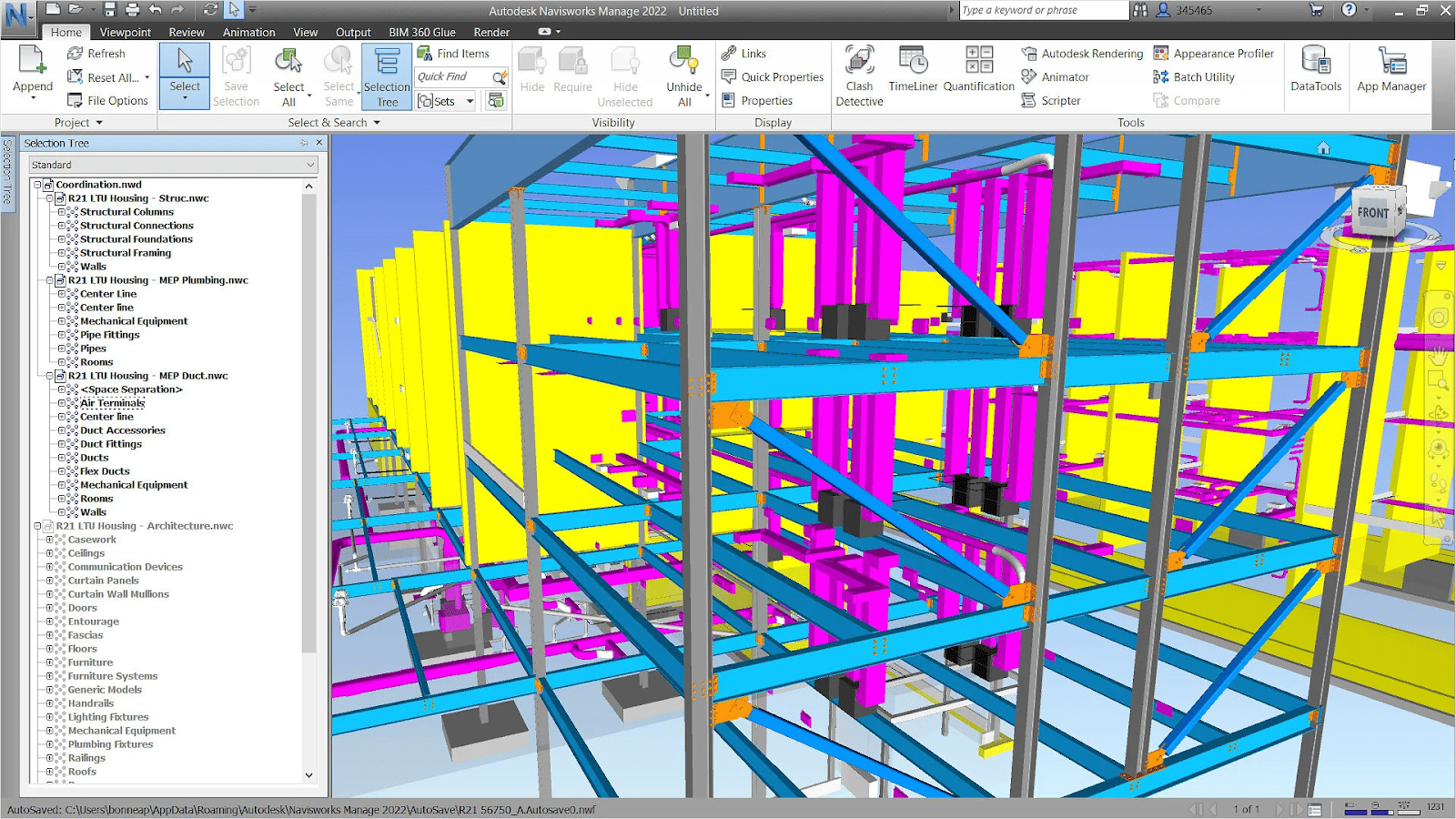
Coordination and collaboration tools are essential for managing complex, multidisciplinary projects. These tools help teams identify conflicts early, improve communication, and maintain alignment across project stages.
Key coordination tools that support project delivery include:
-
Navisworks: Enables clash detection and model aggregation
-
Solibri: Focuses on model checking, validation, and compliance
-
Autodesk Construction Cloud (BIM 360): Supports cloud-based collaboration and document management
Cloud-based platforms improve transparency and accountability by providing a shared environment where all stakeholders can access and update project data in real time. This reduces confusion and ensures that teams work with the most current information.
Benefits of cloud-based collaboration include:
-
Centralized access to project data
-
Real-time updates and version tracking
-
Improved communication across distributed teams
Despite these advantages, architects often make mistakes when using collaboration tools. These mistakes can reduce efficiency and limit the value of BIM workflows.
Common issues include:
-
Inconsistent data standards across teams
-
Irregular model updates and coordination cycles
-
Failure to integrate collaboration tools into daily workflows
Another frequent challenge is relying too heavily on file-based exchanges instead of leveraging real-time collaboration features. This creates delays and increases the risk of errors.
When used effectively, coordination tools improve project accuracy, reduce conflicts, and support smoother project execution across all disciplines.
Computational and Automation Tools That Elevate BIM Capability
Computational and automation tools are becoming a critical part of BIM workflows. These tools allow architects to automate repetitive tasks, improve efficiency, and explore design options more effectively.
Learning visual scripting and automation tools alongside BIM software provides several advantages:
-
Reduces manual effort in repetitive tasks
-
Improves consistency and accuracy in models
-
Enables faster design iterations and updates
Important tools in this category include:
-
Dynamo: A visual programming tool integrated with Revit
-
Grasshopper: A parametric design tool commonly used with Rhino
-
Python scripting: Enables advanced automation and customization
Parametric and computational workflows allow architects to test multiple design scenarios quickly. This capability supports better decision-making and improves overall design performance.
Automation skills that provide strong practical value include:
-
Automating quantity takeoffs and data extraction
-
Creating parametric design systems and reusable components
-
Streamlining documentation and model updates
For example, using Dynamo to automate repetitive modeling tasks can significantly reduce time spent on manual work while improving model consistency.
As BIM workflows become more advanced, these tools will play a central role in increasing productivity and enabling innovation in design and construction processes.
Visualization, Analysis, and Performance Tools for Advanced Practice
Visualization and analysis tools enhance design quality and support performance-driven decision-making. These tools allow architects to evaluate building performance, improve communication, and deliver better project outcomes.
Tools that support sustainability and performance analysis include:
-
Autodesk Insight: Energy analysis and building performance evaluation
-
Ladybug and Honeybee: Environmental and climate analysis tools
-
IES VE: Advanced simulation for energy and performance modeling
Real-time visualization tools have become essential for client presentations and approvals. They allow stakeholders to understand designs clearly and provide feedback early in the process.
Common visualization tools include:
-
Enscape
-
Twinmotion
-
Lumion
These tools create immersive visual experiences that improve communication and reduce misunderstandings. As a result, they help minimize design changes later in the project.
These tools also support faster design approvals, which contributes to improved project timelines and reduced revisions.
Analysis capabilities that define high-performing BIM architects include:
-
Energy and sustainability assessments
-
Daylighting and thermal performance analysis
-
Lifecycle and operational performance evaluation
Architects who integrate these tools into their workflows can deliver more efficient, sustainable, and data-driven designs. These capabilities are increasingly expected in modern construction projects.
SME Recommendations: Building a Future-Ready Software Stack
Building a future-ready software stack requires a structured and practical approach. Architects must focus on developing both foundational and advanced skills without becoming overwhelmed.
A practical learning roadmap includes:
-
Start with a core BIM platform such as Revit or Archicad
-
Add coordination tools like Navisworks or Solibri
-
Learn automation tools such as Dynamo or Grasshopper
-
Expand into visualization and performance analysis tools
Architects should prioritize tools based on project requirements and career goals. Focusing on one category at a time helps build strong expertise and ensures better retention of skills.
To avoid overload, professionals should concentrate on mastering workflows rather than trying to learn every tool at once. This approach leads to deeper understanding and better application in real projects.
Emerging technologies that professionals should monitor include:
-
AI-driven design and optimization tools
-
Digital twins and real-time data integration
-
Predictive analytics for construction planning
Continuous learning remains essential as technology evolves. Architects who stay updated with new tools and workflows will remain competitive in a rapidly changing industry.
By following a structured roadmap, professionals can build a strong and adaptable software ecosystem that supports long-term growth.