---
title: Is It Too Late to Learn BIM If You’ve Been Using AutoCAD for Years? 2026
description: Learn how experienced AutoCAD users can transition to BIM with tailored BIM training, bridging the CAD to BIM transition, and upskill efficiently.
image: https://blog.novatr.com/hubfs/Is%20It%20Too%20Late%20to%20Learn%20BIM%20If%20You%E2%80%99ve%20Been%20Using%20AutoCAD%20for%20Years.png
---
[Blogs](https://www.novatr.com/learning-hub)
- [Architecture & Construction](https://www.novatr.com/learning-hub?category=Architecture+%26+Construction)
- [BIM](https://www.novatr.com/learning-hub?category=BIM)
- [Computational Design](https://www.novatr.com/learning-hub?category=Computational+Design)
- [Company News](https://www.novatr.com/learning-hub?category=Company+News)
- [Expert Talks](https://www.novatr.com/learning-hub?category=Expert+Talks)
Explore Courses
[Just Launched  BIM Professional Program v.2026 Take your career to the next level by mastering the real-world application of BIM. Know More](https://www.novatr.com/courses/bim-professional-program)
[ Master Computational Design Course Break into an advanced career by learning to apply the power of computation to the art of design. Know More](https://www.novatr.com/courses/computational-design)
[Blogs](https://www.novatr.com/learning-hub)
Explore Blogs
- [Architecture & Construction](https://www.novatr.com/learning-hub?category=Architecture+%26+Construction)
- [BIM](https://www.novatr.com/learning-hub?category=BIM)
- [Computational Design](https://www.novatr.com/learning-hub?category=Computational+Design)
- [Company News](https://www.novatr.com/learning-hub?category=Company+News)
- [Expert Talks](https://www.novatr.com/learning-hub?category=Expert+Talks)
Courses
- [BIM Professional Program v.2026](https://www.novatr.com/courses/bim-professional-program)
- [Master Computational Design](https://www.novatr.com/courses/computational-design)
- [Archi/](https://www.novatr.com/learning-hub?category=BIM)
Featured Article
# Is It Too Late to Learn BIM If You’ve Been Using AutoCAD for Years?

Neha Singh
February 27, 2026
7 min read


The use of BIM software is changing the architecture, engineering, and construction (AEC) industry in the U.S. Growing ranks of professionals are leaving behind traditional design tools in favour of more advanced digital modelling. A [2026 survey](https://www.planradar.com/us/bim-in-the-us/?utm_source) has shown that 74 percent of architects, 67 percent of engineers, and 74 percent of contractors employ BIM in their practice.
In addition, the [U.S. BIM software market](https://www.marketsandmarkets.com/ResearchInsight/us-building-information-modeling-market.asp?utm_source) is projected to grow from $2.09 billion in 2024 to $3.86 billion by 2029, reflecting strong and sustained demand for skilled professionals. For professionals with AutoCAD experience, transitioning to BIM software is more than an upgrade; it’s a strategic career investment in an expanding, model-driven industry.
Unlock High-Paying Careers With BIM
Master BIM workflows, software and skills on real projects.
Apply Now
\*Limited seats available
## **Is switching from AutoCAD to BIM difficult for experienced professionals?**
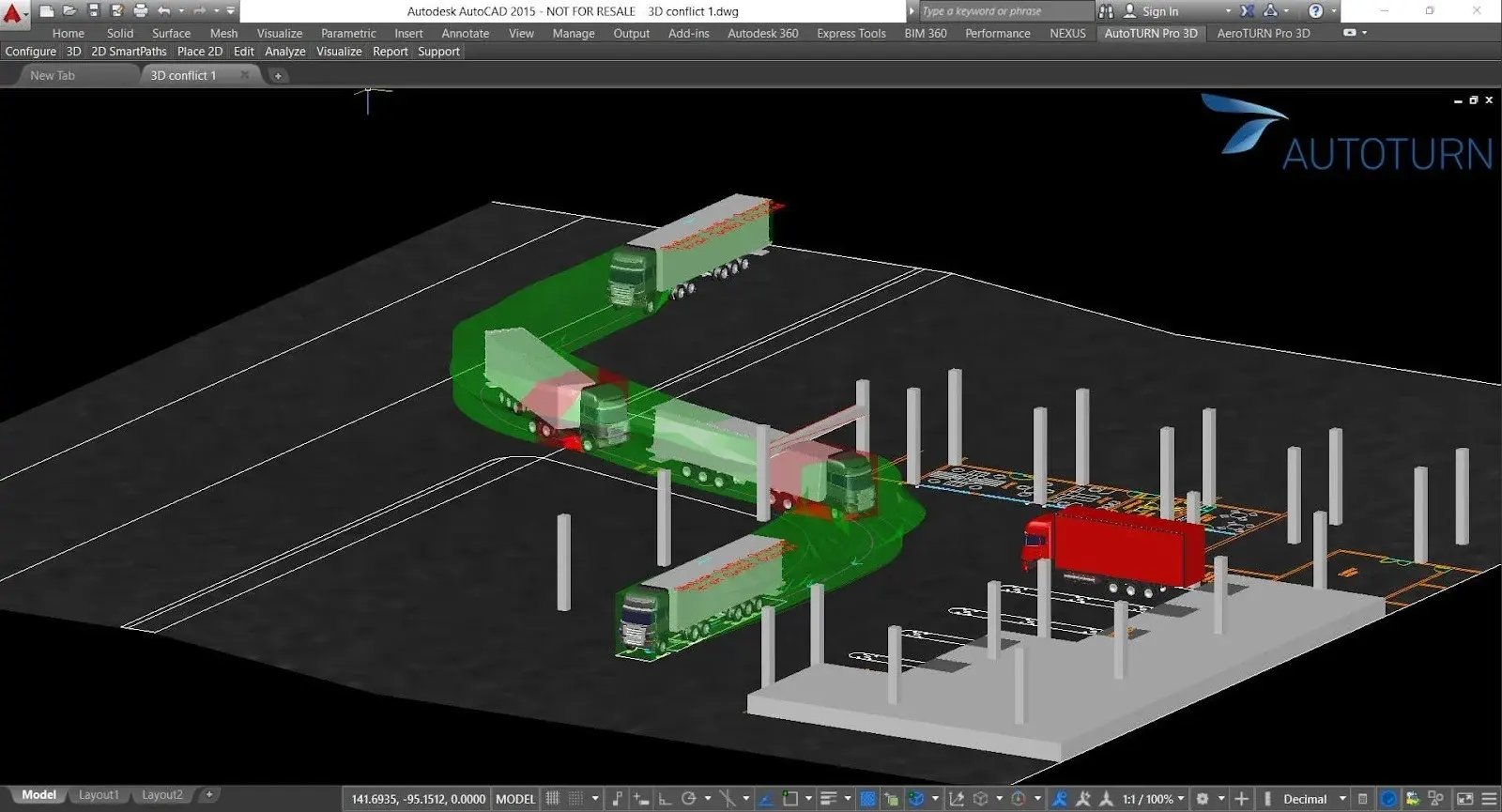
For many seasoned CAD users, moving to **BIM software** is less about starting over and more about adapting to a new way of thinking. The main shift is from producing isolated drawings to managing a coordinated model that integrates both geometry and data. With structured learning, the transition can be smooth.
Key factors that influence ease of transition include:
- **Familiarity with digital design tools** – Existing CAD skills provide a strong foundation for learning BIM tools.
- **Exposure to collaborative workflows** – Teams used to multidisciplinary coordination adapt faster.
- **Willingness to upskill** – Continuous practice and targeted BIM training shorten the learning curve for BIM.
- **Project-based learning** – Applying new skills to real tasks accelerates BIM knowledge retention.
Ultimately, the difficulty lies less in mastering the technical aspects and more in embracing a model-based mindset. Professionals who remain open to collaboration, seek structured learning opportunities, and practice consistently often find the transition both achievable and rewarding.
## **What are the key differences between AutoCAD and BIM workflows?**
Here’s a breakdown of the key differences between AutoCAD and BIM workflows, showing how each approach handles documentation, collaboration, and project intelligence.
| **Aspect** | **AutoCAD Workflow** | **BIM Workflow** |
| --- | --- | --- |
| **Documentation Approach** | Drawings created as standalone 2D linework | Sheets derived directly from coordinated 3D model views |
| **Collaboration** | File handoffs and overlays between team members | Federated models and shared coordination platforms enable real-time collaboration |
| **Lifecycle Utility** | Focused on design and drafting | Supports facility management, energy analysis, quantity extraction, and project lifecycle data |
| **Decision Framing** | Legacy software emphasizes individual efficiency | Modern workflows prioritize model intelligence, collaboration, and informed tool investment |
| **Data & Analysis** | Limited ability to analyze design impact beyond visuals | The model contains integrated cost, schedule, and performance data for deeper project insights |
Recognizing these differences clarifies why organizations emphasize digital transformation in architecture and why firms re-evaluate legacy workflows in favor of model-centric delivery.
## **Can AutoCAD users transition to BIM without starting from scratch?**

Experienced AutoCAD users can migrate skills progressively by translating familiar drafting tasks into model authoring. Start with a small AutoCAD project converted into a BIM model to learn BIM gradually, preserving prior output while building new capabilities.
A stepwise plan:
1. Identify repeatable deliverables and map them to model views and schedules.
2. Master basic family creation and parameter use to represent repetitive elements.
3. Practice coordination workflows (linking, worksharing, clash review) on a consolidated project file.
Many practitioners accelerate learning by converting a past project into a test model and treating it as a safe sandbox. Resources that frame Revit for experienced CAD users' scenarios make initial conversions more predictable and reduce common errors.
This incremental approach eases the CAD to BIM transition, leverages existing domain knowledge, and reduces downtime during adoption. Practitioners who focus on modeled deliverables retain value from legacy projects while developing BIM knowledge for future work. Comparing legacy software vs modern workflows clarifies which practices to retain and which to modernize.
## **What mindset and skills help seasoned AutoCAD users adapt to BIM?**
Adaptation hinges on a systems mindset and a willingness to collaborate across disciplines. Core competencies combine parametric thinking with practical coordination experience.
Essential skills and attitudes:
- Parametric logic and family creation to reduce repetitive modeling effort.
- Data literacy: understanding how model parameters, schedules, and metadata drive downstream processes.
- Coordination practices such as federated models, clash detection, and version control.
- Openness to automation and scripting, where appropriate, to scale repetitive tasks.
For architects and designers, building credentials also matter: pursuing recognized BIM certification can formalize capability, while domain-specific courses serve BIM for architects' objectives, such as schematic coordination and documentation standards.
Cultivating these skills supports upskilling for BIM adoption and prepares experienced CAD users to contribute immediately to integrated project teams.
## **Are there BIM courses tailored for professionals with an AutoCAD background?**

For professionals with AutoCAD experience, BIM courses help transition from 2D drafting to model-based workflows, building on existing skills while introducing advanced project applications. These programs make the CAD to BIM transition smoother by combining structured training with practical, real-world exercises.
Novatr’s [**BIM Course for Architects**](https://www.novatr.com/us/courses/building-information-modelling)offers comprehensive, interactive BIM training online, providing hands-on experience with Revit for architects and other essential BIM tools. Learners work on real project simulations, receive guidance from industry mentors, and develop a portfolio that demonstrates their BIM capabilities.
**Key USPs of the Course**
- **Practical Project Work** – Complete realistic 3D modeling and coordination tasks that mirror professional projects.
- **Software Mastery** – Gain proficiency in Revit for architects and other widely used BIM tools.
- **Expert Guidance** – Industry mentors provide personalized feedback to refine skills and workflow efficiency.
- **Portfolio Building** – Develop tangible project deliverables that highlight your BIM expertise to employers.
- **Flexible Learning** – Combines live workshops and recorded lessons, allowing learners to progress at their own pace.
By integrating hands-on training, expert mentorship, and professional project simulations, Novatr ensures that learners not only understand BIM concepts but are fully prepared to apply them in real-world architectural workflows.
Master BIM and Get Hired Faster
Join a community of 8500+ Architects and Engineers.
Explore Now
\*Limited seats available
## Conclusion
Seasoned AutoCAD professionals can modernize their practice by combining targeted BIM training with hands-on project work and optional vendor certification. Government project requirements and infrastructure programs amplify the value of BIM software proficiency, investing in both career-relevant and market-aligned skills. Embracing these steps advances digital transformation in architecture outcomes and sustains long-term professional value.
Master the CAD to BIM transition with the industry-focused [BIM Course for Architects](https://www.novatr.com/us/courses/building-information-modelling) by [Novatr](https://www.novatr.com/us), gain hands-on experience, build a professional portfolio, and earn credentials that set you apart in the job market.
Visit [our resource](https://www.novatr.com/learning-hub) page for more expert guidance, resources, and career tips.
## **FAQs**
### **1. Can long-time AutoCAD users successfully transition to BIM tools like Revit?**
Long-term AutoCAD users can achieve productive BIM outcomes by applying familiar drafting logic to model setup, practicing Revit for experienced CAD users' workflows, and enrolling in targeted BIM training that emphasizes real project deliverables.
### **2. Is it difficult to shift from 2D drafting in AutoCAD to 3D modeling in BIM?**
Shifting requires a change in approach, moving from sheet-centric production to model-centric information delivery. Still, the learning curve for BIM becomes manageable with iterative practice and mentoring that focuses on essential BIM skills.
### **3. What are the benefits of learning BIM later in your architecture career?**
Late adoption expands professional relevance by aligning experience with BIM for architects' expectations, supporting lifecycle thinking, improving cross-discipline coordination, and integrating modern digital design tools with established domain knowledge.
Was this content helpful to you
Like Yes
Dislike No

TABLE OF CONTENTS
BIM Is The New Standard. Are You Certified?
Get Certified in BIM
SHARE ON YOUR SOCIALS
Link Copied Successfully
Related articles
[ Lessons Learned: Transitioning from 2D CAD to Full BIM Workflows – What Nobody Tells You 25 November 2025 5 min read](https://blog.novatr.com/blog/transitioning-from-2d-cad-to-bim-workflows) [ BIM How To Transition from Tekla Modeler to a High-Paying BIM Engineer 11 November 2025 7 min read](https://blog.novatr.com/blog/how-to-transition-from-tekla-modeler-to-a-high-paying-bim-engineer) [ Why Should you Transition from Electrical Engineer to BIM Electrical Engineer 10 March 2025 11 min read](https://blog.novatr.com/blog/why-should-you-transition-to-bim-electrical-engineer) [.png) How to transition from Electrical Designer to BIM Electrical Designer 5 March 2025 18 min read](https://blog.novatr.com/blog/electrical-designer-to-bim-electrical-designer-transition-guide)
Download Syllabus
## BIM Professional Program
Next Cohort
June 2026
Program Duration
7 Months
Premium Program benefits
8 Credentials from Autodesk, NSDC, Novatr
1 program. 10 career paths. Infinite Growth.
40+ ISO 19650 & RIBA real-world projects to practice
1-on-1 guidance. Access 400+ industry experts.
Access the biggest AEC-Tech community on the planet. 8500+ and counting
Curated for you by 100+ global BIM leaders.
Lifelong access to course content
Enter your details to download the program syllabus.
##### BIM Professional Program
June 2026, 7 Months
Your Name Invalid name.
Phone Number Enter a valid phone number
Email Please enter a valid email address.
Select years of experience\* Currently studying 0-1 years 1-2 years 2-4 years 4-8 years 8-10 years 10-12 years 12+ years Invalid selection.
Specialisation Select your background\* Architecture Civil Engineering Mechanical Engineering Electrical Engineering Invalid selection.
Are you professionally trained in interior design?
Yes
No
I agree to the [Terms of Use](https://www.novatr.com/terms-and-conditions) and [Privacy Policy](https://www.novatr.com/privacy-policy), and consent to be contacted by Email, Call, WhatsApp, or SMS.
Submit
Ready to skyrocket your career?
Begin your next chapter in AEC
with Novatr!
We are here to help you take the industry by storm with advanced, tech-first skills.
[Explore Courses](https://www.novatr.com/#courses)
Join our newsletter
Submit
Thank you for signing up.
We’ll send you a nice letter once per week. No spam.

Dare to Disrupt.
Join thousands of people who organise
work and life with Novatr.
Company
- [About Us](https://www.novatr.com/about)
- [BIM Professional Program v.2026](https://www.novatr.com/courses/bim-professional-program)
- [Masters Computational Design](https://www.novatr.com/courses/computational-design)
- [Become a Mentor](https://www.novatr.com/apply-as-mentor)
- [Hiring from Us](https://www.novatr.com/hire-from-us)
- [Careers at Novatr](https://www.novatr.com/career)
Resources
- [Blog](https://www.novatr.com/learning-hub)
- [Media Room](https://www.novatr.com/media-room-home-page)
- [Career Builder](https://www.novatr.com/career-navigator)
- [Events & Webinars](https://www.novatr.com/webinars)
- [FAQs & Support Center](https://www.novatr.com/contact-us)
- [Contact Us](https://www.novatr.com/contact-us)
- [Privacy Policy](https://www.novatr.com/privacy-policy)
- [Terms of Use](https://www.novatr.com/terms-and-conditions)
©2023 Oneistox Network Pvt. Ltd.
All Rights Reserved
```json
{
"@context" : "https://schema.org",
"@type" : "BlogPosting",
"author" : {
"@type" : "Person",
"name" : "Neha Singh",
"url" : "https://blog.novatr.com/blog/author/neha-singh"
},
"dateModified" : "2026-02-27T15:19:13.988Z",
"datePublished" : "2026-02-27T15:10:15.000Z",
"headline" : " Is It Too Late to Learn BIM If You’ve Been Using AutoCAD for Years? {{year}}",
"image" : [ "https://blog.novatr.com/hubfs/Is%20It%20Too%20Late%20to%20Learn%20BIM%20If%20You%E2%80%99ve%20Been%20Using%20AutoCAD%20for%20Years.png" ],
"mainEntityOfPage" : {
"@id" : "https://blog.novatr.com/blog/is-it-too-late-to-learn-bim-after-autocad",
"@type" : "WebPage"
},
"publisher" : {
"@type" : "Organization",
"logo" : {
"@type" : "ImageObject",
"url" : "https://blog.novatr.com/hubfs/Novatr%20Prev%20OX-2.svg"
}
}
}
```