---
title: How to Learn Rhino 3D - Expert Take!
description: Learn Rhino 3D with expert insights, workflow clarity, and functional guidance for architects and designers.
image: https://blog.novatr.com/hubfs/Your%20Guide%20to%20Rhinoceros_%20How%20Easy%20is%20it%20to%20Learn%20Rhino%203D_.jpg
---
[Blogs](https://www.novatr.com/learning-hub)
- [Architecture & Construction](https://www.novatr.com/learning-hub?category=Architecture+%26+Construction)
- [BIM](https://www.novatr.com/learning-hub?category=BIM)
- [Computational Design](https://www.novatr.com/learning-hub?category=Computational+Design)
- [Company News](https://www.novatr.com/learning-hub?category=Company+News)
- [Expert Talks](https://www.novatr.com/learning-hub?category=Expert+Talks)
Explore Courses
[Just Launched  BIM Professional Program v.2026 Take your career to the next level by mastering the real-world application of BIM. Know More](https://www.novatr.com/courses/bim-professional-program)
[ Master Computational Design Course Break into an advanced career by learning to apply the power of computation to the art of design. Know More](https://www.novatr.com/courses/computational-design)
[Blogs](https://www.novatr.com/learning-hub)
Explore Blogs
- [Architecture & Construction](https://www.novatr.com/learning-hub?category=Architecture+%26+Construction)
- [BIM](https://www.novatr.com/learning-hub?category=BIM)
- [Computational Design](https://www.novatr.com/learning-hub?category=Computational+Design)
- [Company News](https://www.novatr.com/learning-hub?category=Company+News)
- [Expert Talks](https://www.novatr.com/learning-hub?category=Expert+Talks)
Courses
- [BIM Professional Program v.2026](https://www.novatr.com/courses/bim-professional-program)
- [Master Computational Design](https://www.novatr.com/courses/computational-design)
- [BIM/](https://www.novatr.com/learning-hub?category=BIM) [BIM/](https://www.novatr.com/learning-hub?category=BIM)
Featured Article
# How to Learn Rhino 3D - Expert Take!

Kanwaljeet Singh
March 30, 2026
4 min read
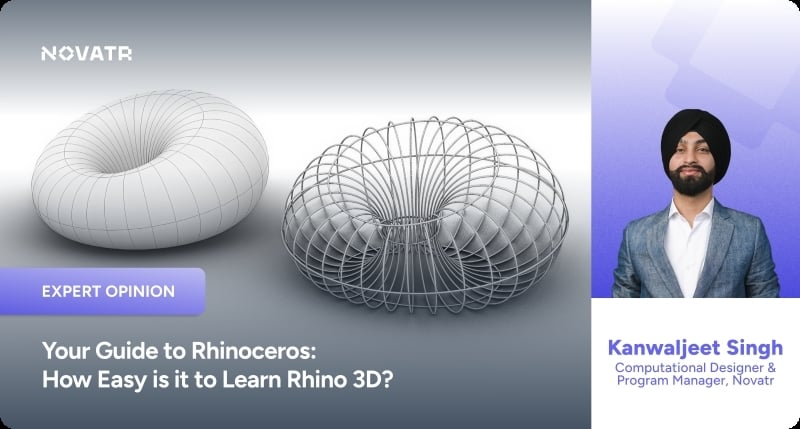

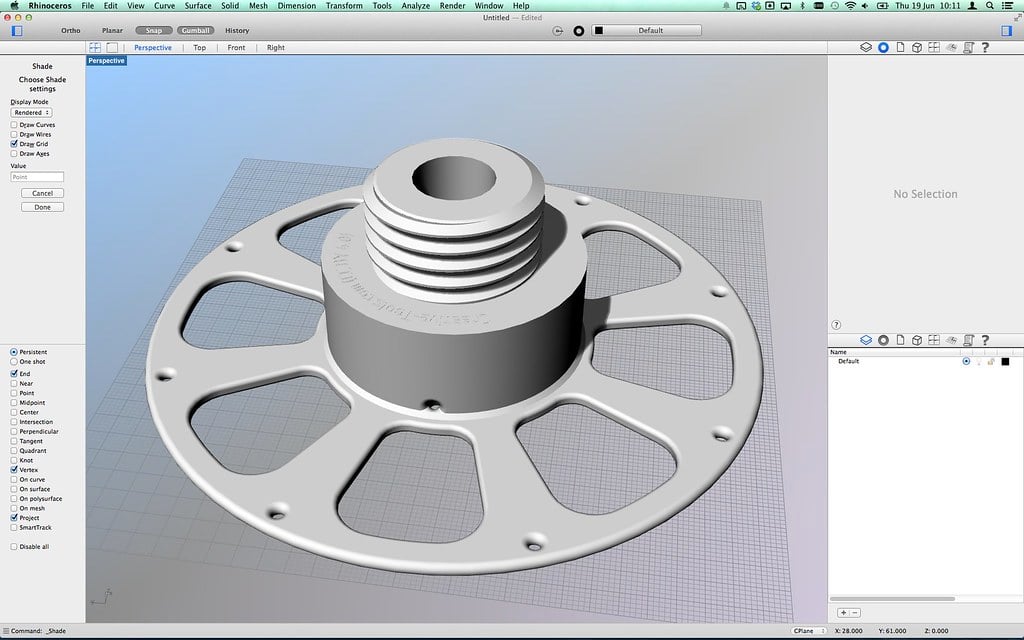
At first glance, Rhino can feel intimidating. Open the interface, and you are greeted with multiple viewports, dense toolbars, and a command line waiting for input. Compared to the visual simplicity of SketchUp, the structured environment of Revit, or the animation-friendly interfaces of Blender and Maya, Rhino appears more technical and almost reserved for advanced users.
That reaction is common among first-time users, especially those transitioning from simplified modelling tools. Yet the perception begins to shift once the intent behind the software becomes clear. Rhino looks complex because it is powerful, not because it is difficult to learn.
This distinction matters in a design industry where digital modelling continues to expand. In the UK construction sector, 47% of firms have adopted advanced digital technologies, showing steady but evolving digital transformation. This reflects a growing reliance on precision-driven tools such as Rhino.
In this article, **computational designer [Kanwaljeet Singh](https://www.linkedin.com/in/kj007/)** draws from his professional experience to unpack this perception. As he highlights through his work, once you understand what Rhino was built for and how it thinks, the intimidation begins to dissolve. Many designers eventually realise that Rhino is one of the most logically structured and learnable professional 3D tools available today.
Unlock High-Paying Careers With BIM
Master BIM workflows, software and skills on real projects.
Apply Now
\*Limited seats available
## **The Story Behind Rhino: Built for Precision, Not Flash**
Rhino was developed in the 1990s by Robert McNeel and Associates at a time when high-end surface modelling software was expensive and inaccessible. Industrial designers and engineers depended on costly CAD systems for precision work, limiting access to advanced tools.
Rhino entered as an affordable yet highly capable alternative. Its foundation is NURBS modelling, where curves and surfaces are defined using exact mathematical representations. Unlike polygon-based systems, NURBS surfaces maintain smooth curvature and measurable precision.
This origin defines its purpose. Rhino was not built for cinematic animation or visual effects like 3ds Max, Maya, or Blender. It was built for professionals who fabricate real objects. Architects use it for façade detailing, product designers for prototyping, and engineers for CNC-ready files.
Across fields such as marine engineering and jewellery design, Rhino became popular because it produces geometry that can be manufactured. This reliability stems from precision, which also contributes to its clarity and learnability.
## **Why Architects and Designers Prefer Rhino Over Other 3D Tools**
When Rhino is compared with AutoCAD, Revit, SketchUp, Blender, 3ds Max, or Maya, the difference is not about capability but about intent.
AutoCAD operates as a drafting-first tool. Revit is system-driven and structured around data and building information modelling. SketchUp simplifies surfaces for conceptual modelling. Blender, 3ds Max, and Maya are mesh-heavy environments designed for animation and visual effects.
Rhino operates as a geometry-first system.
This distinction becomes important in professional workflows where approximation is not sufficient. Mesh-based tools approximate curves using polygons, which works well for rendering but introduces limitations when precision is required. In architectural fabrication, a curved façade panel needs exact radii, not an approximation. In product design, components must meet strict tolerances. In manufacturing, drawings must align perfectly with machining dimensions.
Rhino’s NURBS modelling allows designers to work with mathematically precise curves and surfaces. These geometries translate directly into fabrication-ready drawings, CNC cutting files, 3D printing outputs, and technical documentation without requiring additional conversion steps.
This ability to bridge conceptual design and real-world production reduces friction in the workflow. Designers do not need to switch between multiple platforms to maintain accuracy.
Precision in Rhino does not introduce unnecessary complexity. Instead, it introduces clarity. When geometry behaves predictably, decision-making becomes more direct, and the learning process becomes more structured.
## **Why Rhino Looks Intimidating at First**
The sense of difficulty often comes from the visual density of the interface. Rhino does not conceal its tools behind simplified modes or progressive interfaces. Instead, it exposes a wide range of commands and options from the beginning.
Multiple toolbars, layered menus, and the presence of a command line create the impression of technical depth. For someone transitioning from simplified software, this can feel overwhelming.
However, this perception does not reflect the actual workflow.
Unlike Revit, Rhino does not enforce predefined categories, families, or templates before modelling begins. Unlike BIM systems, it does not require project structuring before geometry creation. A user can start drawing immediately without navigating setup constraints.
The command line, often perceived as technical, functions as an efficiency tool rather than a barrier. Instead of navigating through multiple menus, users can type commands directly, execute them quickly, and maintain modelling flow. Over time, this reduces dependency on toolbars and increases speed.
The intimidation is visual rather than functional. Once users begin interacting with the software, the logic becomes clearer and more approachable.
## **Rhino’s Core Is Surprisingly Simple**
The most important realisation when learning Rhino is that its workflow aligns closely with how designers already think.
The process begins with sketching in three dimensions, followed by refinement, adjustment, and transformation. These steps mirror traditional design thinking, translated into a digital environment.
Most modelling tasks in Rhino revolve around a few core actions. Designers draw curves, generate surfaces from those curves, and then modify them using transformations such as move, rotate, scale, and boolean operations.
Once the initial interface barrier is removed, this sequence feels natural. There are no hidden parametric constraints altering geometry in the background. What is visible on the screen represents the actual geometry.
Rhino rewards logical reasoning rather than memorisation. Users do not need to navigate complex hierarchies or system dependencies, as required in BIM tools. They also do not need to manage polygon topology in the way mesh-based software demands.
Instead, the focus shifts to understanding geometry. Curves define structure, surfaces build form, and transformations refine outcomes. This direct relationship between action and result simplifies the learning experience.
Designers who already understand spatial relationships, proportion, and basic geometry often adapt quickly. Rhino aligns with these existing cognitive patterns, making the transition more intuitive than expected.
## **How Easy Is it to Actually Learn Rhino?**
**[](https://www.novatr.com/courses/computational-design/l?utm_source=blog&utm_medium=website_card_after_intro&utm_campaign=mcd_course_leads)**
Rhino is accessible at the beginning, moderate as complexity increases, and expansive as skills develop.
Within a few weeks, most learners can navigate viewports, create curves, generate surfaces, and manipulate geometry. They also become comfortable with object snaps, layers, and output preparation.
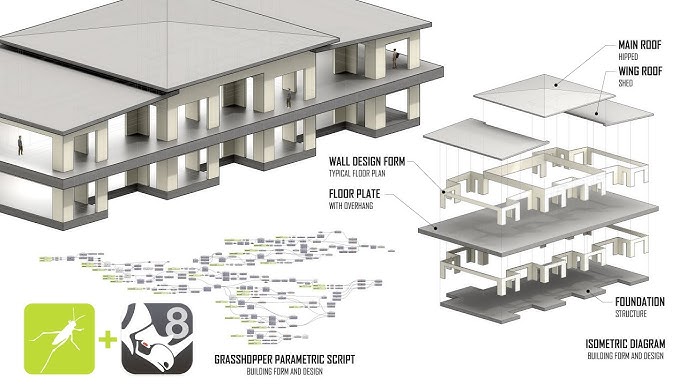
At this stage, users can produce meaningful work without advanced surfacing knowledge. Depth, such as complex curvature control or computational workflows like Grasshopper, comes later and remains optional initially.
Compared to Revit’s structured systems or BIM workflows, Rhino offers a more direct learning path. When compared to Blender or Maya, its geometry behaves more predictably.
Predictability reduces cognitive load. When users understand how geometry responds, they spend less time troubleshooting and more time designing.
Master BIM and Get Hired Faster
Join a community of 8500+ Architects and Engineers.
Explore Now
\*Limited seats available
## **So, Is Rhino Easy?**
Rhino is a precise geometric system that aligns with how designers approach form and iteration. Its interface may appear dense because it exposes capability, yet its underlying logic remains structured and consistent.
When approached as a geometry tool rather than an advanced system, Rhino becomes significantly more approachable. Its predictability and clarity support a learning process that feels intuitive over time.
For those looking to deepen their skills, structured learning can accelerate progress. The [Master Computational Design](https://www.novatr.com/courses/computational-design) Course offered by [Novatr](https://www.novatr.com/) provides a pathway to explore advanced workflows, including parametric and algorithmic design. Visit our [resource page](https://www.novatr.com/learning-hub) to access learning materials that support long-term development in computational design.
Was this content helpful to you
Like Yes
Dislike No

TABLE OF CONTENTS
BIM Is The New Standard. Are You Certified?
Get Certified in BIM
SHARE ON YOUR SOCIALS
Link Copied Successfully
Related articles
[ MCD 8 Awesome Rhino 3D Plugins That Will Change Your Modelling Life 14 January 2025 5 min read](https://blog.novatr.com/blog/8-awesome-rhino-3d-plugins-that-will-change-your-modelling-life) [ What are the latest trends in Landscape Architecture Visualization? 26 March 2026 4 min read](https://blog.novatr.com/blog/latest-trends-in-landscape-architecture-visualization) [ Ultimate Guide to the Best 3D Construction Modeling Software in 2026 20 December 2023 26 min read](https://blog.novatr.com/blog/best-3d-construction-modelling-softwares) [.jpg) MEP Drafting: From 2D CAD to 3D BIM 13 June 2025 8 min read](https://blog.novatr.com/blog/mep-drafting-from-2d-cad-to-3d-bim)
Download Syllabus
## BIM Professional Program
Next Cohort
June 2026
Program Duration
7 Months
Premium Program benefits
8 Credentials from Autodesk, NSDC, Novatr
1 program. 10 career paths. Infinite Growth.
40+ ISO 19650 & RIBA real-world projects to practice
1-on-1 guidance. Access 400+ industry experts.
Access the biggest AEC-Tech community on the planet. 8500+ and counting
Curated for you by 100+ global BIM leaders.
Lifelong access to course content
Enter your details to download the program syllabus.
##### BIM Professional Program
June 2026, 7 Months
Your Name Invalid name.
Phone Number Enter a valid phone number
Email Please enter a valid email address.
Select years of experience\* Currently studying 0-1 years 1-2 years 2-4 years 4-8 years 8-10 years 10-12 years 12+ years Invalid selection.
Specialisation Select your background\* Architecture Civil Engineering Mechanical Engineering Electrical Engineering Invalid selection.
Are you professionally trained in interior design?
Yes
No
I agree to the [Terms of Use](https://www.novatr.com/terms-and-conditions) and [Privacy Policy](https://www.novatr.com/privacy-policy), and consent to be contacted by Email, Call, WhatsApp, or SMS.
Submit
Ready to skyrocket your career?
Begin your next chapter in AEC
with Novatr!
We are here to help you take the industry by storm with advanced, tech-first skills.
[Explore Courses](https://www.novatr.com/#courses)
Join our newsletter
Submit
Thank you for signing up.
We’ll send you a nice letter once per week. No spam.

Dare to Disrupt.
Join thousands of people who organise
work and life with Novatr.
Company
- [About Us](https://www.novatr.com/about)
- [BIM Professional Program v.2026](https://www.novatr.com/courses/bim-professional-program)
- [Masters Computational Design](https://www.novatr.com/courses/computational-design)
- [Become a Mentor](https://www.novatr.com/apply-as-mentor)
- [Hiring from Us](https://www.novatr.com/hire-from-us)
- [Careers at Novatr](https://www.novatr.com/career)
Resources
- [Blog](https://www.novatr.com/learning-hub)
- [Media Room](https://www.novatr.com/media-room-home-page)
- [Career Builder](https://www.novatr.com/career-navigator)
- [Events & Webinars](https://www.novatr.com/webinars)
- [FAQs & Support Center](https://www.novatr.com/contact-us)
- [Contact Us](https://www.novatr.com/contact-us)
- [Privacy Policy](https://www.novatr.com/privacy-policy)
- [Terms of Use](https://www.novatr.com/terms-and-conditions)
©2023 Oneistox Network Pvt. Ltd.
All Rights Reserved
```json
{
"@context" : "https://schema.org",
"@type" : "BlogPosting",
"author" : {
"@type" : "Person",
"name" : "Kanwaljeet Singh",
"url" : "https://blog.novatr.com/blog/author/kanwaljeet-singh"
},
"dateModified" : "2026-03-30T09:30:32.486Z",
"datePublished" : "2026-03-30T09:02:11.000Z",
"headline" : "How to Learn Rhino 3D - Expert Take!",
"image" : [ "https://blog.novatr.com/hubfs/Your%20Guide%20to%20Rhinoceros_%20How%20Easy%20is%20it%20to%20Learn%20Rhino%203D_.jpg" ],
"mainEntityOfPage" : {
"@id" : "https://blog.novatr.com/blog/how-to-learn-rhino-3d-expert-take",
"@type" : "WebPage"
},
"publisher" : {
"@type" : "Organization",
"logo" : {
"@type" : "ImageObject",
"url" : "https://blog.novatr.com/hubfs/Novatr%20Prev%20OX-2.svg"
}
}
}
```