
What Is pyRevit?
.png?width=2000&height=1086&name=image2%20(2).png)
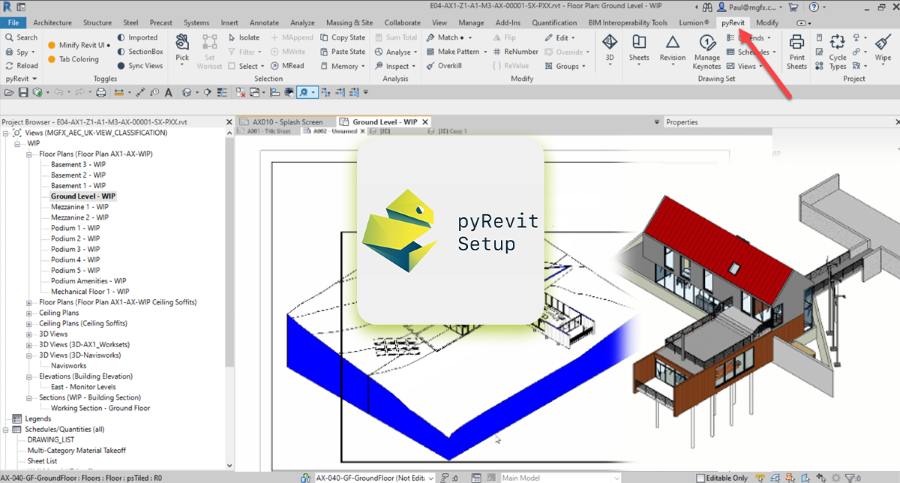
To understand what is pyRevit, it is helpful to look at its role within the Revit ecosystem. pyRevit is an open-source extension that allows users to customize and automate tasks inside Autodesk Revit using Python scripting.
The pyRevit plugin for Revit acts as a development environment that enables BIM professionals to create scripts, add custom tools, and automate workflows directly within the Revit interface. Instead of manually repeating modeling or documentation steps, users can create scripts that perform tasks automatically.
This capability improves productivity for professionals working on large BIM projects. The platform supports Python-based automation, allowing engineers to build custom tools that interact with Revit models.
Another important aspect of pyRevit is its flexibility. Because it is open-source, BIM specialists can extend its capabilities by creating their own pyRevit extension packages. These extensions may include scripts for model auditing, sheet generation, project data management, and documentation automation.
For BIM teams managing complex infrastructure or building projects, automation helps reduce repetitive tasks. This is where pyRevit automation becomes valuable. Instead of performing manual actions repeatedly in Revit, professionals can create scripts that execute multiple steps within seconds.
Because of these capabilities, pyRevit is widely used by BIM engineers and digital construction specialists who want to improve productivity while working with complex Revit models.
What Are the Key Features of pyRevit?
pyRevit provides several features that help BIM professionals customize workflows and automate repetitive tasks. The platform offers multiple capabilities designed to simplify modeling and documentation processes.
Before reviewing the features in detail, it is important to note that many pyRevit tools are built specifically to improve everyday BIM workflows.
1. Custom Script Development
One of the most powerful capabilities of pyRevit is the ability to create custom scripts using Python. These scripts can automate tasks such as renaming views, organizing sheets, or checking project parameters.
Instead of repeating these tasks manually, scripts allow teams to complete them automatically.
2. Workflow Automation
Another major benefit of pyRevit is automation. Through pyRevit automation, professionals can automate repetitive processes such as parameter updates, sheet generation, and project data extraction.
This allows BIM teams to focus more on design coordination rather than manual documentation tasks.
3. Custom Toolbars Inside Revit
The pyRevit plugin for Revit enables users to create custom toolbars directly within the Revit interface. These toolbars can include shortcuts to scripts, model checking tools, and workflow utilities.
This feature helps teams organize frequently used tools within one workspace.
4. Model Quality Control
Many BIM teams use pyRevit to perform automated model audits. Scripts can check models for errors, missing parameters, or incorrect naming conventions.
These checks help maintain consistent modeling standards across large project teams.
5. Extension Management
Another useful capability is the ability to manage custom extensions. A pyRevit extension may include multiple scripts designed for specific workflows such as documentation automation or data management.
Teams can share extensions across projects to maintain consistent BIM practices.
Why pyRevit Is Popular Among BIM Professionals?
Several factors explain why pyRevit has become widely used across BIM teams. These advantages illustrate the growing uses of PyRevit in digital construction environments.
Before reviewing the benefits, it is helpful to recognize that pyRevit for BIM engineers supports both automation and workflow customization.
The reasons for its popularity include:
- Automation of repetitive modeling and documentation tasks
- Ability to create project-specific scripts and workflows
- Open-source flexibility that allows teams to modify tools
- Improved model quality control through automated checks
- Increased productivity when working with complex BIM models
- Support for developing custom pyRevit tools for team workflows
These advantages help BIM professionals reduce repetitive work and maintain higher consistency across project models.
Who Uses pyRevit?
pyRevit is used by several professionals working within BIM environments. Because it supports customization and automation, it is particularly useful for specialists responsible for managing digital project workflows.
The following professionals frequently use pyRevit in their daily work.
1. BIM Engineers
BIM engineers use pyRevit for BIM engineers workflows to automate model checking, parameter management, and project documentation.
2. BIM Managers
BIM managers develop scripts that help enforce modeling standards across project teams. These tools support consistent naming conventions and parameter management.
3. Computational Designers
Design professionals with programming skills often create custom scripts that integrate design automation with BIM modeling workflows.
4. Revit Specialists
Revit specialists frequently build scripts to improve productivity when working with large project models.
5. Digital Construction Professionals
Professionals working in digital construction environments use pyRevit to automate tasks related to project data extraction, scheduling, and documentation.
These professionals rely on automation tools to manage complex BIM models more efficiently.
Learn PyRevit With 10+ Software Tools
Professionals interested in mastering automation tools such as pyRevit often pursue specialized training programs that focus on BIM workflows and digital construction technologies.
One option is the BIM Professional Course for Civil Engineers by Novatr, a project-based program designed to prepare professionals for modern construction workflows using 12+ industry software and BIM plugins.
The course introduces learners to tools, including Autodesk Revit, Navisworks, Construction Cloud, and automation plugins such as DiRoots.One, pyRevit, EF-Tools, ProSheets, Issue, and Model Checker for Revit.
Participants gain:
- End-to-end understanding of BIM workflows, including modeling, estimation, coordination, sequencing, and documentation
- Hands-on training aligned with ISO 19650 standards and real residential and commercial projects
- Globally recognized certifications, including Novatr Course Certificate, Autodesk User Certification, and NSDC Skill Certificate
Learners can also pursue advanced specializations such as:
- Visual Programming with Dynamo for automation workflows
- 4D, 5D, and 6D BIM for schedule and cost integration
- Tekla for RCC modeling
- Civil 3D for infrastructure projects
- BIM project strategy using Plannerly
These skills help professionals build practical automation and digital construction expertise.