
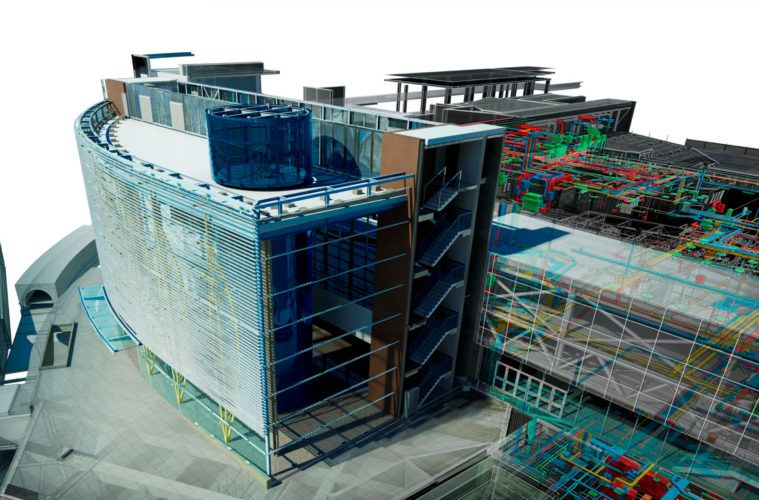

What is Autodesk Navisworks?
Formerly known as “Jetstream” this software by Autodesk can review, annotate, animate, and even render a model to improve the quality of the delivered projects. This software has become a predilect tool for BIM enthusiasts in the industry.
The Main Challenge of the Industry
As we know, one of the biggest issues that affect construction projects is the time spent doing reworks. In fact, according to a study done in 2015, “more than 30% of construction works are related to rework” (Miri & Khaksefidi, 2015).
And of course, we know time equals money, 5% of the total cost to be exact (Hwang, Haas, & Caldas, 2009). The main reason why reworks happen is that there aren’t any measures taken by the companies to avoid them, to begin with.

How can Navisworks help you?
When correct coordination is lacking, things tend to get mixed up. Collaborators not knowing about specific changes, clients and stakeholders not being aware of the project status, MEP engineers not knowing if there are any changes to the original model, etc. - things that can be easily solved by improving communication between parties. Given this, it is crucial that we implement strategies that take on these issues before they happen.
Some of them could be:
● Improving communication with stakeholders and clients.
● Having review sessions with discipline managers to check for any discrepancies between models and versions.
● Democratizing access to the information of the project.
And guess what? Navisworks does exactly all of that. This tool allows teams to improve coordination, revision and simulation within the same interface as it allows cross-platform collaboration, improving the times needed to check any project with a laser-cut precision. Let's go over some of the features that this software includes.
Features of Navisworks

Currently there are 3 different versions different set of features; from its most basic version (Navisworks Freedom) to the complete version (Navisworks Manage).
Here is a comprehensive list of things that you can do with this tool:
● Navigate within the model in first-person view.
● Publish a file with all the disciplines integrated.
● Render views with native and online engines.
● Take off quantities of materials, building areas, and components of different categories.
● Integrate the 4th and 5th dimensions, by including time frames and costs of the different tasks to later sync this data into other software like Alto Qi, or Microsoft Project to create a Gantt diagram.
● Animate and preview how the construction will evolve.
● Detect clashes between elements and disciplines.
● Measure, filter and annotate, so that anyone can check for any discrepancies and notify others to correct them.
● Personalize the software with its API, in case you need to execute a specific task that is not native.
● Collaborate with people in real-time, open multiple file formats, append local models, and give access to the team.
The main difference with other 3D tools like Revit is that there are no commands that can modify or create new elements because this software is focused on what happens after modelling. You can load and coordinate models from different disciplines and corroborate if what’s being modelled by the different teams coincide or if there are modifications to be made, which makes it perfect for construction companies to incorporate into their BIM workflow.
How much does Navisworks Software Cost?
Disclaimer: The above pricing is in US Dollars.
Career Opportunities with Navisworks
Navisworks grants you complete control over the project independently of the different disciplines involved. And this is excellent for the professional of the present who wants to advance their career in the AEC industry, especially when BIM is projected to grow exponentially globally.
Are you ready to take on the challenge of becoming a BIM expert? If so we got you covered! We have the most in-depth course to jump-start your career - Novatr’s BIM Professional Course.
Wish to know more about other in-demand software, career insights and industry trends? Head straight to our Resources!

.png)