---
title: "The BIM Revolution: Building India's Iconic Statue of Unity"
description: Understand the application of BIM in the project of Statue of Unity, from design to execution, and how large infrastructure projects are affected by BIM.
image: https://blog.novatr.com/hubfs/BIM%20workflow%20with%203D%20infrastructure%20model%20and%20engineers%20analyzing%20design%20data..jpg
---
[Blogs](https://www.novatr.com/learning-hub)
- [Architecture & Construction](https://www.novatr.com/learning-hub?category=Architecture+%26+Construction)
- [BIM](https://www.novatr.com/learning-hub?category=BIM)
- [Computational Design](https://www.novatr.com/learning-hub?category=Computational+Design)
- [Company News](https://www.novatr.com/learning-hub?category=Company+News)
- [Expert Talks](https://www.novatr.com/learning-hub?category=Expert+Talks)
Explore Courses
[Just Launched  BIM Professional Program v.2026 Take your career to the next level by mastering the real-world application of BIM. Know More](https://www.novatr.com/courses/bim-professional-program)
[ Master Computational Design Course Break into an advanced career by learning to apply the power of computation to the art of design. Know More](https://www.novatr.com/courses/computational-design)
[Blogs](https://www.novatr.com/learning-hub)
Explore Blogs
- [Architecture & Construction](https://www.novatr.com/learning-hub?category=Architecture+%26+Construction)
- [BIM](https://www.novatr.com/learning-hub?category=BIM)
- [Computational Design](https://www.novatr.com/learning-hub?category=Computational+Design)
- [Company News](https://www.novatr.com/learning-hub?category=Company+News)
- [Expert Talks](https://www.novatr.com/learning-hub?category=Expert+Talks)
Courses
- [BIM Professional Program v.2026](https://www.novatr.com/courses/bim-professional-program)
- [Master Computational Design](https://www.novatr.com/courses/computational-design)
- [CIVIL/](https://www.novatr.com/learning-hub?category=BIM)
Featured Article
# The BIM Revolution: Building India's Iconic Statue of Unity

Deependra Dobriyal
June 9, 2026
6 min read
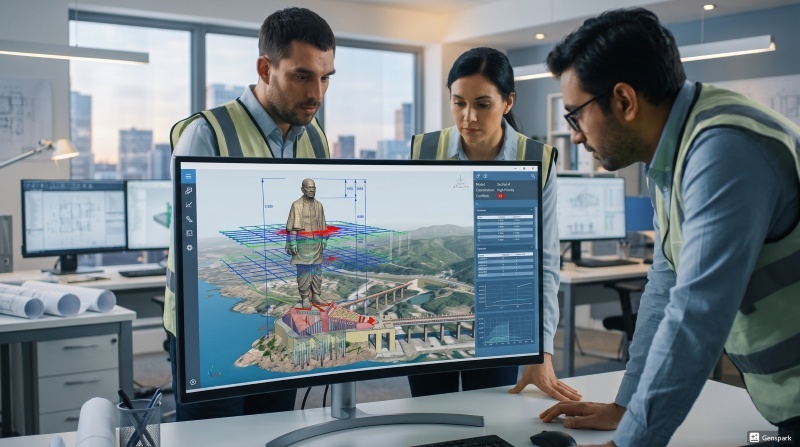

For large infrastructure projects that need to coordinate with multiple projects and need to reduce errors and manage complex operations, the Digital tools are essential. The McKinsey & Company report 2024 article reports that digital construction methods, which include BIM, demonstrate an efficiency increase of [14% - 15%](https://www.mckinsey.com/capabilities/operations/our-insights/decoding-digital-transformation-in-construction) for construction projects. This is especially important in projects that involve multiple teams that are under a tight time constraint.
An example of that is the Statue of Unity, where the teams were able to contain the design, planning and execution process in a more structured manner using the **use of BIM in statue of Unity**. The scale and engineering challenges of the project allowed BIM to be a critical factor in coordinating and ensuring the correct implementation.
Unlock High-Paying Careers With BIM
Master BIM workflows, software and skills on real projects.
Apply Now
\*Limited seats available
## **Overview of the Statue of Unity Project**
The Statue of Unity is one of the largest statues in the world, and it is dedicated to Sardar Vallabhbhai Patel. It is 182 meters tall and is a landmark project in global infrastructure.
The **statue of unity is located at** Kevadia, near the Narmada River. The project was a massive engineering undertaking, requiring coordination and collaboration amongst various disciplines, structural design, and foundation work.
The **statue of unity design** had to be carefully planned as it was to be very high, wind-resistant, and structurally stable. Statue of Unity was conceived by Ram V. Sutar, the architect who designed statue of Unity, and later detailed out using advanced tools by the designing team.
## **What is BIM in Construction?**
***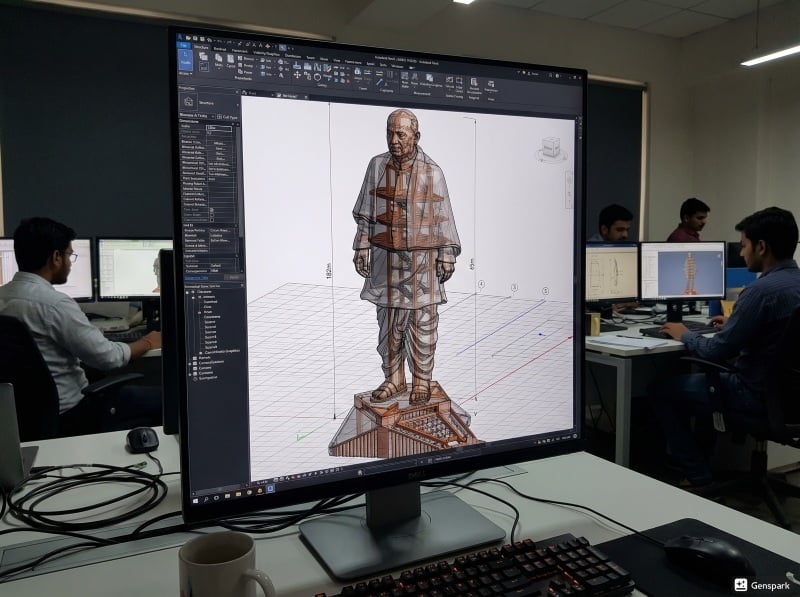***
[Building Information Modeling (BIM)](https://www.novatr.com/blog/detailed-bim-guide) is a digital process that can be employed in construction to create and manage information of a construction project in a 3D model. It's not only visualisation, but it's also about combining information from other teams in one system.
BIM can assist in a nutshell:
- Bring architectural, structural, and MEP designs into a single model
- Look for conflicts prior to construction
- Enhance interactions between colleagues and teams. Facilitate team dynamics
- Handle project data on the go
**BIM in construction** and **BIM in infrastructure** projects have risen in use due to the fact that they help in the reduction of manual errors and also enhance the overall performance. It also enables improved planning and quick decision-making.
## **How BIM Was Used in Statue of Unity's Design and Planning?**
The design and planning phase of the Statue of Unity was done with accuracy. The shape was complicated, and even slight inaccuracies might cause instability.
BIM helped in this process by:
- **Accurate 3D Modelling:** All of the building components were designed as a [3D model](https://www.novatr.com/blog/everything-about-3d-modelling-in-construction), thereby giving a better impression of proportions and measurements. This added to the design process of the BIM.
- **Parametric Design Adjustments:** The engineers were able to quickly make design changes and see the impact of the change on the design.
- **Wind and Structural Analysis Integration:** The integration of the models and analysis tools with BIM ensured the sustainability of the statue in the environmental conditions.
- Clarify and eliminate confusion among the teams, including architects, engineers, and contractors, with data integration.
When using **use of BIM in statue of unity** during the planning process, this ensured that the design would be not only accurate, but structurally sound as well.
## **Role of BIM in Execution and Coordination**
******
Most construction problems are encountered during execution. There was a significant need for coordination between teams for such an endeavor.
The BIM was used to support the following:
- Issues between structural and [MEP systems](https://www.novatr.com/blog/mep-engineer-guide) were identified early through the use of Clash Detection Before Construction
- Better Team Coordination – various teams operating with the same new model, thus with decreased delays
- Use of BIM information for better Scheduling and Planning
- With Real-Time Updates, changes were reflected throughout the model, maintaining everyone's alignment
- Material and Quantity Tracking: Material and quantity tracking gave accurate data to help manage materials and reduce waste
In construction, the **BIM in construction** made it easier to run and reduced errors in the construction site, which is essential in large-scale construction projects such as this one.
## **Benefits of Using BIM in Statue of Unity**
The [application of BIM](https://www.novatr.com/blog/scope-of-bim-in-civil-engineering) in the Statue of Unity helped the project to be put on track because it has several benefits.
Key benefits include:
- **Less Uncertainty:** All stages were planned before execution, which resulted in less uncertainty
- **Better accuracy:** Digital models reduced the design errors
- **Time Efficiency:** Quick decisions were made, which enhanced timelines
- **Budget control:** Lowered rework, hence reduced the budgets
- **Enhanced Coordination:** Teams remained coordinated with a common model
- **Risk Reduction:** Early detection of problems enhances safety
The advantages explain why the **BIM in infrastructure** projects is increasing, particularly in large and complex projects.
## **How to Build BIM Skills for Mega Projects**
[](https://www.novatr.com/courses/bim-for-civil-engineers/l?utm_source=blog&utm_medium=website_card_after_intro&utm_campaign=bim_civil_course_leads)
Building up BIM skills for mega projects demands knowledge of a wide range of tools, processes, and coordination. It is important for professionals to be able to use the industry software and standards correctly in actual project scenarios.
Take your civil engineering career to the next level with Novatr’s BIM Professional Course for Civil Engineers, a project-based program that prepares you to plan, design, and manage construction projects using 12+ industry software and essential BIM plugins.
Learn how to work with Autodesk Revit, Navisworks, Construction Cloud, and key plugins like DiRoots.One, pyRevit, EF-Tools, ProSheets, Issue and Model Checker for Revit to improve automation, accuracy, and project efficiency.
**Here’s what you’ll gain:**
- End-to-end understanding of BIM workflows — modeling, estimation, coordination, sequencing, and documentation.
- Hands-on training aligned with ISO 19650 standards and real residential + commercial projects.
- **Globally recognized certifications**:
After completing the core modules, learners can also choose 2 additional specializations, including:
- **Visual Programming with Dynamo** – for automation and parametric workflows
- **4D, 5D & 6D with BIM** – for time, cost, and facility integration
- **Tekla for RCC Modeling** – for detailed steel and concrete modeling
- **Civil 3D for Infrastructure** – for roadways, railways, and utilities
- **Project Strategy & Optimization with Plannerly -** Plan, structure, and audit BIM execution plans.
The checklist provides a structured way to develop effective BIM skills and to use BIM in practical projects.
Master BIM and Get Hired Faster
Join a community of 8500+ Architects and Engineers.
Explore Now
\*Limited seats available
## Conclusion
The Statue of Unity is a testament to the use of digital tools in today's construction landscape. The **use of BIM in statue of Unity** provided the advantage of managing the design complexity, enhanced coordination, and minimized errors during various stages. BIM contributed to the organization and efficiency of the project, from planning to execution.
Those wanting to work on similar projects should consider learning BIM. The[BIM Professional Course for Civil Engineers](https://www.novatr.com/courses/bim-for-civil-engineers?course=bim-for-civil-engineers) by [Novatr](https://www.novatr.com/)teaches students through actual work experience of real industry processes.
Our [resource page](https://www.novatr.com/learning-hub) provides extra information about BIM and current construction industry developments.
Was this content helpful to you
Like Yes
Dislike No

TABLE OF CONTENTS
BIM Is The New Standard. Are You Certified?
Get Certified in BIM
SHARE ON YOUR SOCIALS
Link Copied Successfully
Related articles
[ BIM Civil Metro vs Airport Projects: How BIM Workflows Differ? 5 June 2026 9 min read](https://blog.novatr.com/blog/metro-vs-airport-projects-how-bim-workflows-differ) [ BIM Civil How Real BIM Projects Work: From Design to Construction? 5 May 2026 5 min read](https://blog.novatr.com/blog/the-practicality-of-bim-projects-from-design-to-construction) [ BIM Civil Want to Work on Mеtro Projеcts? Lеarn Thеsе BIM Skills 28 May 2026 7 min read](https://blog.novatr.com/blog/bim-skills-for-metro-projects-and-infrastructure-careers) [ BIM Civil How Delhi-Mumbai Industrial Corridor Are Built using BIM? 5 June 2026 7 min read](https://blog.novatr.com/blog/how-delhi-mumbai-industrial-corridor-are-built-using-bim)
Download Syllabus
## BIM Professional Program
Next Cohort
June 2026
Program Duration
7 Months
Premium Program benefits
8 Credentials from Autodesk, NSDC, Novatr
1 program. 10 career paths. Infinite Growth.
40+ ISO 19650 & RIBA real-world projects to practice
1-on-1 guidance. Access 400+ industry experts.
Access the biggest AEC-Tech community on the planet. 8500+ and counting
Curated for you by 100+ global BIM leaders.
Lifelong access to course content
Enter your details to download the program syllabus.
##### BIM Professional Program
June 2026, 7 Months
Your Name Invalid name.
Phone Number Enter a valid phone number
Email Please enter a valid email address.
Select years of experience\* Currently studying 0-1 years 1-2 years 2-4 years 4-8 years 8-10 years 10-12 years 12+ years Invalid selection.
Specialisation Select your background\* Architecture Civil Engineering Mechanical Engineering Electrical Engineering Invalid selection.
Are you professionally trained in interior design?
Yes
No
I agree to the [Terms of Use](https://www.novatr.com/terms-and-conditions) and [Privacy Policy](https://www.novatr.com/privacy-policy), and consent to be contacted by Email, Call, WhatsApp, or SMS.
Submit
Ready to skyrocket your career?
Begin your next chapter in AEC
with Novatr!
We are here to help you take the industry by storm with advanced, tech-first skills.
[Explore Courses](https://www.novatr.com/#courses)
Join our newsletter
Submit
Thank you for signing up.
We’ll send you a nice letter once per week. No spam.

Dare to Disrupt.
Join thousands of people who organise
work and life with Novatr.
Company
- [About Us](https://www.novatr.com/about)
- [BIM Professional Program v.2026](https://www.novatr.com/courses/bim-professional-program)
- [Masters Computational Design](https://www.novatr.com/courses/computational-design)
- [Become a Mentor](https://www.novatr.com/apply-as-mentor)
- [Hiring from Us](https://www.novatr.com/hire-from-us)
- [Careers at Novatr](https://www.novatr.com/career)
Resources
- [Blog](https://www.novatr.com/learning-hub)
- [Media Room](https://www.novatr.com/media-room-home-page)
- [Career Builder](https://www.novatr.com/career-navigator)
- [Events & Webinars](https://www.novatr.com/webinars)
- [FAQs & Support Center](https://www.novatr.com/contact-us)
- [Contact Us](https://www.novatr.com/contact-us)
- [Privacy Policy](https://www.novatr.com/privacy-policy)
- [Terms of Use](https://www.novatr.com/terms-and-conditions)
©2023 Oneistox Network Pvt. Ltd.
All Rights Reserved
```json
{
"@context" : "https://schema.org",
"@type" : "BlogPosting",
"author" : {
"@type" : "Person",
"name" : "Deependra Dobriyal",
"url" : "https://blog.novatr.com/blog/author/deependra-dobriyal"
},
"dateModified" : "2026-06-11T05:05:37.761Z",
"datePublished" : "2026-06-09T10:34:35.000Z",
"headline" : "The BIM Revolution: Building India's Iconic Statue of Unity",
"image" : [ "https://blog.novatr.com/hubfs/BIM%20workflow%20with%203D%20infrastructure%20model%20and%20engineers%20analyzing%20design%20data..jpg" ],
"mainEntityOfPage" : {
"@id" : "https://blog.novatr.com/blog/the-bim-revolution-building-indias-iconic-statue-of-unity",
"@type" : "WebPage"
},
"publisher" : {
"@type" : "Organization",
"logo" : {
"@type" : "ImageObject",
"url" : "https://blog.novatr.com/hubfs/Novatr%20Prev%20OX-2.svg"
}
}
}
```