---
title: "Navisworks vs Revit: What Should You Learn First in 2026?"
description: Compare Navisworks vs Revit, key differences, use cases, and which tool civil engineers should learn first for a strong BIM career.
image: https://blog.novatr.com/hubfs/Navisworks%20and%20Revit%20BIM%20software%20comparison%20interface..jpg
---
[Blogs](https://www.novatr.com/learning-hub)
- [Architecture & Construction](https://www.novatr.com/learning-hub?category=Architecture+%26+Construction)
- [BIM](https://www.novatr.com/learning-hub?category=BIM)
- [Computational Design](https://www.novatr.com/learning-hub?category=Computational+Design)
- [Company News](https://www.novatr.com/learning-hub?category=Company+News)
- [Expert Talks](https://www.novatr.com/learning-hub?category=Expert+Talks)
Explore Courses
[Just Launched  BIM Professional Program v.2026 Take your career to the next level by mastering the real-world application of BIM. Know More](https://www.novatr.com/courses/bim-professional-program)
[ Master Computational Design Course Break into an advanced career by learning to apply the power of computation to the art of design. Know More](https://www.novatr.com/courses/computational-design)
[Blogs](https://www.novatr.com/learning-hub)
Explore Blogs
- [Architecture & Construction](https://www.novatr.com/learning-hub?category=Architecture+%26+Construction)
- [BIM](https://www.novatr.com/learning-hub?category=BIM)
- [Computational Design](https://www.novatr.com/learning-hub?category=Computational+Design)
- [Company News](https://www.novatr.com/learning-hub?category=Company+News)
- [Expert Talks](https://www.novatr.com/learning-hub?category=Expert+Talks)
Courses
- [BIM Professional Program v.2026](https://www.novatr.com/courses/bim-professional-program)
- [Master Computational Design](https://www.novatr.com/courses/computational-design)
- [CIVIL/](https://www.novatr.com/learning-hub?category=BIM)
Featured Article
# Navisworks vs Revit: What Should You Learn First in 2026?

Deependra Dobriyal
April 27, 2026
6 min read
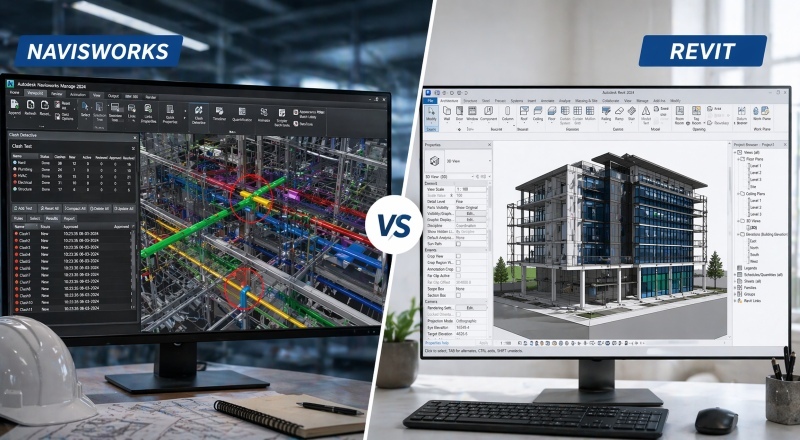

**Navisworks Vs Revit** is a common comparison for civil engineers starting with BIM workflows. The functional answer is to begin with Revit for modeling and then learn Navisworks for coordination and review. According to the UK Government, BIM adoption in public projects has enabled [15–20%](https://assets.publishing.service.gov.uk/media/5a79b2eae5274a18ba50e280/12-1327-building-information-modelling.pdf) cost savings through improved coordination and reduced errors.
This shows why both tools are used together rather than separately. While Revit focuses on creating models, Navisworks ensures those models are coordinated and ready for construction. Understanding how Revit and Navisworks work together is essential for anyone planning a Career in BIM.
Unlock High-Paying Careers With BIM
Master BIM workflows, software and skills on real projects.
Apply Now
\*Limited seats available
## **What is Autodesk Revit?**
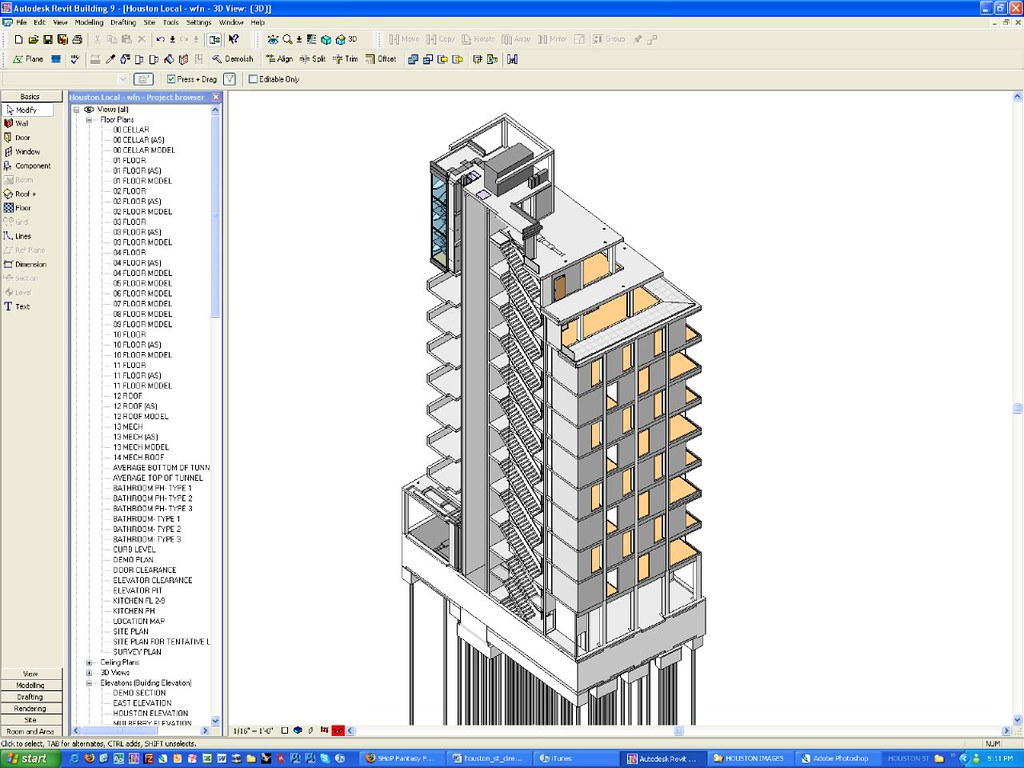
[Autodesk Revit](https://www.novatr.com/blog/detailed-revit-guide) is a BIM software used to create intelligent 3D models for buildings and infrastructure. It connects geometry with data, allowing engineers to design, document, and manage project information in one place.
Key capabilities include:
- **Parametric modeling**This allows any change made in the model to automatically reflect across drawings and schedules, maintaining consistency.
- **Integrated documentation**Instead of creating drawings separately, Revit generates them directly from the model, reducing duplication of effort.
- **Collaboration across teams**Multiple disciplines can work on the same model, improving coordination and minimizing conflicts.
- **Support for automation workflows**Revit integrates with plugins and scripts, making it suitable for advanced BIM processes.
Revit plays an important role in the **revit vs navisworks** comparison because it is where all project data and geometry originate.
## **What is Navisworks?**
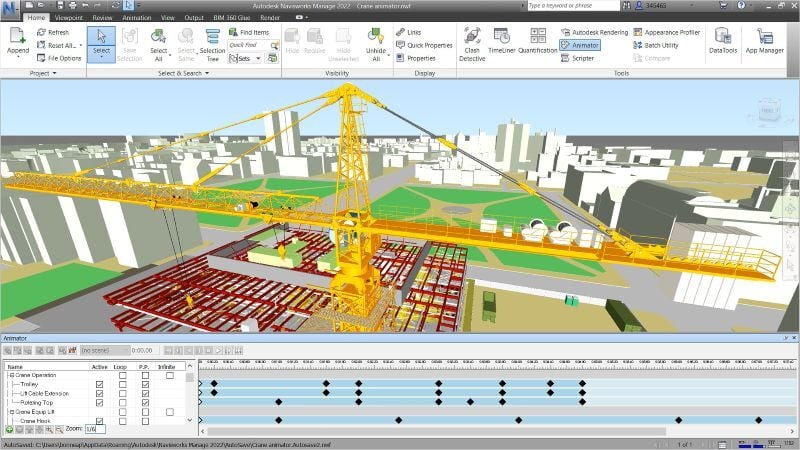
[Navisworks](https://www.novatr.com/blog/navisworks-type) is a coordination and review tool used after models are created. It helps teams combine models from different disciplines and evaluate them before construction begins.
Its main capabilities include:
- **Model aggregation**It brings together models from different software into a single environment for coordination.
- **Clash detection**It identifies conflicts between systems, helping teams resolve issues early in the project lifecycle.
- **4D simulation**It connects models with project timelines, allowing teams to visualize construction sequences.
- **Project review and visualization**It enables detailed model reviews, improving decision-making and coordination.
Navisworks complements Revit, which is why understanding **Revit and Navisworks** together is important for effective BIM workflows.
## **Key Differences Between Navisworks and Revit**
Revit and Navisworks serve different purposes within the same workflow, which often leads to confusion when comparing Revit vs Navisworks.
Looking at how they function in practice helps clarify these differences:
- **Purpose and role in projects**Revit is used for creating and developing models, while Navisworks is used for reviewing and coordinating them.
- **Type of functionality provided**Revit focuses on design and documentation, whereas Navisworks focuses on analysis and validation.
- **Clash detection capabilities**In **clash detection Revit vs Navisworks**, Navisworks provides more advanced tools for identifying and managing conflicts across disciplines.
- **Position in the workflow**Revit is used during design stages, while Navisworks is used closer to construction for coordination.
- **Typical users**Designers and engineers primarily use Revit, while coordinators and project managers rely on Navisworks.
Understanding these differences makes it easier to see how both tools contribute to project efficiency without overlapping responsibilities.
## **Navisworks vs Revit: Use Cases in Real Projects**
In real-world projects, both tools are used at different stages but contribute to the same outcome.
Revit is used to create detailed building models, including structural elements, architectural layouts, and MEP systems. Engineers rely on it to develop designs and generate documentation.
Navisworks is used once these models are complete. It combines models from multiple disciplines and performs coordination checks. This is where **clash detection Revit vs Navisworks,** becomes relevant, as Navisworks handles large-scale coordination more effectively.
For example, in a commercial building project:
- Revit is used to design and model the building
- Navisworks is used to detect clashes between systems before construction
This shows how **Revit and Navisworks** complement each other rather than compete.
## **Which Tool Should Civil Engineers Learn First?**

Choosing between these tools depends on career goals, but there is a logical learning sequence.
Civil engineers should start with Revit because it forms the foundation of BIM workflows. It helps build important skills such as modeling, documentation, and data management.
Once these skills are developed, learning Navisworks becomes easier because it builds on existing models and focuses on coordination.
To simplify this decision:
- Start with Revit to understand modeling and BIM fundamentals
- Learn Navisworks to handle coordination and validation
- Combine both tools to build a strong [Career in BIM](https://www.novatr.com/blog/software-and-industry-requirements-for-bim-jobs)
This sequence ensures a structured learning approach and prepares engineers for real-world project workflows.
## **How Navisworks and Revit Fit Into the BIM Workflow?**
[BIM](https://www.novatr.com/blog/what-is-building-information-modeling-bim) workflows involve multiple stages, and each tool fits into a specific part of the process.
Revit is used in the early stages for model creation and design development. Engineers create data-rich models that include all project information. These models are then exported to Navisworks.
Navisworks is used in later stages to review models, detect clashes, and simulate construction sequences. This helps resolve issues before construction begins.
A typical workflow includes:
- Model creation in Revit
- Model export and integration
- Coordination and clash detection in Navisworks
- Final validation before construction
Understanding this sequence helps professionals [learn BIM](https://www.novatr.com/blog/how-to-learn-bim) effectively and apply it in real projects.
## **Where to Learn BIM the Right Way?**
**[](https://www.novatr.com/courses/bim-for-civil-engineers/l?utm_source=blog&utm_medium=website_card_after_intro&utm_campaign=bim_civil_course_leads)**
Take your civil engineering career to the next level with Novatr’s [BIM Professional Course for Civil Engineers](https://www.novatr.com/us/courses/bim-for-civil-engineers), a project-based program that prepares you to plan, design, and manage construction projects using 12+ industry software and essential BIM plugins.
Learn how to work with Autodesk Revit, Navisworks, construction cloud and key plugins like DiRoots.One, pyRevit, EF-Tools, ProSheets, Issue and Model Checker for Revit to improve automation, accuracy, and project efficiency.
Here’s what you’ll gain:
- End-to-end understanding of BIM workflows, modeling, estimation, coordination, sequencing, and documentation.
- Hands-on training aligned with ISO 19650 standards and real residential + commercial projects.
- Globally recognized certifications:
o Novatr Course Certificate
o Autodesk User Certification
o NSDC Skill Certificate
o Novatr Specialization Certificate, if opted
After completing the core modules, learners can also choose 2 additional specializations, including:
- Visual Programming with Dynamo – for automation and parametric workflows
- 4D, 5D & 6D with BIM – for time, cost, and facility integration
- Tekla for RCC Modeling – for detailed steel and concrete modeling
- Civil 3D for Infrastructure – for roadways, railways, and utilities
- Project Strategy & Optimization with Plannerly - Plan, structure, and audit BIM execution plans.
Structured learning helps connect modeling, coordination, and automation, making it easier to build hands-on skills and grow in a Career in BIM.
Master BIM and Get Hired Faster
Join a community of 8500+ Architects and Engineers.
Explore Now
\*Limited seats available
## Conclusion
Understanding **Navisworks Vs Revit** helps clarify how BIM workflows operate in real projects. Revit focuses on creating models, while Navisworks ensures those models are coordinated and validated before construction. Both tools serve different purposes but work together throughout the project lifecycle.
Starting with Revit and then learning Navisworks provides a clear path for civil engineers. For those looking to build hands-on BIM skills, structured learning can provide clarity and direction. The [BIM Professional course for Civil Engineers](https://www.novatr.com/courses/bim-for-civil-engineers) by [Novatr](https://www.novatr.com/) offers a way to explore these tools in real project contexts. Visit our [resource page](https://www.novatr.com/learning-hub) for more insights and continue building industry-ready skills.
## **FAQs**
### **1. Can you open Revit files in Navisworks?**
Yes, Revit files can be opened in Navisworks by exporting them as NWC files and appending them for coordination.
### **2. How to add Navisworks in Revit?**
Navisworks is not directly added to Revit, but models can be exported using the Navisworks exporter plugin.
### **3. How to create a Navisworks file from Revit?**
You can export a Revit model as an NWC file and open it in Navisworks for coordination.
### **4. How to export Revit model to Navisworks?**
Use the “Export to Navisworks” option in Revit to create an NWC file for use in Navisworks.
### **5. When to use Navisworks vs Revit model for interference detection?**
In clash detection Revit vs Navisworks, Navisworks is preferred for large projects due to its advanced clash detection, while Revit handles basic checks during modeling.
Was this content helpful to you
Like Yes
Dislike No

TABLE OF CONTENTS
BIM Is The New Standard. Are You Certified?
Get Certified in BIM
SHARE ON YOUR SOCIALS
Link Copied Successfully
Related articles
[ CIVIL What is BIM in Construction Management? Benefits & Applications Explained 30 September 2023 10 min read](https://blog.novatr.com/blog/benefits-of-bim-in-construction-management) [ CIVIL 10 Essential Software For Highway Engineer in 2026 5 August 2025 5 min read](https://blog.novatr.com/blog/10-essential-software-for-highway-engineer) [.jpg) CIVIL How to become a BIM VDC Coordinator in USA? Career Path, Skills & Certifications 5 August 2025 5 min read](https://blog.novatr.com/blog/how-to-become-a-bim-vdc-coordinator-in-usa-career-path-skills-certifications) [ CIVIL Civil Vs BIM Engineers - A Comparative Guide On Career, Salary & Job Roles 22 August 2023 18 min read](https://blog.novatr.com/blog/civil-engineer-and-bim-engineer-salary)
Download Syllabus
## BIM Professional Program
Next Cohort
June 2026
Program Duration
7 Months
Premium Program benefits
8 Credentials from Autodesk, NSDC, Novatr
1 program. 10 career paths. Infinite Growth.
40+ ISO 19650 & RIBA real-world projects to practice
1-on-1 guidance. Access 400+ industry experts.
Access the biggest AEC-Tech community on the planet. 8500+ and counting
Curated for you by 100+ global BIM leaders.
Lifelong access to course content
Enter your details to download the program syllabus.
##### BIM Professional Program
June 2026, 7 Months
Your Name Invalid name.
Phone Number Enter a valid phone number
Email Please enter a valid email address.
Select years of experience\* Currently studying 0-1 years 1-2 years 2-4 years 4-8 years 8-10 years 10-12 years 12+ years Invalid selection.
Specialisation Select your background\* Architecture Civil Engineering Mechanical Engineering Electrical Engineering Invalid selection.
Are you professionally trained in interior design?
Yes
No
I agree to the [Terms of Use](https://www.novatr.com/terms-and-conditions) and [Privacy Policy](https://www.novatr.com/privacy-policy), and consent to be contacted by Email, Call, WhatsApp, or SMS.
Submit
Ready to skyrocket your career?
Begin your next chapter in AEC
with Novatr!
We are here to help you take the industry by storm with advanced, tech-first skills.
[Explore Courses](https://www.novatr.com/#courses)
Join our newsletter
Submit
Thank you for signing up.
We’ll send you a nice letter once per week. No spam.

Dare to Disrupt.
Join thousands of people who organise
work and life with Novatr.
Company
- [About Us](https://www.novatr.com/about)
- [BIM Professional Program v.2026](https://www.novatr.com/courses/bim-professional-program)
- [Masters Computational Design](https://www.novatr.com/courses/computational-design)
- [Become a Mentor](https://www.novatr.com/apply-as-mentor)
- [Hiring from Us](https://www.novatr.com/hire-from-us)
- [Careers at Novatr](https://www.novatr.com/career)
Resources
- [Blog](https://www.novatr.com/learning-hub)
- [Media Room](https://www.novatr.com/media-room-home-page)
- [Career Builder](https://www.novatr.com/career-navigator)
- [Events & Webinars](https://www.novatr.com/webinars)
- [FAQs & Support Center](https://www.novatr.com/contact-us)
- [Contact Us](https://www.novatr.com/contact-us)
- [Privacy Policy](https://www.novatr.com/privacy-policy)
- [Terms of Use](https://www.novatr.com/terms-and-conditions)
©2023 Oneistox Network Pvt. Ltd.
All Rights Reserved
```json
{
"@context" : "https://schema.org",
"@type" : "BlogPosting",
"author" : {
"@type" : "Person",
"name" : "Deependra Dobriyal",
"url" : "https://blog.novatr.com/blog/author/deependra-dobriyal"
},
"dateModified" : "2026-04-27T08:24:04.210Z",
"datePublished" : "2026-04-27T08:22:42.000Z",
"headline" : "Navisworks vs Revit: What Should You Learn First in {{year}}?",
"image" : [ "https://blog.novatr.com/hubfs/Navisworks%20and%20Revit%20BIM%20software%20comparison%20interface..jpg" ],
"mainEntityOfPage" : {
"@id" : "https://blog.novatr.com/blog/navisworks-vs-revit-what-should-you-learn-first",
"@type" : "WebPage"
},
"publisher" : {
"@type" : "Organization",
"logo" : {
"@type" : "ImageObject",
"url" : "https://blog.novatr.com/hubfs/Novatr%20Prev%20OX-2.svg"
}
}
}
```