---
title: "Navisworks Jobs: Career Paths After Mastering Navisworks 2026"
description: Explore Navisworks jobs, roles, and skills needed to build a BIM career in construction, engineering, and design.
image: https://blog.novatr.com/hubfs/What%20Jobs%20Can%20You%20Get%20After%20Mastering%20Navisworks%20Software.png
---
[Blogs](https://www.novatr.com/learning-hub)
- [Architecture & Construction](https://www.novatr.com/learning-hub?category=Architecture+%26+Construction)
- [BIM](https://www.novatr.com/learning-hub?category=BIM)
- [Computational Design](https://www.novatr.com/learning-hub?category=Computational+Design)
- [Company News](https://www.novatr.com/learning-hub?category=Company+News)
- [Expert Talks](https://www.novatr.com/learning-hub?category=Expert+Talks)
Explore Courses
[Just Launched  BIM Professional Program v.2026 Take your career to the next level by mastering the real-world application of BIM. Know More](https://www.novatr.com/courses/bim-professional-program)
[ Master Computational Design Course Break into an advanced career by learning to apply the power of computation to the art of design. Know More](https://www.novatr.com/courses/computational-design)
[Blogs](https://www.novatr.com/learning-hub)
Explore Blogs
- [Architecture & Construction](https://www.novatr.com/learning-hub?category=Architecture+%26+Construction)
- [BIM](https://www.novatr.com/learning-hub?category=BIM)
- [Computational Design](https://www.novatr.com/learning-hub?category=Computational+Design)
- [Company News](https://www.novatr.com/learning-hub?category=Company+News)
- [Expert Talks](https://www.novatr.com/learning-hub?category=Expert+Talks)
Courses
- [BIM Professional Program v.2026](https://www.novatr.com/courses/bim-professional-program)
- [Master Computational Design](https://www.novatr.com/courses/computational-design)
- [Archi/](https://www.novatr.com/learning-hub?category=BIM)
Featured Article
# What Jobs Can You Get After Mastering Navisworks Software?

Neha Singh
March 30, 2026
5 min read

Mastering Navisworks jobs pathways opens opportunities across construction, design, and coordination roles. As BIM adoption grows, professionals with strong model review and simulation skills are in demand across global AEC projects.
The demand for BIM-driven construction is increasing rapidly. The shift toward digital construction is measurable. The UK Government Construction Strategy delivered [£1.7 billion](https://www.gov.uk/government/publications/transforming-infrastructure-performance-roadmap-to-2030/transforming-infrastructure-performance-roadmap-to-2030) in efficiency savings through improved processes and digital adoption, highlighting the growing importance of BIM-driven tools. This shows why Navisworks software is becoming an important requirement in modern projects.
Professionals who understand Navisworks basics can work confidently with integrated models, especially when handling a 3d model Navisworks environment. These skills support coordination, improve decision-making, and open doors to multiple career paths.
Unlock High-Paying Careers With BIM
Master BIM workflows, software and skills on real projects.
Apply Now
\*Limited seats available
## **Why Is Navisworks a Valuable Skill in the AEC Industry?**
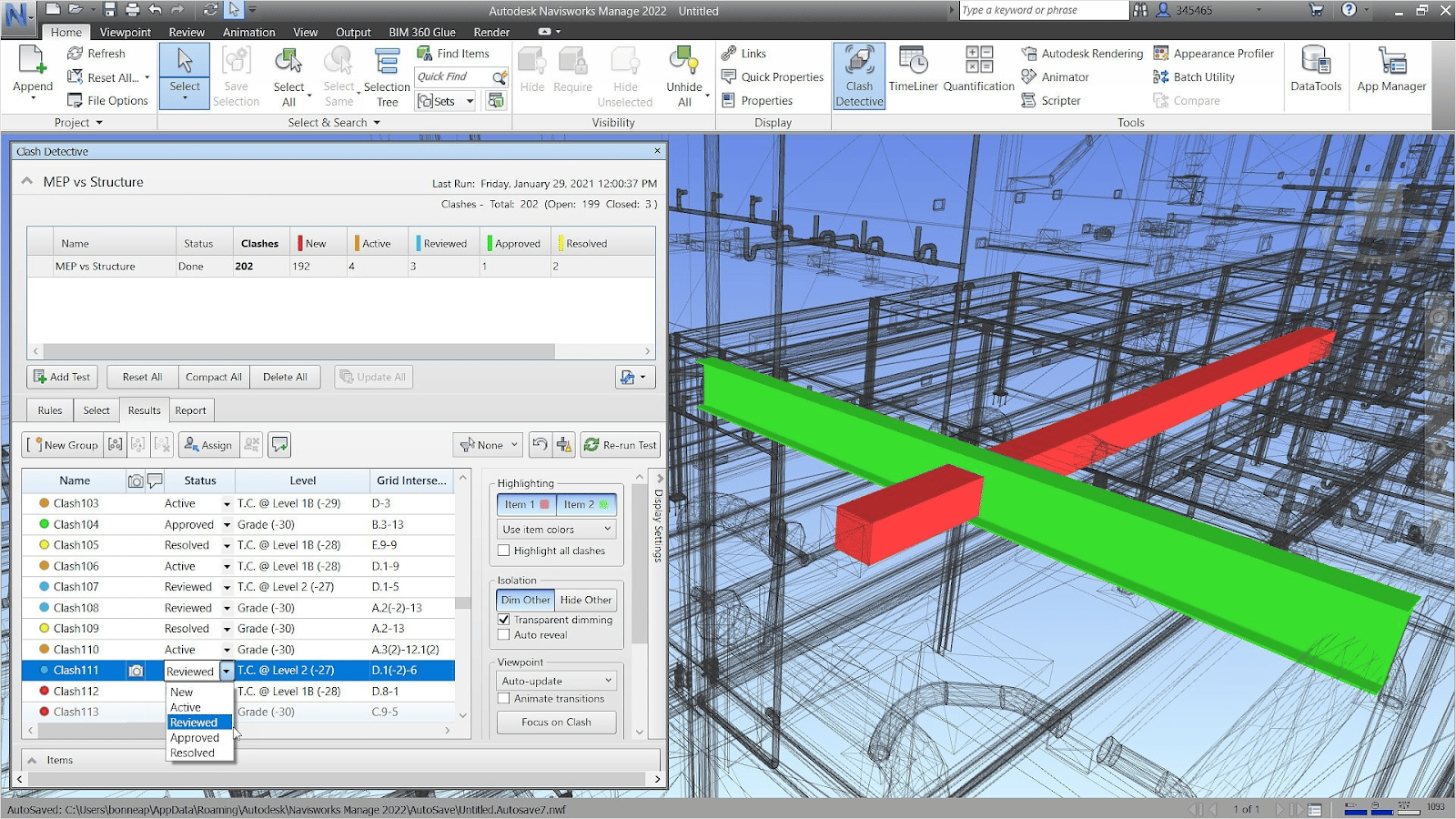
Navisworks is valuable because it connects design, coordination, and construction workflows in one platform. It helps teams detect issues early, improve collaboration, and manage project timelines with precision.
Its value becomes clearer when looking at how it supports different stages of a project:
- **Centralized Model Coordination**Teams can combine multiple disciplines into a single navisworks 3d model, improving communication and reducing data silos across design and construction teams.
- **Efficient Clash Detection**Using Navisworks clash detection, professionals can identify conflicts before construction begins. A detailed Navisworks clash detection report supports faster resolution and fewer on-site errors.
- **Flexible Software Options**Different versions serve specific needs. Navisworks Freedom allows easy model viewing, Navisworks Simulate supports analysis, and Navisworks Manage enables full coordination and clash detection.
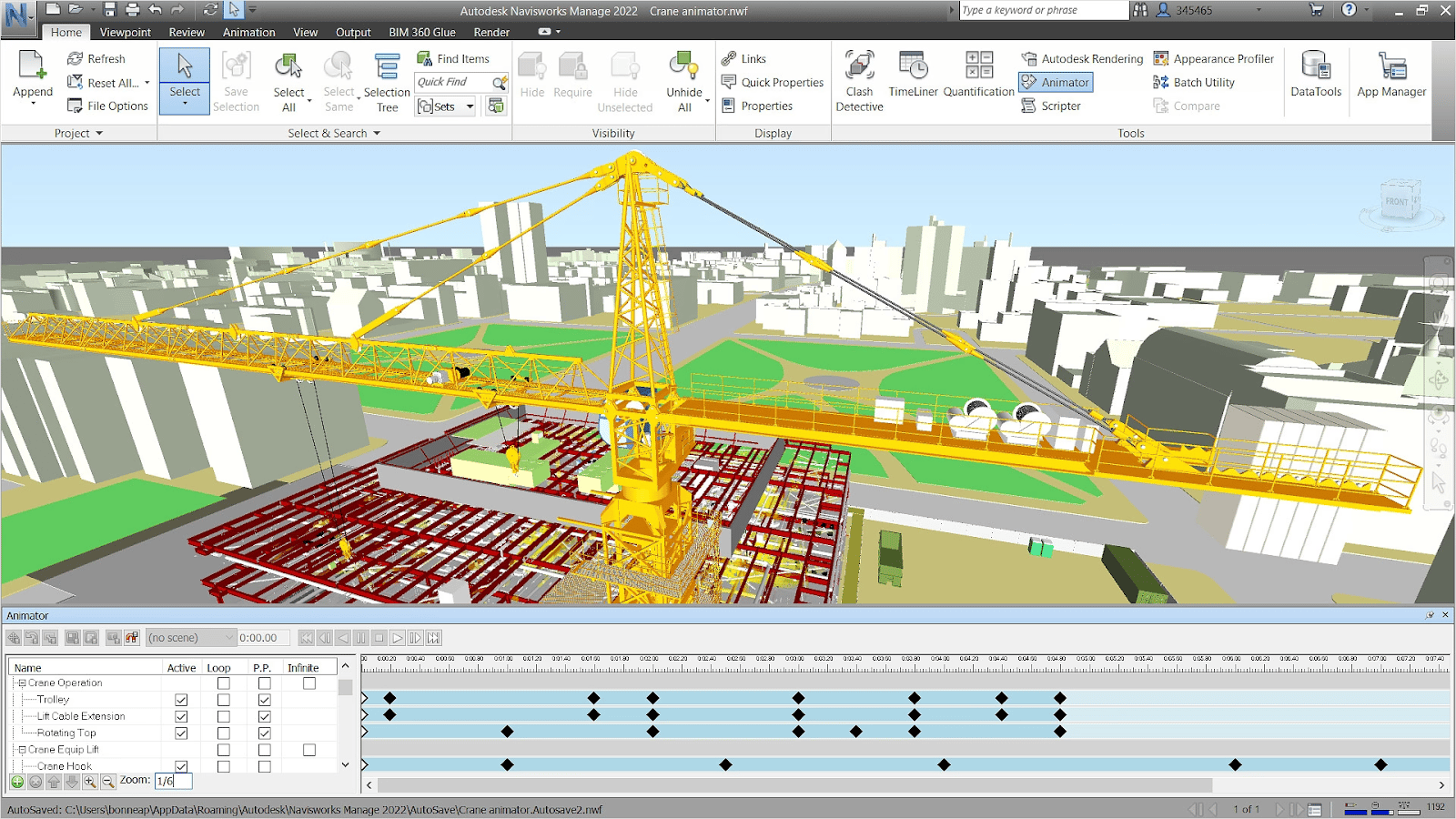
- **Advanced Project Simulation**With 4D simulation in Navisworks, teams can link schedules to models, visualize construction sequences, and improve planning accuracy across phases.
- **Seamless Collaboration**Through Navisworks BIM 360 integration, teams can collaborate in real time. This improves communication across remote and distributed teams.
- **Strong Integration Capabilities**Navisworks integration allows models from different software to work together, ensuring smooth workflows across disciplines and reducing compatibility issues.
- **Enhanced Visualization**Built-in Navisworks rendering features help present realistic project visuals, making it easier to communicate designs and construction intent to stakeholders.
These capabilities highlight the functional Navisworks benefits across design, coordination, and construction. The platform supports better decision-making and reduces project risks at every stage.
## **What Jobs Can You Get After Mastering Navisworks Software?**
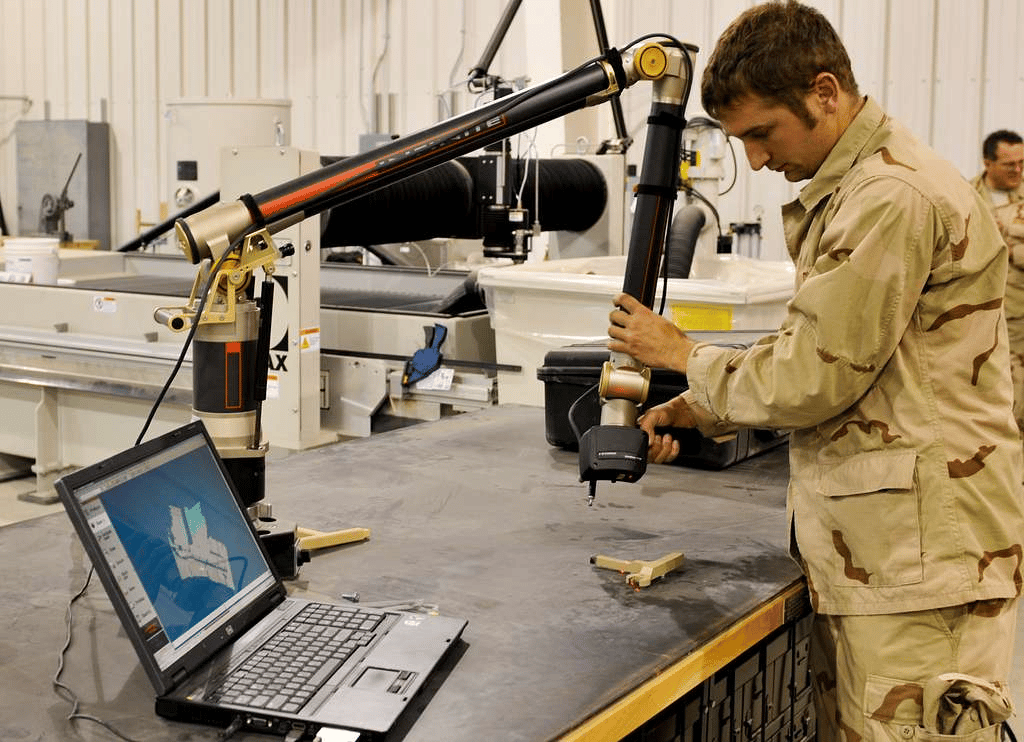
Navisworks expertise leads to diverse roles across BIM, construction, and facility management. These roles rely on coordination, simulation, and data-driven workflows.
As projects become more complex, professionals skilled in Navisworks workflows are increasingly valuable. The following roles highlight how these skills are applied:
### **1. BIM Coordinator/Manager**
Manages model coordination across disciplines. Uses tools such as the Navisworks coordination plugin to streamline communication and resolve clashes efficiently. This role involves reviewing models regularly, conducting coordination meetings, and ensuring that all project stakeholders are aligned with the latest updates.
### **2. Construction Project Manager**
Uses Navisworks for construction to monitor timelines, track progress, and ensure project delivery aligns with planned schedules. By leveraging simulation, project managers can anticipate delays, optimize resource allocation, and improve decision-making throughout the project lifecycle.
### **3. MEP Engineer**
Focuses on system coordination across mechanical, electrical, and plumbing networks. Navisworks helps identify clashes early, ensuring smoother installation processes and reducing rework during construction phases.
### **4. Quantity Surveyor**
Extract quantities from a navisworks 3d model to improve cost estimation and budgeting accuracy. This role benefits from precise model data, enabling better financial planning and reducing cost overruns.
### **5. Facility Manager**
Uses Navisworks models to manage operations, maintenance, and long-term asset performance. Access to accurate model data supports efficient maintenance planning and improves building performance over time.
### **6. VDC Engineer**
Specializes in virtual design and construction. Uses simulation tools and 4D simulation in Navisworks to optimize project workflows. This role focuses on improving construction efficiency through detailed planning and visualization.
### **7. Project Coordinator**
Supports communication between teams. Uses Navisworks for model reviews and reporting, ensuring that project information is shared accurately and consistently among stakeholders.
### **8. Facility Lifecycle Analyst**
Analyzes building performance over time using model-based data to improve lifecycle efficiency. This role focuses on long-term asset optimization and operational cost reduction.
Beyond these, Navisworks skills also support related career paths:
- Architectural Designer using Navisworks for architects for model review and validation
- Structural Engineer applying Navisworks for engineers for coordination and analysis
- Urban Planner integrating BIM insights into planning and infrastructure development
- Interior Designer visualizing layouts and improving spatial coordination
- CAD Drafter/Technician supporting model creation and documentation
These roles demonstrate how Navisworks supports both technical execution and strategic decision-making across the AEC industry.
## **What Additional Skills Boost Your Career Alongside Navisworks?**
Navisworks expertise becomes more valuable when combined with complementary skills. Expanding your capabilities helps you move into advanced roles and improves long-term career growth.
To strengthen your Navisworks career, focus on the following areas:
- **BIM Software Knowledge**Learning tools such as Revit and AutoCAD improves your understanding of Navisworks workflows and cross-platform coordination. This ensures smoother data exchange between design and coordination stages.
- **Clash Detection Expertise**Advanced knowledge of Navisworks clash detection improves your ability to identify and resolve conflicts efficiently. This is essential for maintaining project accuracy.
- **Project Management Skills**Understanding scheduling, cost control, and risk management supports career growth into leadership roles and improves project delivery outcomes.
- **Data Analysis and Reporting**The ability to interpret models and generate insights, such as a Navisworks clash detection report, enhances decision-making and supports better communication with stakeholders.
- **Simulation and Visualization**Skills in 4D simulation in Navisworks and visualization improve how projects are planned and communicated, especially during pre-construction phases.
- **Collaboration Platforms**Experience with Navisworks BIM 360 integration supports real-time coordination and improves teamwork across geographically distributed teams.
- **Professional Certification**Earning a Navisworks certification validates your skills and improves employability in competitive markets, especially for specialized BIM roles.
These skills help professionals move beyond technical roles and contribute strategically to project success while adapting to evolving industry demands.
Master BIM and Get Hired Faster
Join a community of 8500+ Architects and Engineers.
Explore Now
\*Limited seats available
## Conclusion
Navisworks expertise creates opportunities across BIM, construction, and facility management roles. It supports coordination, reduces risks, and improves project efficiency, making it a valuable skill in modern AEC workflows.
Professionals who combine Navisworks knowledge with skills in simulation, coordination, and project management are better positioned for long-term growth. As digital construction evolves, Navisworks continues to play a key role in project delivery.
For architects and design professionals aiming to strengthen their BIM capabilities, structured learning can accelerate progress. Explore the [BIM Course for Architects](https://www.novatr.com/us/courses/building-information-modelling) by [Novatr](https://www.novatr.com/us) to build hands-on skills and advance your career. Visit our [resource page](https://www.novatr.com/learning-hub) to access more learning materials and industry insights.
## **FAQs**
### **1. What career roles require Navisworks skills in the AEC industry?**
Navisworks skills are required in roles such as BIM Coordinator, VDC Engineer, Construction Project Manager, and MEP Engineer. These professionals rely on model coordination, clash detection, and simulation to improve project efficiency and reduce errors across complex construction projects.
### **2. Can mastering Navisworks help you get a job in BIM coordination?**
Mastering Navisworks supports entry into BIM coordination roles by enabling professionals to manage integrated models, perform clash detection, and generate coordination reports. Employers value candidates who can streamline workflows and improve collaboration across multidisciplinary teams.
### **3. Which industries hire professionals with strong Navisworks experience?**
Industries such as construction, architecture, engineering, infrastructure development, and real estate hire professionals with Navisworks expertise. It is also widely used in facility management and urban planning, where BIM-based coordination and lifecycle analysis are essential for project success.
Was this content helpful to you
Like Yes
Dislike No

TABLE OF CONTENTS
BIM Is The New Standard. Are You Certified?
Get Certified in BIM
SHARE ON YOUR SOCIALS
Link Copied Successfully
Related articles
[ Keyboard Shortcuts and Productivity Hacks in Navisworks 30 March 2026 6 min read](https://blog.novatr.com/blog/navisworks-shortcuts-to-improve-productivity) [ Best YouTube Channels, Courses & Communities to Learn Navisworks 25 February 2026 5 min read](https://blog.novatr.com/blog/resources-to-learn-navisworks-effectively) [ Revit vs. Navisworks for Coordination in MEP: Which Tool Is Better? 23 June 2025 6 min read](https://blog.novatr.com/blog/revit-and-navisworks-for-effective-mep-coordination) [ Revit vs Navisworks: Which Tool Does What in BIM MEP Workflows? 18 June 2025 12 min read](https://blog.novatr.com/blog/revit-vs-navisworks-in-bim-mep-workflows)
Download Syllabus
## BIM Professional Program
Next Cohort
June 2026
Program Duration
7 Months
Premium Program benefits
8 Credentials from Autodesk, NSDC, Novatr
1 program. 10 career paths. Infinite Growth.
40+ ISO 19650 & RIBA real-world projects to practice
1-on-1 guidance. Access 400+ industry experts.
Access the biggest AEC-Tech community on the planet. 8500+ and counting
Curated for you by 100+ global BIM leaders.
Lifelong access to course content
Enter your details to download the program syllabus.
##### BIM Professional Program
June 2026, 7 Months
Your Name Invalid name.
Phone Number Enter a valid phone number
Email Please enter a valid email address.
Select years of experience\* Currently studying 0-1 years 1-2 years 2-4 years 4-8 years 8-10 years 10-12 years 12+ years Invalid selection.
Specialisation Select your background\* Architecture Civil Engineering Mechanical Engineering Electrical Engineering Invalid selection.
Are you professionally trained in interior design?
Yes
No
I agree to the [Terms of Use](https://www.novatr.com/terms-and-conditions) and [Privacy Policy](https://www.novatr.com/privacy-policy), and consent to be contacted by Email, Call, WhatsApp, or SMS.
Submit
Ready to skyrocket your career?
Begin your next chapter in AEC
with Novatr!
We are here to help you take the industry by storm with advanced, tech-first skills.
[Explore Courses](https://www.novatr.com/#courses)
Join our newsletter
Submit
Thank you for signing up.
We’ll send you a nice letter once per week. No spam.

Dare to Disrupt.
Join thousands of people who organise
work and life with Novatr.
Company
- [About Us](https://www.novatr.com/about)
- [BIM Professional Program v.2026](https://www.novatr.com/courses/bim-professional-program)
- [Masters Computational Design](https://www.novatr.com/courses/computational-design)
- [Become a Mentor](https://www.novatr.com/apply-as-mentor)
- [Hiring from Us](https://www.novatr.com/hire-from-us)
- [Careers at Novatr](https://www.novatr.com/career)
Resources
- [Blog](https://www.novatr.com/learning-hub)
- [Media Room](https://www.novatr.com/media-room-home-page)
- [Career Builder](https://www.novatr.com/career-navigator)
- [Events & Webinars](https://www.novatr.com/webinars)
- [FAQs & Support Center](https://www.novatr.com/contact-us)
- [Contact Us](https://www.novatr.com/contact-us)
- [Privacy Policy](https://www.novatr.com/privacy-policy)
- [Terms of Use](https://www.novatr.com/terms-and-conditions)
©2023 Oneistox Network Pvt. Ltd.
All Rights Reserved
```json
{
"@context" : "https://schema.org",
"@type" : "BlogPosting",
"author" : {
"@type" : "Person",
"name" : "Neha Singh",
"url" : "https://blog.novatr.com/blog/author/neha-singh"
},
"dateModified" : "2026-03-30T06:19:21.019Z",
"datePublished" : "2026-03-30T06:13:03.000Z",
"headline" : "Navisworks Jobs: Career Paths After Mastering Navisworks {{year}}",
"image" : [ "https://blog.novatr.com/hubfs/What%20Jobs%20Can%20You%20Get%20After%20Mastering%20Navisworks%20Software.png" ],
"mainEntityOfPage" : {
"@id" : "https://blog.novatr.com/blog/jobs-after-mastering-navisworks",
"@type" : "WebPage"
},
"publisher" : {
"@type" : "Organization",
"logo" : {
"@type" : "ImageObject",
"url" : "https://blog.novatr.com/hubfs/Novatr%20Prev%20OX-2.svg"
}
}
}
```