---
title: "Bluebeam Revu Vs Autodesk Construction Cloud: What Construction Professionals Should Know?"
description: Compare Bluebeam Revu vs Autodesk Construction Cloud. Explore key differences, project uses, and digital construction workflows for engineers.
image: https://blog.novatr.com/hubfs/Bluebeam%20Vs%20Autodesk%20Construction%20Cloud.jpg
---
[Blogs](https://www.novatr.com/learning-hub)
- [Architecture & Construction](https://www.novatr.com/learning-hub?category=Architecture+%26+Construction)
- [BIM](https://www.novatr.com/learning-hub?category=BIM)
- [Computational Design](https://www.novatr.com/learning-hub?category=Computational+Design)
- [Company News](https://www.novatr.com/learning-hub?category=Company+News)
- [Expert Talks](https://www.novatr.com/learning-hub?category=Expert+Talks)
Explore Courses
[Just Launched  BIM Professional Program v.2026 Take your career to the next level by mastering the real-world application of BIM. Know More](https://www.novatr.com/courses/bim-professional-program)
[ Master Computational Design Course Break into an advanced career by learning to apply the power of computation to the art of design. Know More](https://www.novatr.com/courses/computational-design)
[Blogs](https://www.novatr.com/learning-hub)
Explore Blogs
- [Architecture & Construction](https://www.novatr.com/learning-hub?category=Architecture+%26+Construction)
- [BIM](https://www.novatr.com/learning-hub?category=BIM)
- [Computational Design](https://www.novatr.com/learning-hub?category=Computational+Design)
- [Company News](https://www.novatr.com/learning-hub?category=Company+News)
- [Expert Talks](https://www.novatr.com/learning-hub?category=Expert+Talks)
Courses
- [BIM Professional Program v.2026](https://www.novatr.com/courses/bim-professional-program)
- [Master Computational Design](https://www.novatr.com/courses/computational-design)
- [CIVIL/](https://www.novatr.com/learning-hub?category=BIM)
Featured Article
# Bluebeam Revu Vs Autodesk Construction Cloud: What Construction Professionals Should Know?

Deependra Dobriyal
February 20, 2026
7 min read

The comparison between **Bluebeam Revu vs Autodesk Construction Cloud** comes down to how construction teams manage documentation, coordination, and collaboration. Bluebeam Revu centers on drawing markup and PDF-based workflows, while Autodesk Construction Cloud connects design, coordination, and field management within a cloud platform.
The [National Institute of Building Sciences](https://nibs.org/our-work/resources/reports/bim-cad-design/) notes that structured BIM collaboration reduces errors and improves coordination across project teams. As projects involve more stakeholders and tighter schedules, platforms that support reliable communication and organized documentation are increasingly necessary.
Understanding **Bluebeam Revu vs Autodesk Construction Cloud** helps civil engineers, structural engineers, quantity surveyors, and construction managers determine which tool aligns with their responsibilities and the project phase.
Unlock High-Paying Careers With BIM
Master BIM workflows, software and skills on real projects.
Apply Now
\*Limited seats available
## **What Is Bluebeam Revu?**
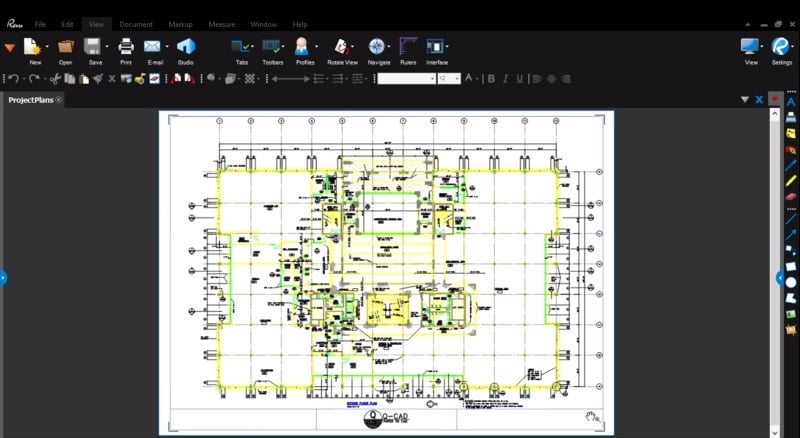
To clarify [**what is Bluebeam Revu**](https://www.novatr.com/blog/what-is-bluebeam-revu-a-guide-for-civil-engineers), it is a PDF-based collaboration tool designed for construction drawing review and documentation control. It enables teams to annotate plans, measure quantities, and manage revisions in a structured digital format.
Many professionals ask **what is bluebeam revu used for** on active projects. Its primary applications include:
- Drawing markup and annotation
- Submittal and RFI review
- Quantity takeoffs from PDF plans
- Revision tracking and document comparison
- Collaboration on design documentation
Bluebeam Revu is typically used during the preconstruction and documentation review stages. Civil engineers rely on it to comment on grading layouts and site plans. [Structural engineers](https://www.novatr.com/blog/bim-for-structural-engineers) use it to review reinforcement drawings and connection details before final approvals. Quantity surveyors depend on its measurement tools to extract material quantities directly from plan sets.
Because it is document-focused, Bluebeam supports organized review processes but does not function as full-scale [Construction project management software](https://www.novatr.com/blog/must-used-bim-softwares-by-construction-project-manager). It strengthens documentation accuracy within broader Digital construction workflows, especially in early design and bidding stages.
Understanding **What is Bluebeam Revu** explains its role as a specialized documentation tool rather than a centralized BIM coordination platform.
## **What Is Autodesk Construction Cloud?**
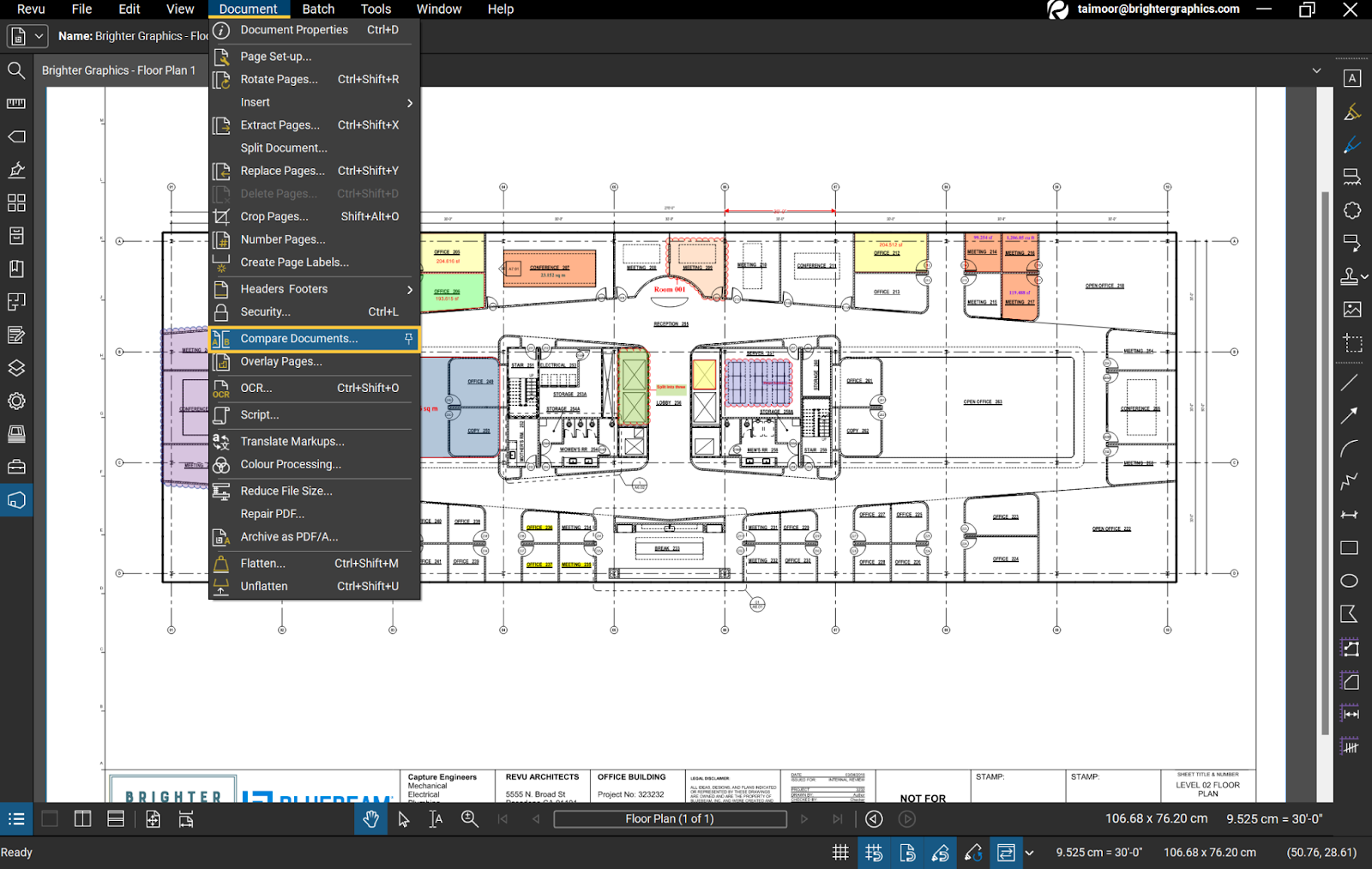
***Image:*** *AI-generated*
***Alt text:*** *Autodesk Construction Cloud showing floor plan with document comparison menu open.*
To explain [**what is Autodesk Contruction Cloud**](https://www.novatr.com/blog/autodesk-construction-cloud-acc-complete-guide), it is a cloud-based platform that connects project teams through shared models, documents, and coordination tools. It integrates BIM coordination, document management, and field reporting in one environment.
Unlike file-based tools, Autodesk Construction Cloud allows real-time access to updated models and documents. Key capabilities include:
- Model coordination and issue tracking
- Centralized document management
- Field reporting and quality control logs
- Dashboard monitoring of project data
- Integration with BIM authoring platforms
This system supports [**BIM for construction managers**](https://www.novatr.com/blog/why-construction-project-managers-should-learn-bim) by linking model coordination with site execution. For instance, a clash identified during coordination can be assigned to a responsible party and tracked until resolution within the same environment.
Civil engineers use it to review coordinated site models. Structural engineers track updates in shared BIM environments. Construction managers rely on dashboards and issue logs to monitor progress and ensure accountability.
Understanding **What is Autodesk Contruction Cloud** shows that it operates as comprehensive Construction project management software, supporting integrated digital construction workflows across project phases.
## **Who Mainly Uses Bluebeam Revu and Construction Cloud and for What?**
Both platforms serve different professional roles at specific stages of construction. The following examples illustrate typical usage:
1. [**Civil Engineers**](https://www.novatr.com/blog/bim-in-civil-engineering) – Use Bluebeam Revu to review infrastructure drawings and annotate revisions during design. In later coordination stages, they use Autodesk Construction Cloud to access shared BIM models and track issue resolution.
2. [**Structural Engineers**](https://www.novatr.com/blog/bim-for-structural-engineers) – Apply Bluebeam for reviewing structural detailing and marking design changes. During multidisciplinary coordination, they use Construction Cloud to monitor integration with architectural and MEP systems.
3. [**Quantity Surveyors**](https://www.novatr.com/blog/10-essential-software-tools-for-quantity-surveyors) – Rely on Bluebeam for quantity takeoffs and cost-related documentation reviews. Within Construction Cloud, they monitor drawing updates and coordinate cost implications tied to design revisions.
4. [**Construction Managers**](https://www.novatr.com/blog/what-does-a-construction-manager-do-job-description-key-skills-softwares) – Use Autodesk Construction Cloud to manage field reports, track coordination issues, and oversee schedule-related updates. It strengthens **BIM for construction managers** by connecting office and site workflows.
By assigning clear responsibilities, teams can integrate both systems into consistent **Digital construction workflows** that improve efficiency and transparency.
## **Key Differences Between Bluebeam Revu Vs Autodesk Construction Cloud**
Understanding the functional differences between Bluebeam Revu and Autodesk Construction Cloud helps construction professionals choose the right platform based on project complexity and collaboration needs. While both tools support construction documentation and coordination, they serve distinct purposes within the project lifecycle.
The comparison below outlines how each platform performs across core workflow areas, from document review to integrated BIM coordination.
| **Feature** | **Bluebeam Revu** | **Autodesk Construction Cloud** |
| --- | --- | --- |
| Main Focus | Focuses on PDF-based drawing markup, annotation, and document review during design and preconstruction phases | Focuses on cloud-based coordination, centralized document control, and project-wide collaboration |
| BIM Integration | Supports limited BIM interaction through linked documents and model exports | Provides full BIM model coordination, issue tracking, and integration with authoring tools |
| Collaboration | Primarily file-based sharing through exported PDFs and manual distribution | Enables real-time shared access to models, documents, and issue logs across teams |
| Field Reporting | Offers minimal direct field connectivity and reporting tools | Includes integrated field reporting, inspection logs, and progress tracking |
| Workflow Scope | Primarily documentation workflows | Supports end-to-end coordination from design through construction |
The table demonstrates that Bluebeam strengthens drawing-level precision, while Autodesk Construction Cloud enables broader oversight and structured collaboration across multidisciplinary project teams.
Also Read:
1. [Key Differences between ALLPlan Vs Revit](https://www.novatr.com/blog/solibri-vs-autodesk-navisworks-what-bim-coordinators-and-engineers-should-know)
2. [Key Differences between Solibri Vs Autodesk Navisworks](https://www.novatr.com/blog/solibri-vs-autodesk-navisworks-what-bim-coordinators-and-engineers-should-know)
## **Bluebeam Revu Vs Autodesk Construction Cloud: Which Is Best for Engineers?**
When evaluating **Bluebeam Revu vs Autodesk Construction Cloud**, engineers should consider the level of integration required. Bluebeam remains effective for structured drawing reviews, markup workflows, and cost estimation during early project phases.
Autodesk Construction Cloud, however, offers more comprehensive coordination. It connects models, documents, and field updates within a unified system.
For engineers working in integrated BIM environments, Construction Cloud strengthens oversight, accountability, and transparency. Its cloud-based environment aligns with modern **Digital construction workflows** that prioritize accessibility and structured coordination.
While both tools provide value, Autodesk Construction Cloud generally supports broader collaboration across the project lifecycle.
Professionals seeking to build practical expertise in cloud-based coordination tools can benefit from structured training. The Novatr [BIM Course for Civil Engineers](https://www.novatr.com/us/courses/bim-for-civil-engineers) includes hands-on exposure to Construction Cloud workflows, enabling engineers to develop applied skills in coordination, issue tracking, and collaborative project environments.
Master BIM and Get Hired Faster
Join a community of 8500+ Architects and Engineers.
Explore Now
\*Limited seats available
## **Conclusion**
The discussion of **Bluebeam Revu vs Autodesk Construction Cloud** shows two complementary approaches to construction technology. Bluebeam enhances drawing review and document accuracy, while Autodesk Construction Cloud strengthens centralized model coordination and collaborative project management.
Civil engineers, structural engineers, quantity surveyors, and construction managers should select tools based on workflow demands and project complexity. For projects requiring integrated BIM collaboration and cloud-based oversight, Autodesk Construction Cloud provides wider functionality.
To build functional capabilities in modern coordination platforms, consider enrolling in the [BIM professional Course for Civil Engineers](https://www.novatr.com/us/courses/bim-for-civil-engineers) offered by [Novatr](https://www.novatr.com/us). The program offers structured exposure to Construction Cloud tools and real-world coordination scenarios that reflect current industry practice.
Visit our [resource page](https://www.novatr.com/learning-hub) to explore detailed learning pathways and professional development guidance designed to support growth in your AEC career.
## **FAQs:**
### **1. What is Bluebeam Revu used for?**
Bluebeam Revu is used for PDF-based drawing markup, submittal review, quantity takeoffs, and revision tracking during design and preconstruction stages. It improves documentation clarity and supports structured communication among project teams.
### **2. What is Autodesk Construction Cloud used for?**
Autodesk Construction Cloud is used for cloud-based model coordination, document control, issue tracking, and field reporting. It connects design and construction teams, supporting integrated workflows throughout the project lifecycle.
Was this content helpful to you
Like Yes
Dislike No

TABLE OF CONTENTS
BIM Is The New Standard. Are You Certified?
Get Certified in BIM
SHARE ON YOUR SOCIALS
Link Copied Successfully
Related articles
[ CIVIL How BIM Managers Use Drofus Vs Autodesk Construction Cloud? 20 February 2026 7 min read](https://blog.novatr.com/blog/how-bim-managers-use-drofus-vs-autodesk-construction-cloud) [ CIVIL How To Become a Successful Construction Site Manager in the USA 3 July 2025 5 min read](https://blog.novatr.com/blog/how-to-become-a-successful-construction-site-manager-in-the-usa) [ CIVIL 10 Best Online Courses To Upskill as a Construction Project Engineer in the USA (2026) 18 August 2025 5 min read](https://blog.novatr.com/blog/10-best-online-courses-to-upskill-as-a-construction-project-engineer-in-the-usa) [ CIVIL 5 Best Software Courses For Construction Site Managers in the USA 11 July 2025 6 min read](https://blog.novatr.com/blog/5-best-software-courses-for-construction-site-managers-in-the-usa)
Download Syllabus
## BIM Professional Program
Next Cohort
June 2026
Program Duration
7 Months
Premium Program benefits
8 Credentials from Autodesk, NSDC, Novatr
1 program. 10 career paths. Infinite Growth.
40+ ISO 19650 & RIBA real-world projects to practice
1-on-1 guidance. Access 400+ industry experts.
Access the biggest AEC-Tech community on the planet. 8500+ and counting
Curated for you by 100+ global BIM leaders.
Lifelong access to course content
Enter your details to download the program syllabus.
##### BIM Professional Program
June 2026, 7 Months
Your Name Invalid name.
Phone Number Enter a valid phone number
Email Please enter a valid email address.
Select years of experience\* Currently studying 0-1 years 1-2 years 2-4 years 4-8 years 8-10 years 10-12 years 12+ years Invalid selection.
Specialisation Select your background\* Architecture Civil Engineering Mechanical Engineering Electrical Engineering Invalid selection.
Are you professionally trained in interior design?
Yes
No
I agree to the [Terms of Use](https://www.novatr.com/terms-and-conditions) and [Privacy Policy](https://www.novatr.com/privacy-policy), and consent to be contacted by Email, Call, WhatsApp, or SMS.
Submit
Ready to skyrocket your career?
Begin your next chapter in AEC
with Novatr!
We are here to help you take the industry by storm with advanced, tech-first skills.
[Explore Courses](https://www.novatr.com/#courses)
Join our newsletter
Submit
Thank you for signing up.
We’ll send you a nice letter once per week. No spam.

Dare to Disrupt.
Join thousands of people who organise
work and life with Novatr.
Company
- [About Us](https://www.novatr.com/about)
- [BIM Professional Program v.2026](https://www.novatr.com/courses/bim-professional-program)
- [Masters Computational Design](https://www.novatr.com/courses/computational-design)
- [Become a Mentor](https://www.novatr.com/apply-as-mentor)
- [Hiring from Us](https://www.novatr.com/hire-from-us)
- [Careers at Novatr](https://www.novatr.com/career)
Resources
- [Blog](https://www.novatr.com/learning-hub)
- [Media Room](https://www.novatr.com/media-room-home-page)
- [Career Builder](https://www.novatr.com/career-navigator)
- [Events & Webinars](https://www.novatr.com/webinars)
- [FAQs & Support Center](https://www.novatr.com/contact-us)
- [Contact Us](https://www.novatr.com/contact-us)
- [Privacy Policy](https://www.novatr.com/privacy-policy)
- [Terms of Use](https://www.novatr.com/terms-and-conditions)
©2023 Oneistox Network Pvt. Ltd.
All Rights Reserved
```json
{
"@context" : "https://schema.org",
"@type" : "BlogPosting",
"author" : {
"@type" : "Person",
"name" : "Deependra Dobriyal",
"url" : "https://blog.novatr.com/blog/author/deependra-dobriyal"
},
"dateModified" : "2026-02-20T11:36:43.656Z",
"datePublished" : "2026-02-20T11:28:55.000Z",
"headline" : "Bluebeam Revu Vs Autodesk Construction Cloud: What Construction Professionals Should Know?",
"image" : [ "https://blog.novatr.com/hubfs/Bluebeam%20Vs%20Autodesk%20Construction%20Cloud.jpg" ],
"mainEntityOfPage" : {
"@id" : "https://blog.novatr.com/blog/bluebeam-revu-vs-autodesk-construction-cloud-what-construction-professionals-should-know",
"@type" : "WebPage"
},
"publisher" : {
"@type" : "Organization",
"logo" : {
"@type" : "ImageObject",
"url" : "https://blog.novatr.com/hubfs/Novatr%20Prev%20OX-2.svg"
}
}
}
```